50 Rev. 2
Calibration
Capacitance-Based Level Calibration : Approximate Calibration Procedure
sensor cannot be dipped, then a partial length dip can be
performed. If both situations are encountered, then a partial length
dip can be performed in a substitute reference liquid.
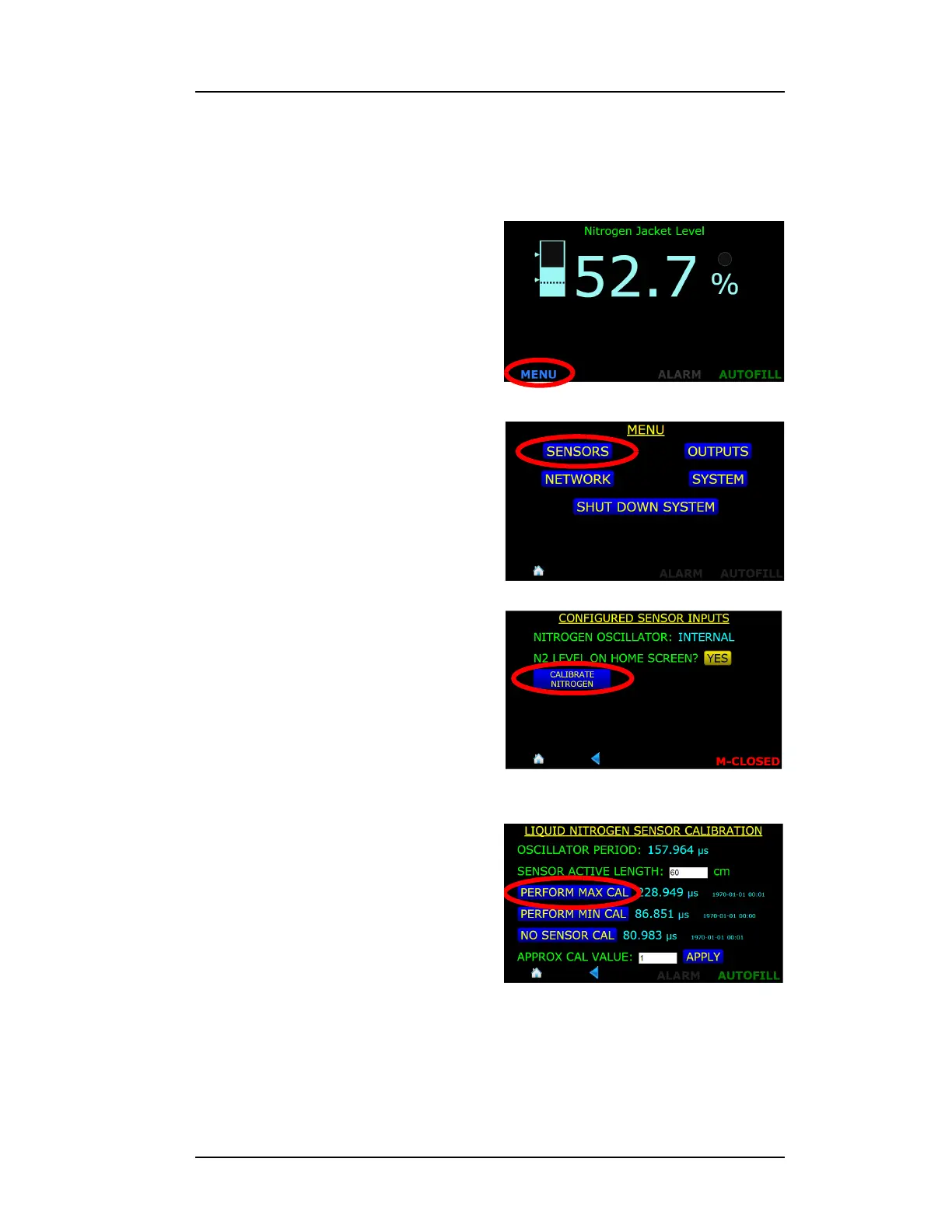
1. Press the MENU button in the
lower left corner of the display
screen.
2. Choose the SENSORS
selection from the MENU
screen.
3. Press the CALIBRATE
NITROGEN button
4. Position the capacitance
sensor in the target liquid at
the 100% level. Hold the
sensor at this location and
press the PERFORM MAX
CAL button.
Figure 4-27. MENU Selection Button
Figure 4-28. SENSORS Selection
Figure 4-29. CALIBRATE NITROGEN
Selection Button
Figure 4-30. PERFORM MAX CAL.
Selection Button



 To Next Page