Rev. 2 51
Calibration
Capacitance-Based Level Calibration : Approximate Calibration Procedure
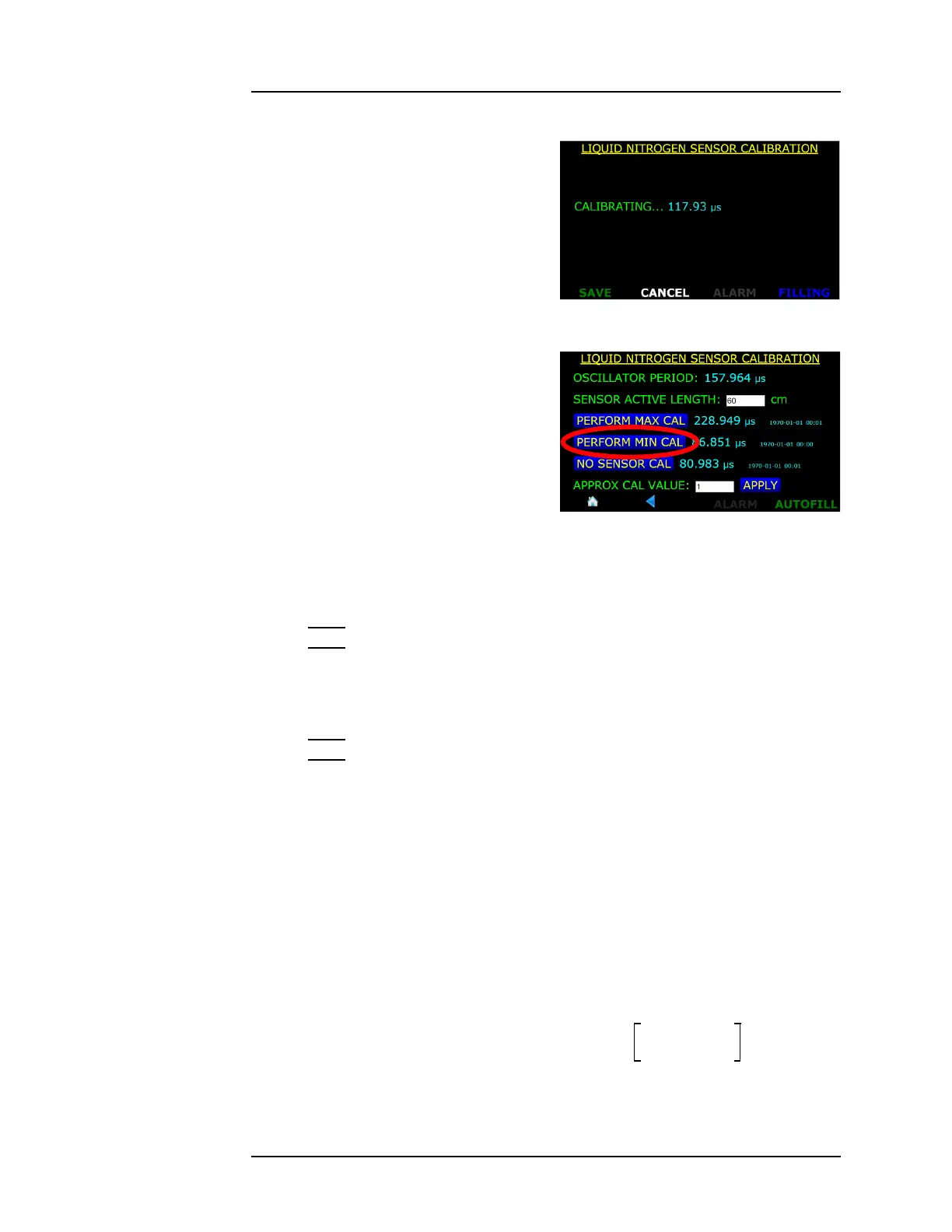
5. The instrument will display
the following screen as it takes
data for several seconds. Once
the calibration measurement
is completed, press the SAVE
button.
6. Position the capacitance
sensor in the target liquid at
the 0% level. Hold the sensor
at this level and press the
PERFORM MIN CAL button.
7. After several seconds of
displaying “CALIBRATING...”,
the instrument will complete
the calibration process. Press
the SAVE button to save the new calibration set point.
Note
Note that the frequencies listed to the right of the PERFORM MAX
and MIN CAL buttons are updated as well as the date and time
stamps of the calibration points.
Note
The Minimum and Maximum calibration can be performed in either
order. Also, either the Minimum or Maximum calibration point can
be updated without altering the other calibration point.
8. Measure the distance between the bottom hole of the sensor and
the location of the liquid level dipped for max calibration. This
measured length is L
dipped
.
9. The dielectric constant for the reference liquid,
e
1
, and the target
liquid,
e
2
, must be known to complete the approximate calibration.
These values must be placed in the equation:
Figure 4-31. Updated MAX CAL
Frequency
Figure 4-32. PERFORM MIN CAL.
Selection Button
Approximate Calibration Factor
e
2
1–
e
1
1–
--------------
100
L
active
L
dipped
-----------------
=



 To Next Page