23
3 kHz – Short wave amateur band, short wave utility such as oceanic airband etc.
500 Hz – Morse code used by radio amateurs and some marine traffic on short wave
An appropriate IF filter is automatically selected when auto mode is selected. However any
combination of IF filter and receive mode is possible in the manual mode. When you have manually
selected an IF filter bandwidth, auto mode will be cancelled, but the receive mode, frequency step, etc
will be retained until they are changed manually.
3-8-1 MANUALLY SELECTING IF BANDWIDTH
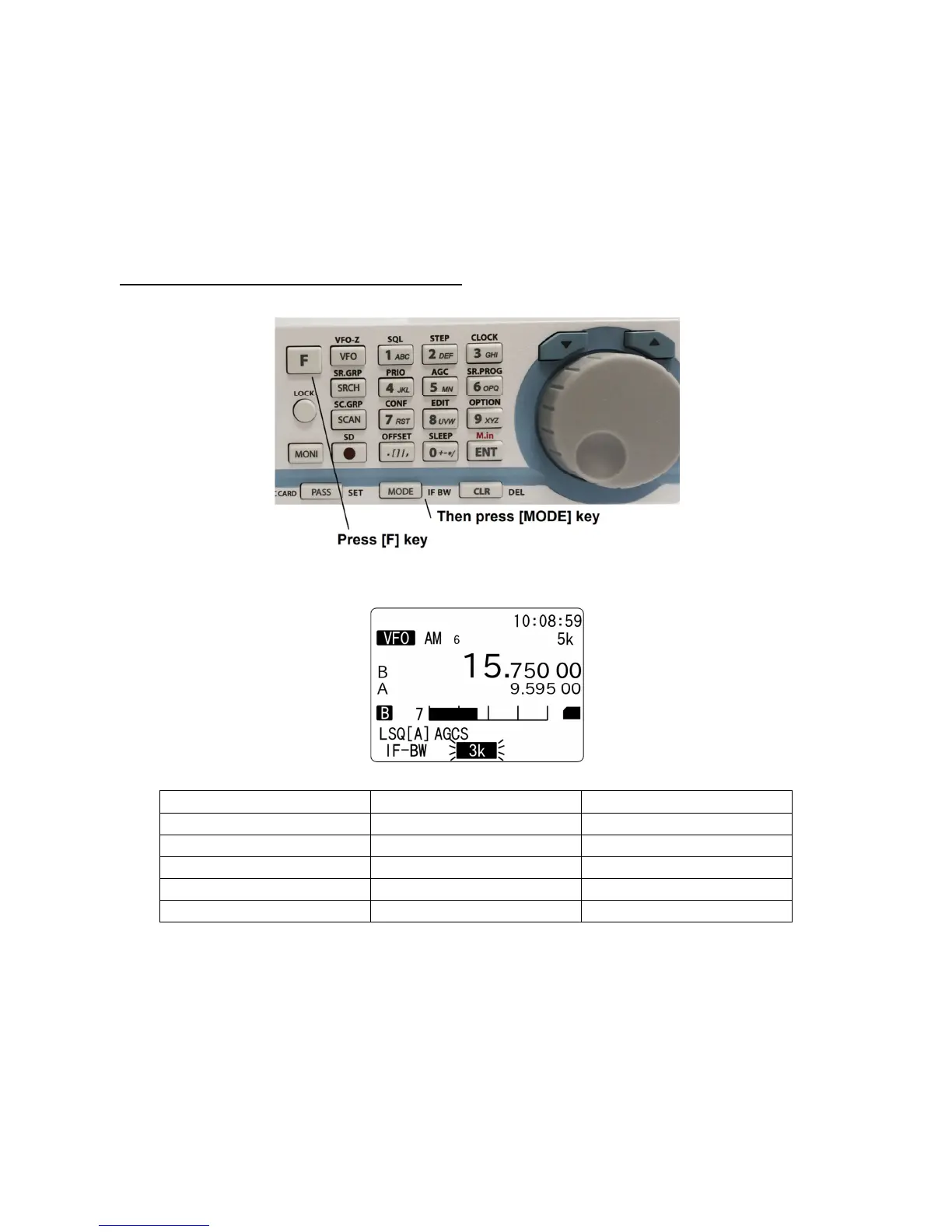
Press the [F] key and then the [MODE] key.
Select a new bandwidth from the list by rotating the dial knob. To accept the new bandwidth selection,
press the [ENT] key.
Selectable band width
Note: The IF bandwidth will be selected automatically in digital mode.
Mode Selectable band width (kHz) Default (kHz)
FM 200, 100, 30, 15, 6 15
AM 15, 8, 5.5, 3.8 8
SAH, SAL 5.5, 3.8 5.5
USB, LSB 2.6, 1.8 2.6
CW 0.5, 0.2 0.5



 To Next Page