31
5-3 RESTORE DATA FROM A SD CARD
1. Insert a new SD memory card with a printed label facing upward into the slot on the front panel until
you hear a click.
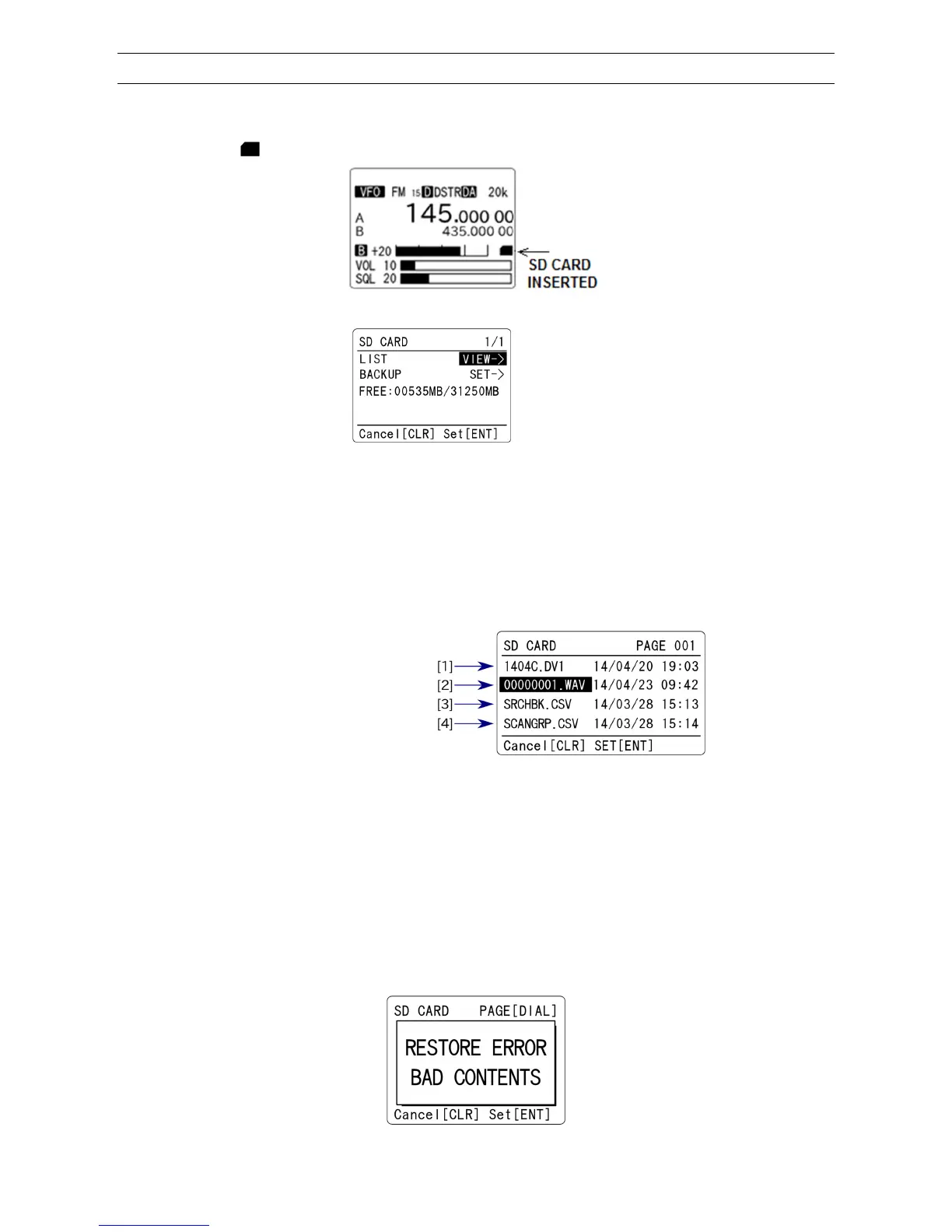
2. Wait until “ ” icon appears on the right middle of the LCD.
3. Press the [F] key and then the [●] (SD) key. The following screen will appear.
(Example)
4. Press the [▼] key to move the cursor to [LIST] parameter in reverse contrast.
5. Press the [ENT] key.
6. The file list of the SD card will be displayed.
The file list of the SD card will appear.
(1) Firmware version
(2) Recorded files
(3) Search bank data
(4) Scan group data
7. Select the desired backup file to be restored
8. Press the [ENT] key. Restore will start.
When restoring either the entire amount of data or a specific selection of data, it may be easier to
plan in advance and use a PC.
9. The prefix of file name can use any characters or numbers, however, the extension must be
always “.csv”. If there is an error of the file contents, an error message will be displayed and quit
restoring.



 To Next Page