30
(2) Recorded files
(3) Search bank data
(4) Scan group data
To exit the SD card configuration menu, press the [CLR] key.
5-2 BACKUP DATA TO A SD CARD
To backup memory channel, search bank contents, or receiver’s configuration data of the AR-DV1 to a
SD card, perform the following steps:
1. Insert a SD memory card with a printed label facing upward into the slot on the front panel until you
hear a click.
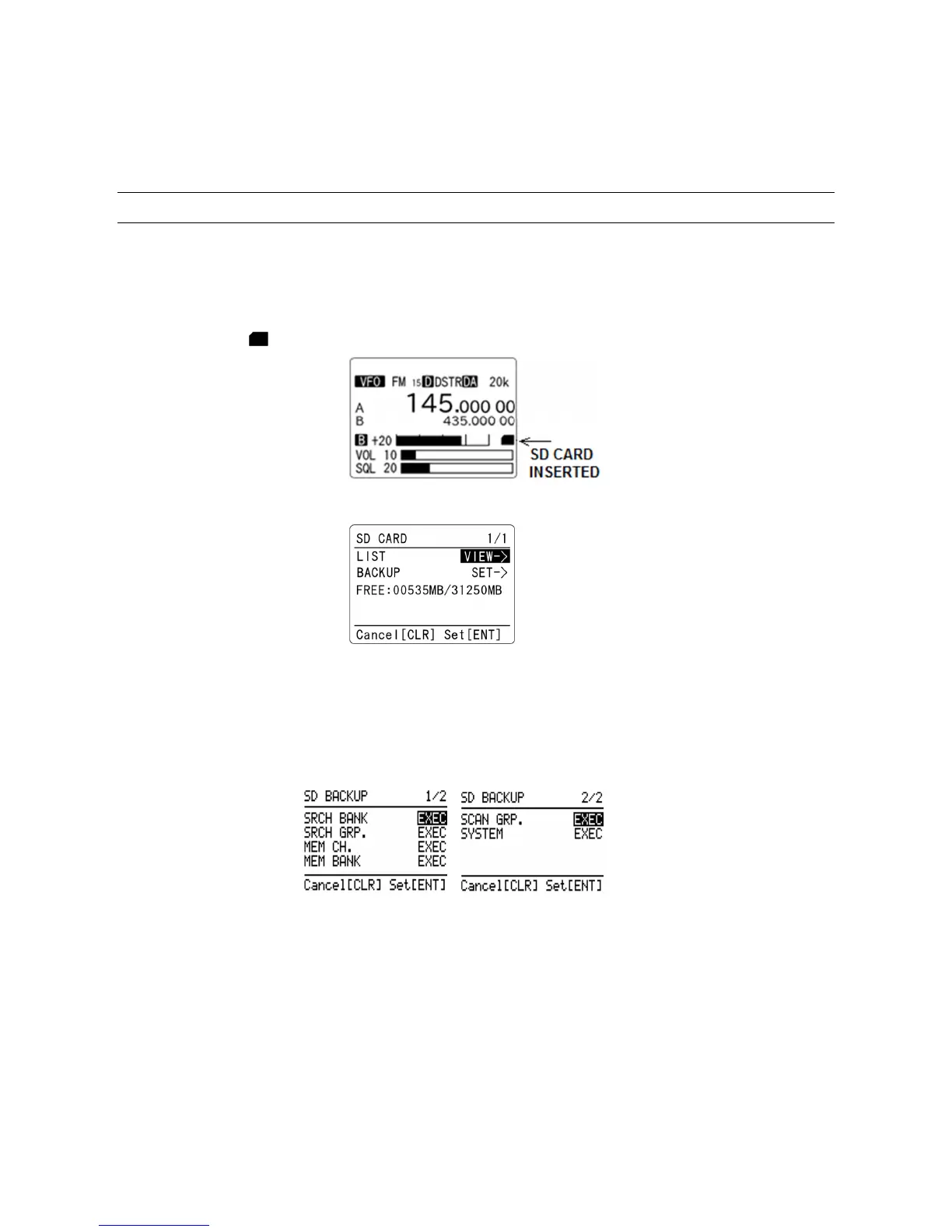
2. Wait until “ ” icon appears on the right middle of the LCD.
3. Press the [F] key and then the [●] (SD) key. The following screen will appear.
(Example)
4. Press the [▼] key to move the cursor to [BACKUP] parameter in reverse contrast.
5. Press the [ENT] key while “SET->” is selected in reverse contrast.
6. The following backup menu will appear.
SRCH BANK (Search Bank): Backup all search bank data --- File name: SRCHBK.CSV
SRCH GRP (Search Bank Group): Backup all search bank group data
--- File name: SRCHGRP.CSV
MEM CH (Memory Channel): Backup memory channel data --- File name: MEMCH.CSV
SCAN GRP (Scan Group): Backup all scan bank group data
--- File name: SCANGRP.CSV
SYSTEM: Backup Receiver’s configuration data --- File name: SYSTEM.CSV
Select the category and press the [ENT] key to backup data.



 To Next Page