SW Version 2.04 30-January-2009 Page 18 of 128
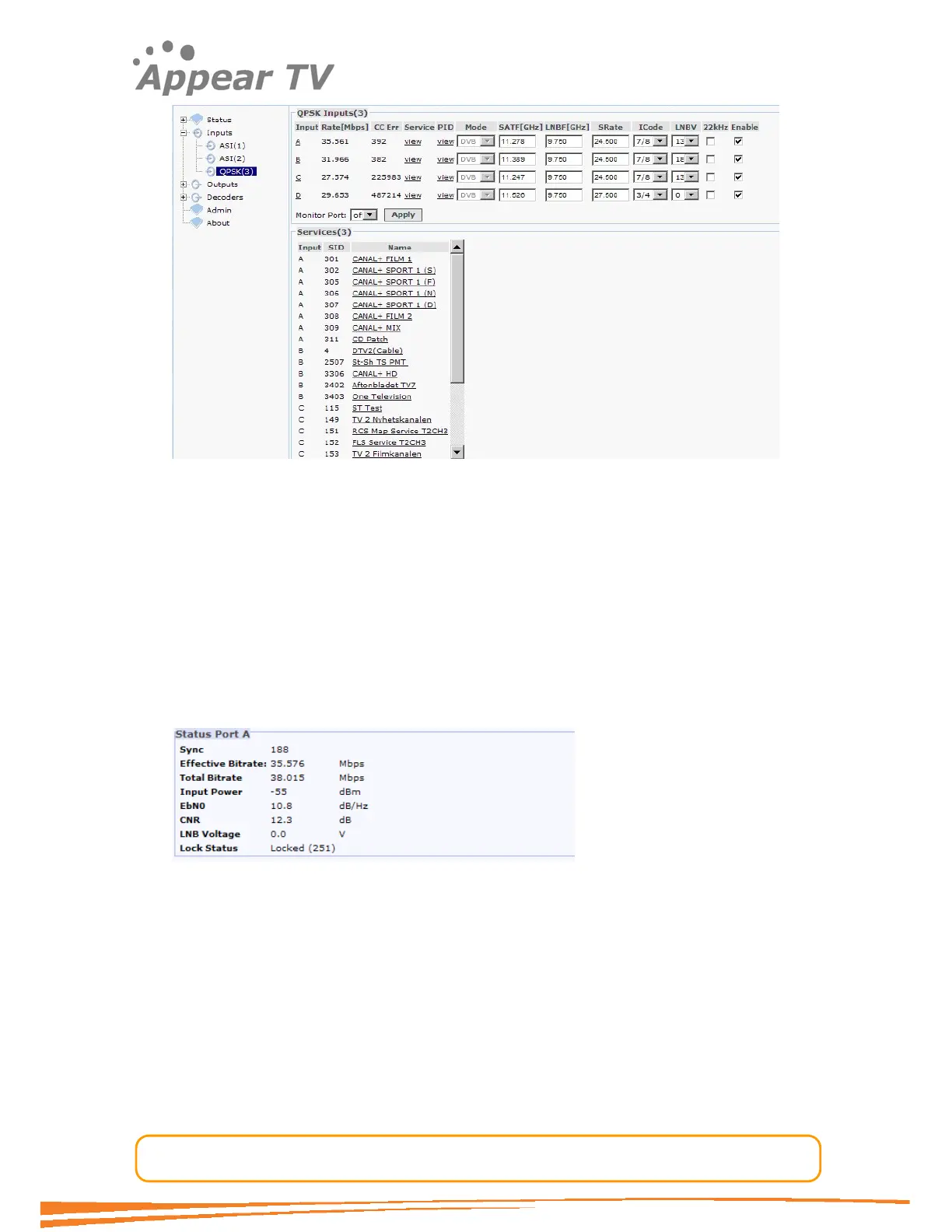
Highlighting the input module will display all the ports with their input configuration in
the top pane, and it will list all the services detected for the entire input card in the
lower pane. This upper pane shows the total input rate for each port, the number of
CC errors and the configuration parameters currently set for each port.
4.3.1.1 Input Port Analysis
From the input card view it is possible to access the next level of information such as
for the port specific information. For all the input cards with demodulators click on the
port letter on the left hand side in the top pane and the port specific information will
be displayed. For the IP input card there is no more information available then the
one shown on the top pane only.
The QPSK port detailed view:
For a description of the actual parameters please refer to the configuration section for
the respective input type in this chapter.
4.3.1.2 Input Service Analysis
It is possible to apply filters on the information displayed in the lower pane. Selecting
the QPSK service view (by clicking the “view” link in the “Service” column), only the
services associated with the selected input will be displayed in the service listing view.
To access detailed PSI/SI analysis of the input services just click the respective
service in the lower pane. The detailed analysis result will appear on the right hand
side in the lower pane.



 To Next Page