SW Version 2.04 30-January-2009 Page 78 of 128
4.7.3.1 Service Properties
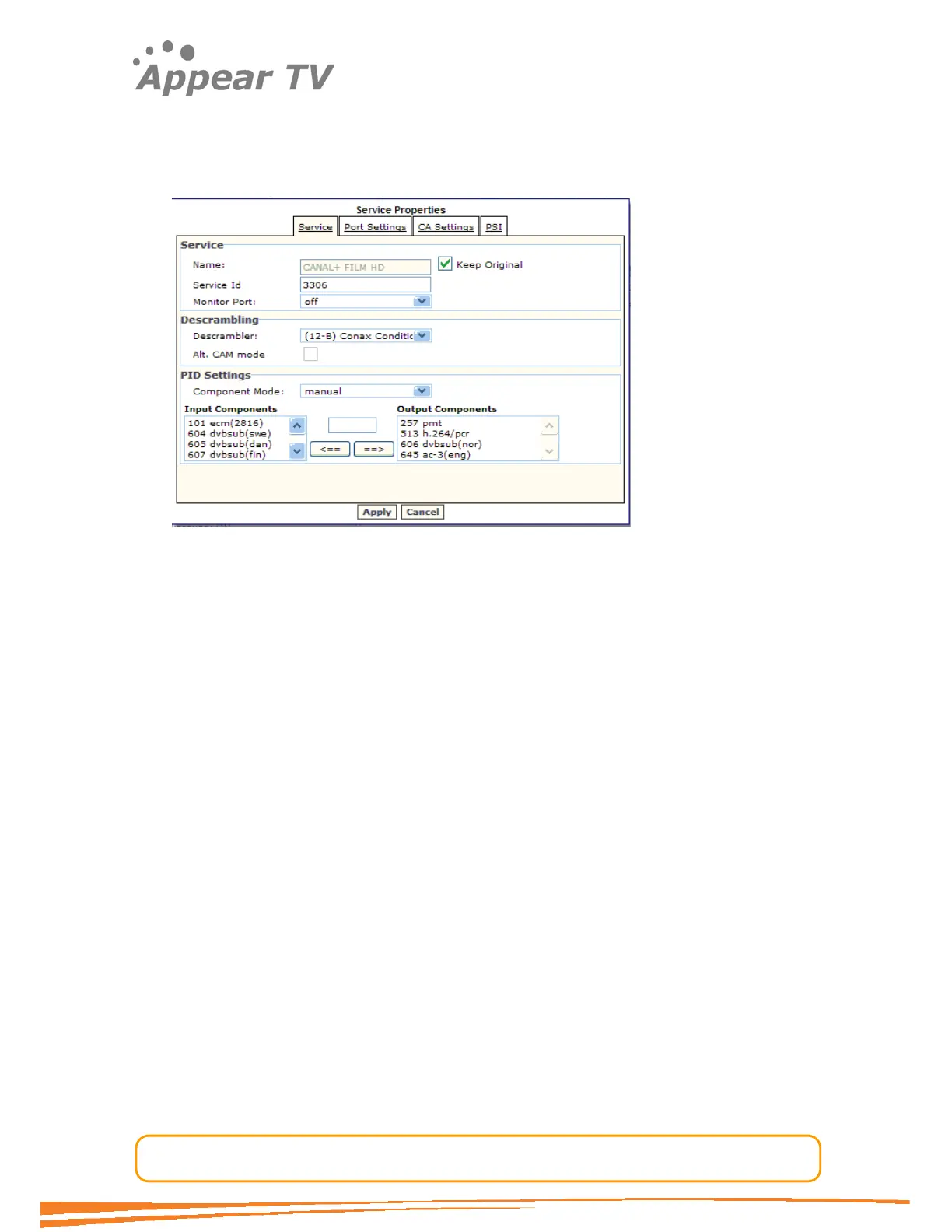
In order to change the settings for an assigned service just double-click the service
and the Service Properties for that service will be displayed (see above for
parameter details).
The Service tab displays the Service Name, Service Id, Monitor Port, and
Component Mode for PID Settings. The original Service Name can be enabled
using the checkbox, or the operator can configure their own by unchecking the
checkbox.
The Service Id can be configured.
The Monitor Port option is intended as a way to monitor a descrambled service by
configuring the system to send the descrambled stream to a decoder card within the
chassis. The stream sent to the decoder is an exact copy of the outgoing stream. The
packet copying is done on the descrambler card to ensure that the monitored stream
is identical to the outgoing one.
It is possible to change the PID Component Mode. Here the mode manual is added
compared to the default parameter list described above. In the manual mode it is
possible to select which PIDs to include. It is also possible to remap PIDs to a different
output value.
In the above example the pid filter is used to stop the ecm and three DVB Subtitling
pids. In the manual PID mapping mode the system will not handle dynamic changes
of the input pids. This implies that if the input has dynamic characteristics it is adviced
to use one of the automatic modes, (auto all, A/V, A/V/TTX), which will handle
dynamic input changes.



 To Next Page