SW Version 2.04 30-January-2009 Page 81 of 128
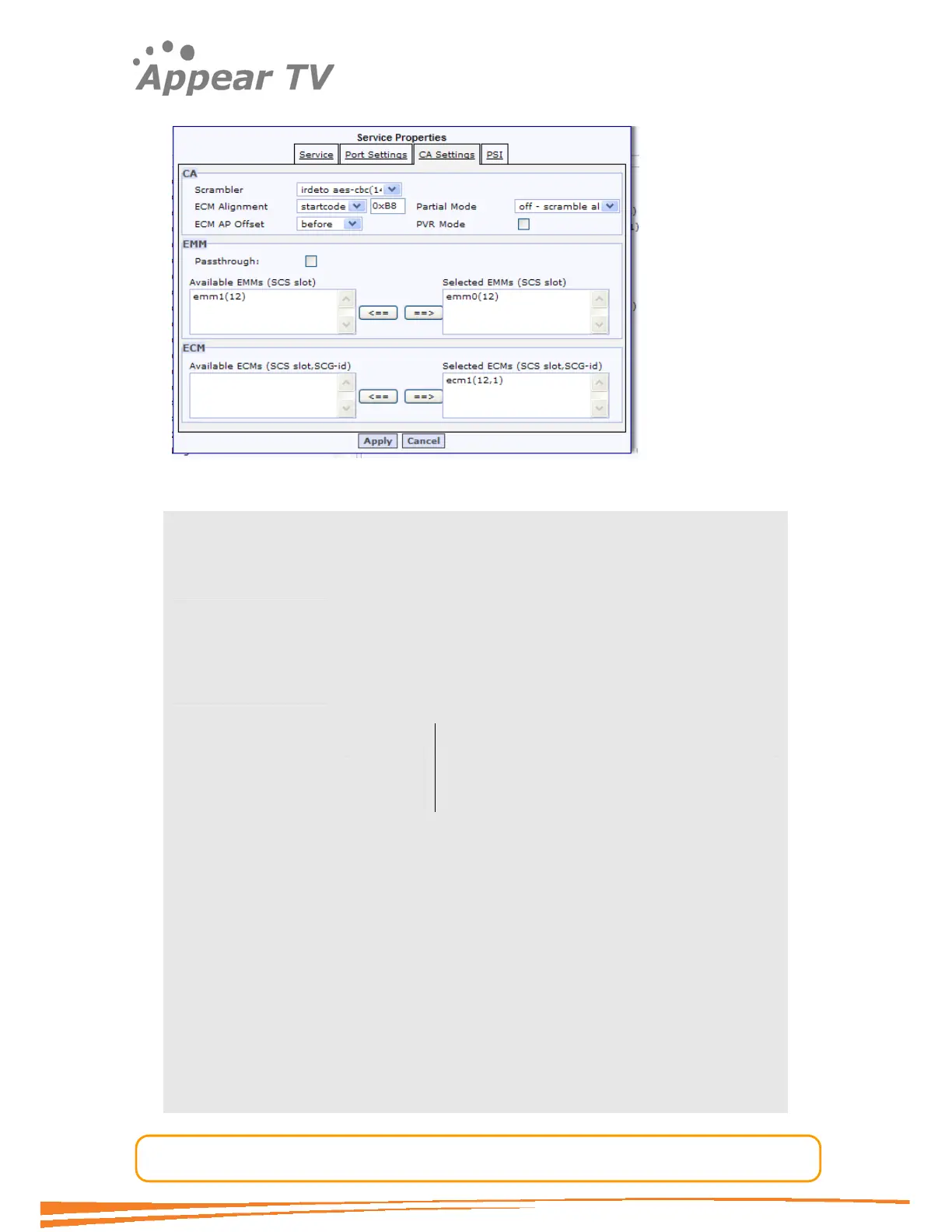
4.7.3.4 CA Settings
The CA Settings tab handles all aspects of encryption.
Scrambler Selects scrambler card to be used for the scrambling of this
service.
Partial mode Defines the percentage of the packets to be scrambled. A
service which is partially scrambled requires less processing
capacity for the receivers hence could be used if the STBs in
the system are struggling to cope if all packets are
scrambled.
ECM Alignment Specifies where to insert the ECM relative to the GOP
structure.
Startcode User defined startcode insertion point.
RAI. Random Access Insertion point as specified by
MPEG
Note:
Not all encoders use this field. This option is available
for selected customers only.
ECM AP Offset ECM Access Point offset. Insert the ECM before or after the
above specified point.
Note:
This option is available for selected customers only.
PVR Mode This field should be used if the headers of the packets should
be left in the clear – typically used for trick mode applications.
EMM Passthrough Used if an incoming service shall be transmitted with its
original CA without being descrambled in the unit, such that
receivers further down the chain can do the descrambling.



 To Next Page