SW Version 2.04 30-January-2009 Page 48 of 128
4.4.3.4 Configure an ECM Generator Channel
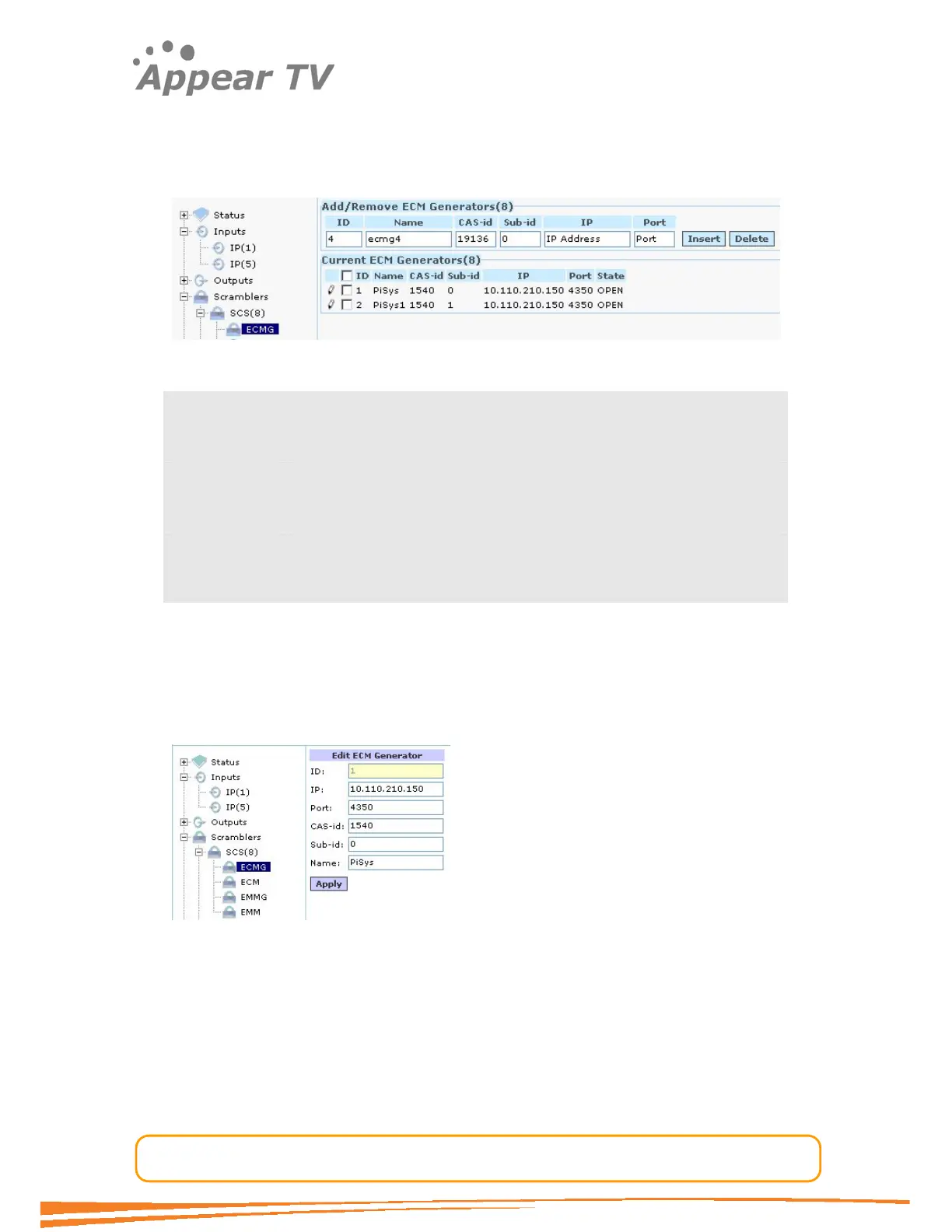
A connection to an ECM generator is defined in the ECMG tab located under the
“scramblers->SCS” tab in the navigation tree. The connection to an ECMG will
establish a channel over which ECMs will be sent.
Figure 35 - Adding ECM generator
ID The Simulcrypt Channel ID used towards the CA system
Name Used for reference in the GUI only
CAS-id CA-Vendor specific ID
Sub-id CA-Vendor specific subid
IP IP Address of ECM Generator
Port TCP/UDP port of ECM generator
It is possible to add more than one ECMG connection. These connections may be to
different CA system vendors or to multiple instances to CA systems from the same
vendor. Note however if the same system ID is used a real Simulcrypt will not work
as the CA Descriptor in the PMT will be the same for both ECMs.
To change an ECMG channel connection click on the ECMG tab in the navigation tree,
enter the new configuration and click the “apply” button.
Figure 36 - Editing ECM generators
4.4.3.5 Configure an ECM Stream
The definition of an ECM is done from the ECM node in the navigation tree. The ECM
entry links a CW and Access criteria to an ECM generator.



 To Next Page