ASE2000 V2 Communication Test Set User Manual 42
Events Properties
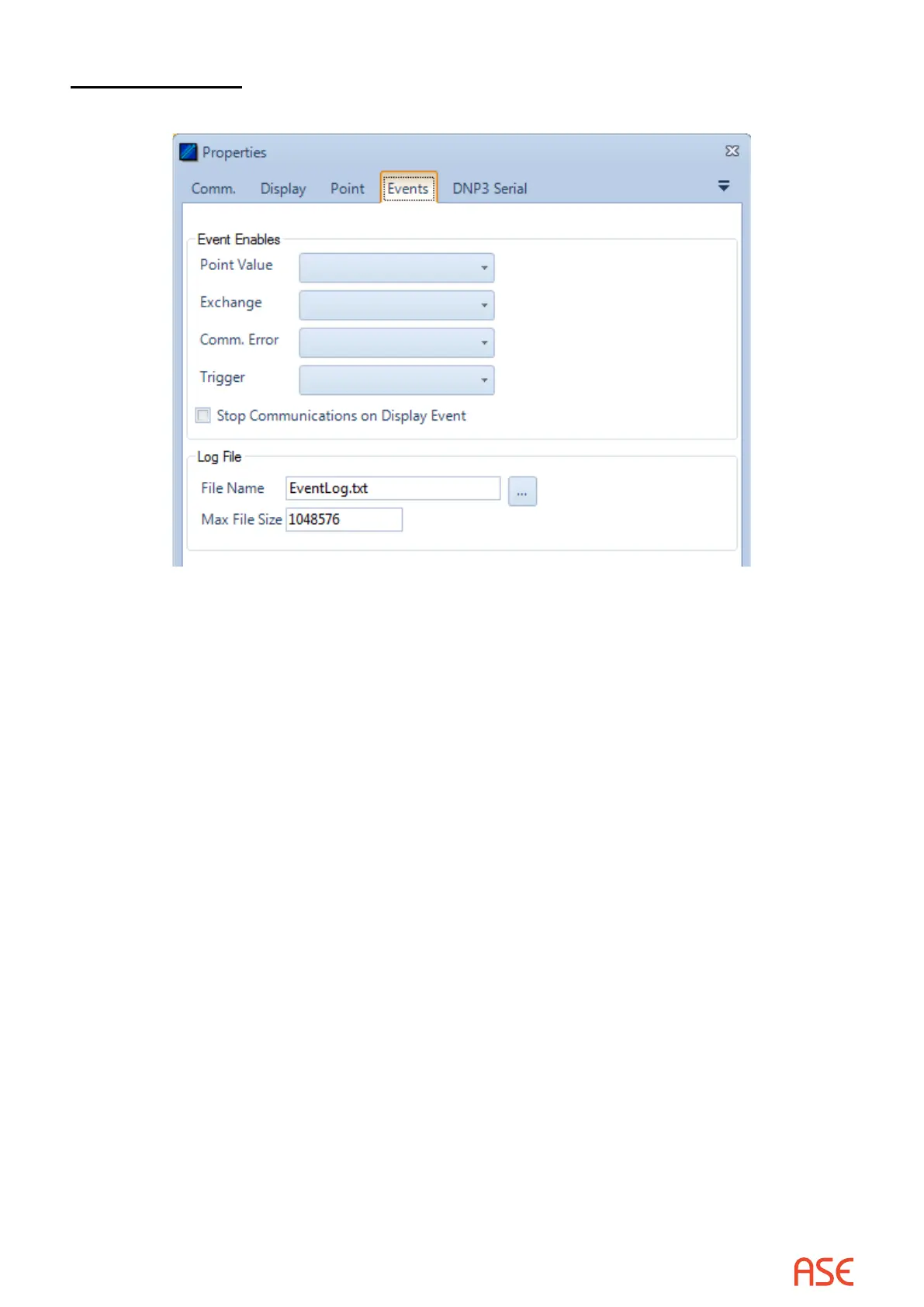
Events Tab
The ASE2000 can detect four classes of events and the user can congure action for the
ASE2000 to perform as an event is each class is detected. The classes are:
• Point Value – A change in state of certain digital points, or an analog value exceeding an alarm
limit or returning within limits after having previously exceeded a limit. Points to be considered
in event processing are dened from the Point Values view
• Exchange – Detection of any event-enabled exchange. Event exchanges are specied from
the Exchanges properties menu
• Comm Errors – Any communication error, including parity, security, and timeout
• Trigger – Any trigger congured
Each event class can be enabled for Display, Log, or Audible processing, or for any subset
thereof
• Display processing causes a one-line entry to appear in the Line Monitoring view
• Log processing causes an entry to be written to the text log le
• Audible processing causes the PC audible to be sounded briey
The Stop Communications on Display Event option, if checked, causes the ASE2000 to stop
communication after detection of any event with Display processing enabled
Other Tabs
Other protocol-dependent tabs may be present depending on the currently selected protocol.
Please refer to protocol-dependent sections of this document for more information.



 To Next Page