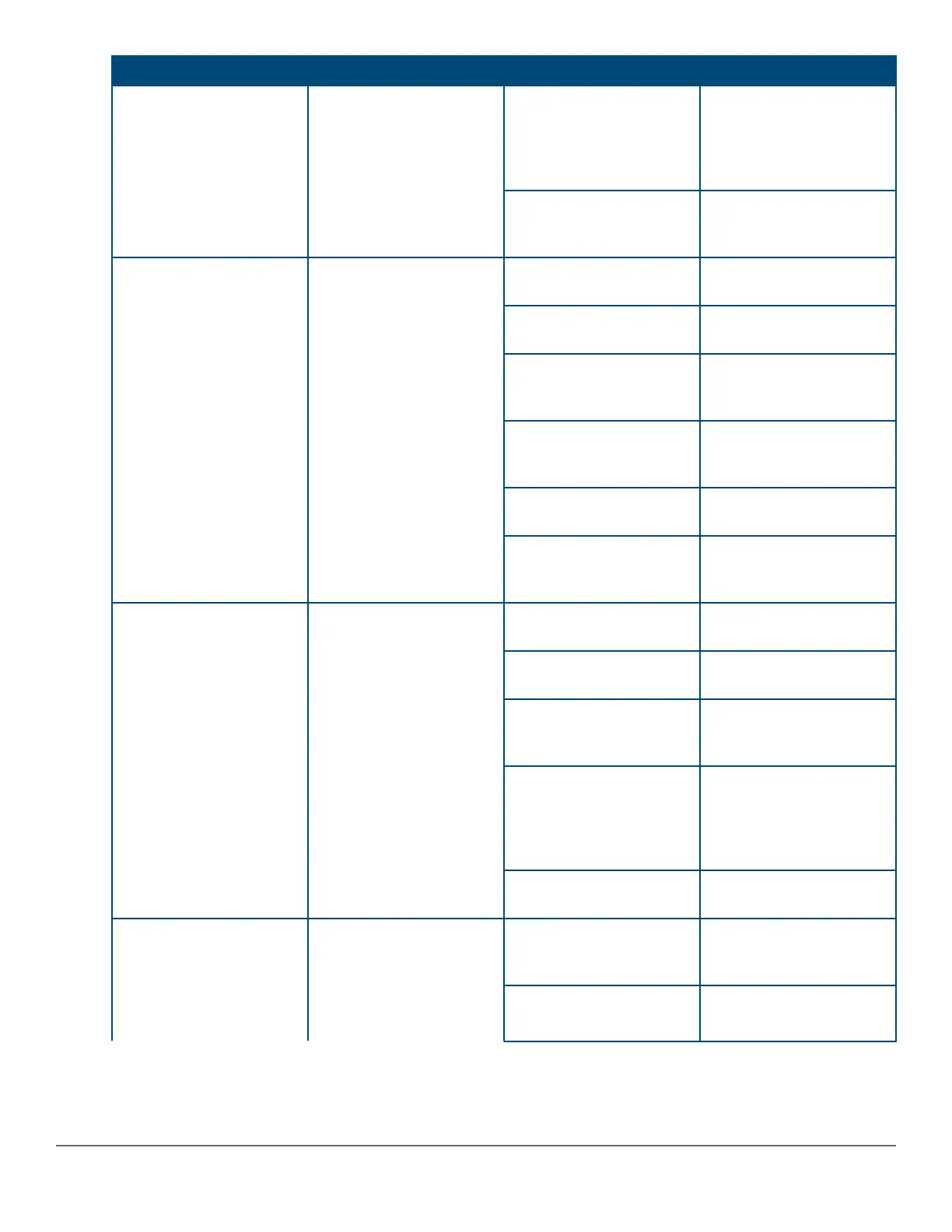
Switch LEDs Function State/Mode Meaning
Slow Flash Orange* The corresponding port
has failed its self-test.
Flashes simultaneously
with the Global Status
LED flashing orange.
Off The Port is disabled, not
connected, or not
receiving link.
Speed Mode Selected Port LEDs are displaying
the connection speed at
which each port is
operating.
Fast Flash Green** The port is operating at 40
Gbps.
On Green The port is operating at 10
Gbps.
Triple Blink Green The port is operating at 5
Gbps. (HPE Smart Rate
ports only)
Double Blink Green The port is operating at
2.5 Gbps. (HPE Smart
Rate ports only)
Slow Flash Green* The port is operating at 1
Gbps.
Off The port is not Linked, or
is operating at 10 Mbps or
100 Mbps.
PoE Mode Selected Port LEDs are displaying
PoE information.
On Green The port is providing PoE
power.
On Orange PoE is disabled on the
port.
Fast Flash Orange** The port is denied power
or is detecting an external
PD fault.
Slow Flash Orange* The port has an internal
hardware failure. Flashes
simultaneously with the
Global Status LED
flashing orange.
Off The port is not providing
PoE power.
User Mode Selected
Mode currently active only
in stacked configurations.
Used to display the
number of members in a
stack and their status.
On Green Stack Member exists in
the stack and is
operational.
Slow Flash Green* Indicates the Member # of
the chassis.
Table Continued
18 Aruba 2930M Switches












 To Next Page