42 User’s Manual—SNAP™ 700 Printer
Classification: Avery Dennison - Public
Test Pattern 1
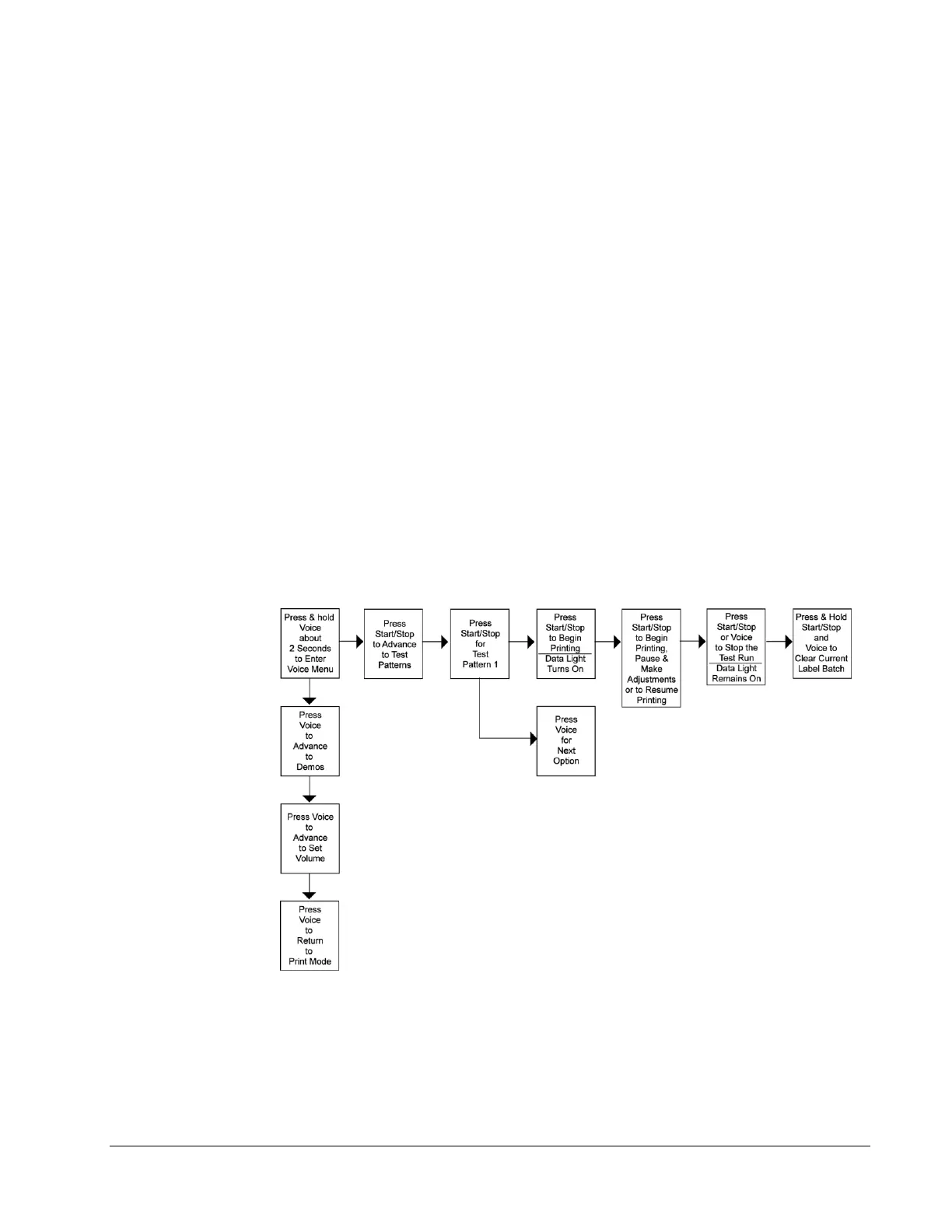
1. To run a test label, press and hold the Voice button about two seconds. The
voice message will say, “Press Start for Test Pattern.”
2. Press the Start / Stop Button. The voice message will say, “Press Start for
Narrow Setup Test Pattern”.
3. Press the Start / Stop button. The voice message will respond with, “Ready
to Print Narrow Setup Test Pattern. Returning to Print Mode.” The Data light
will turn on.
4. Press the Start / Stop button. The machine will begin printing Test Pattern 1.
5. To stop printing the test labels, press the Start / Stop button. The Data light
will remain on. Make any necessary adjustments, and press Start / Stop to
resume printing the test labels.
6. Once satisfied with the test label you are running, press either the Start /
Stop or Voice button to stop the test run. The Data light will remain on.
7. Press and hold the Start / Stop and Voice buttons simultaneously to clear the
current batch of labels being printed.
8. The voice message will say, “Clearing Current Batch.” The Data light will go
out.
.
Figure 12a. Running Test Patterns
Test Pattern 2
1. Press and hold the Voice button for about two seconds. The voice
message will state, “Press Start for Test Pattern.”














 To Next Page