80 User’s Manual—SNAP™ 700 Printer
Classification: Avery Dennison - Public
side shows the folder, and the bottom pane shows files and subfolders in the
highlighted folder.
4. The information in these panes is not live – it is a snapshot of the file structure
when the screen was last refreshed. To refresh the screen, select View –
Refresh from the menu or click the Refresh icon on the toolbar. Transferring the
Upgrade File to the Printer
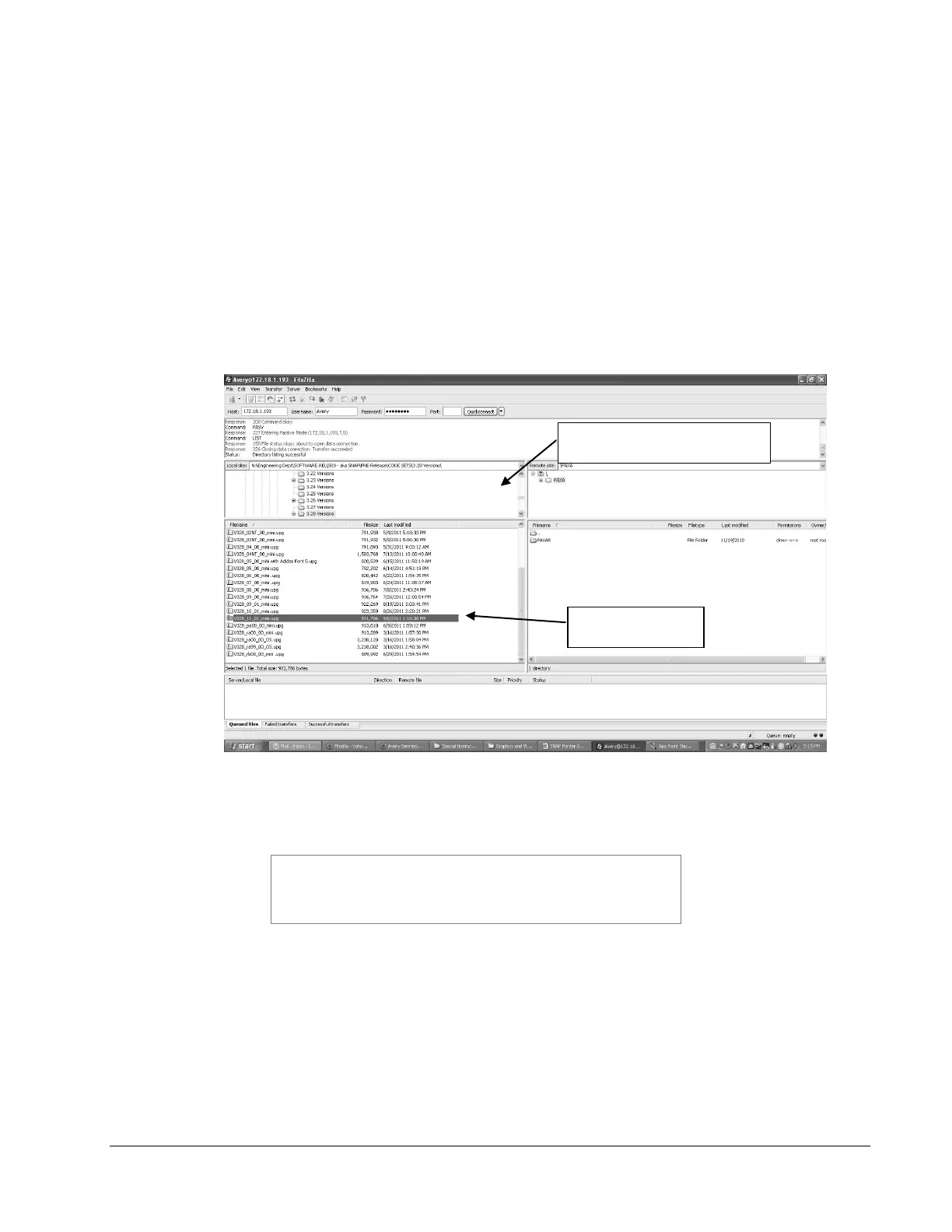
5. The screen below shows Filezilla ready to transfer the upgrade file to the printer.
In the left panes, the folder on the computer that hold the upgrade file has been
selected in the upper pane and the upgrade file is selected in the lower pane. In
the right panes, the root directory of the printer is shown. The upgrade file must
be placed in the printer’s root directory.
6. To transfer the file, simply drag it from the bottom left pane to the bottom right
pane, or double click the upgrade file.
There may be a folder in the root directory of the printer
called PAXA. This is a temporary folder used in
processing the upgrade file. Ignore this directory and
place the upgrade file in the root directory.














 To Next Page