MENU | AUDIO
NAME:
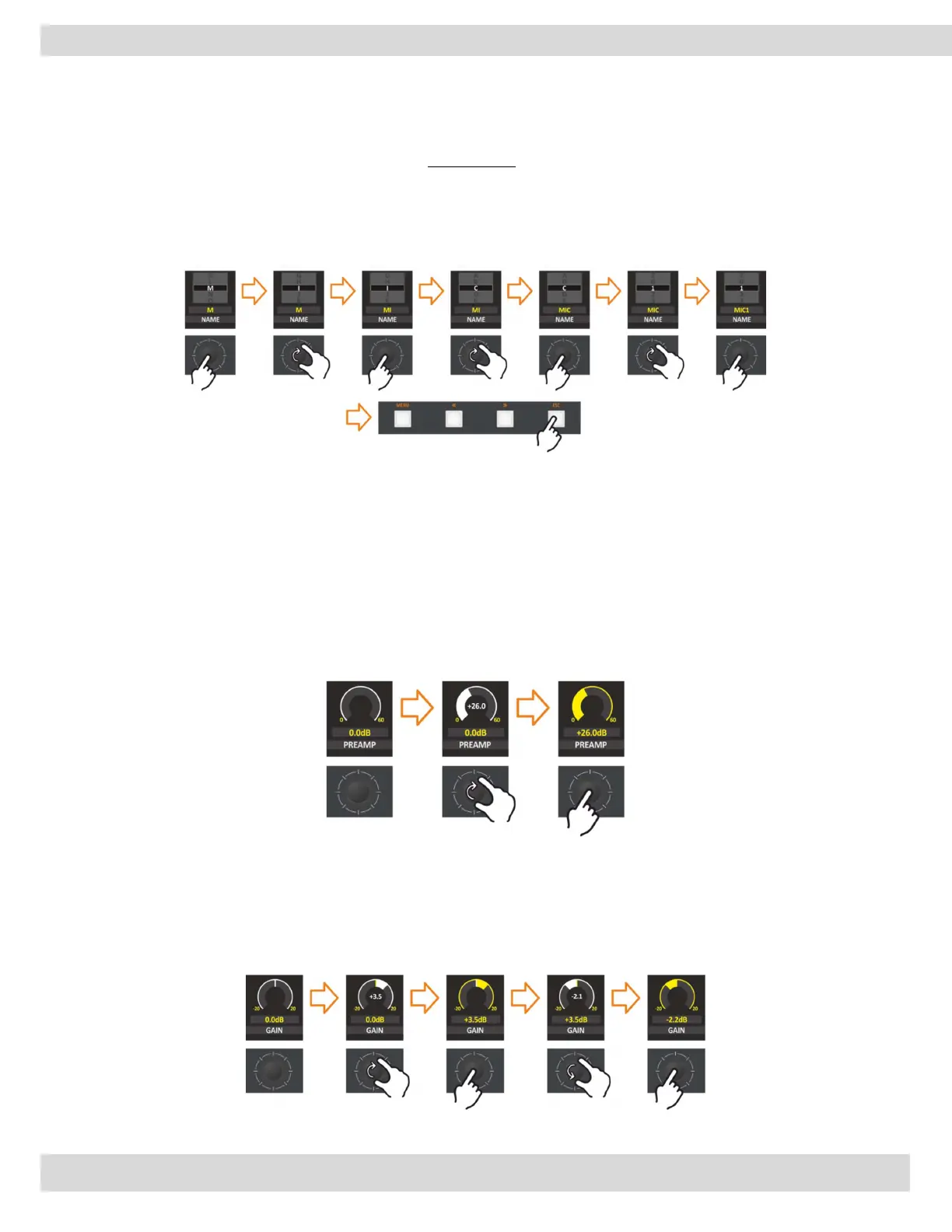
This parameter allows the assignment of a LABEL to the various input sources.
It is not possible to have a LABEL of more than 8 characters.
To change the microphone name and sign it as you like, it’s so easy way just rotate and push the knobs.
To end editing the LABEL, just push the ESC button.
just follow the next steps. The description works the same for all Inputs. (In the example we are going to
set the channel name as (MIC1).
PREAMP:
The preamplifier is typically used to amplify signals from analog sensors such as microphones. It allows you
to convert a weak signal for sending to a power amplifier or loudspeaker without any noise or distortion.
This parameter changes the Input PREAMPLIFIER.
The parameter has a 0.5 dB step for a maximum of 57.0 dB.
N.B.: When you adjust the PREAMP parameter, you have a real-time change of the parameter value and a
real-time perception of the PREAMP change. The Graphics will become white to indicate the parameter
change, and they will become yellow again after the confirmation.
GAIN:
This parameter allows you to adjust the input GAIN to bring the source to the right level.
The input Gain has steps of 0.1 dB.
N.B.: When the parameter control is activated, in real-time the parameter value is updated, perceiving the
increase and decrease of the GAIN, the graphics will change from yellow to white until the parameter is
confirmed.



 To Next Page