62
Display on entry
When entering the menu item the display first shows the newest complete
registration period or the last set of billing data. The cursor (blinking) points
to the first character of the first parameter. If the memory is empty, the dis-
play will show “No data available”.
7.7.1 Current values
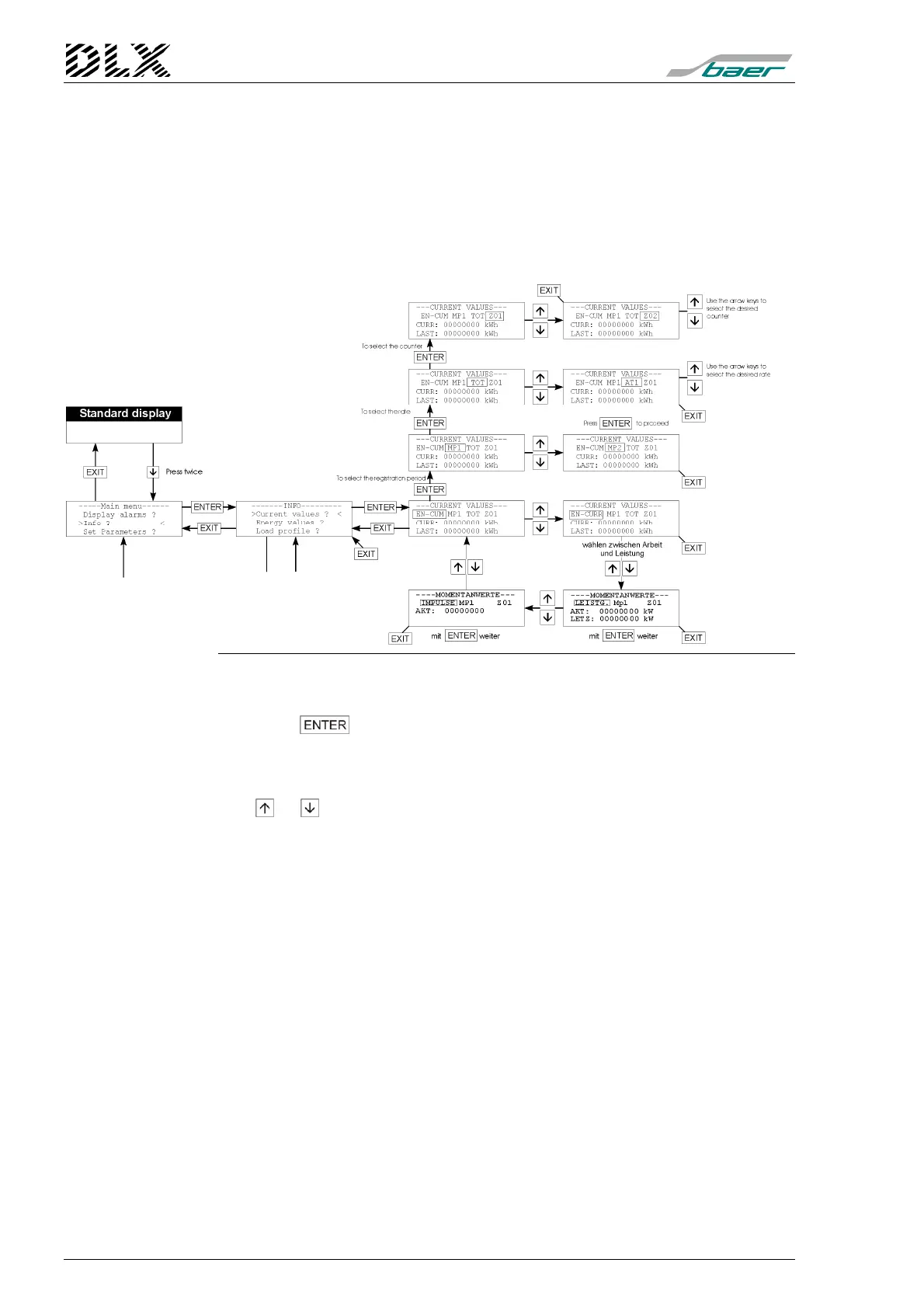
Figure 31, Flow diagram for menu item “Info” (Current values)
How to get there
Press the -key while in menu “Info”. The DLX enters the menu item
selected (displays and arrow on each side).
Changing the parameters
The or keys can be used to select energy, demand or pulse values,
to select the registration period, the rate, the counter or to select a total
value.
What will be shown ?
The display will show the cumulative (settable) and the current (not
settable) energy values as well as the demand values of the DLX for the
current and the previous (last) registration period Tm1 or Tm2 (if present)
for all inputs (I) and totals (S) stored in that registration period.
For the pulse values all pulses recorded since the start of measurement
(unweighted) will be shown for all inputs (I01 to I16), as well as all pulses
forwarded to outputs from totals (S01 to S04).
Analogue inputs (from firmware version 1.06.00 and up): the instantaneous
(last data telegram; display “Inst”) and average (display “Aver”) value will be
shown.



 To Next Page