86
9.2 ISDN Modem
9.2.1 Default settings
After delivery the following settings are active in the ISDN modem:
•
S0=1 Respond after one ring
•
&D0 Ignore DTR
•
B10 B-Chanel Protocol X.75-NL
•
**BSIZE=512 Block size 512 Byte
•
**MSN=* MSN non active
•
Q1 No feedback messages
•
&W Save user settings in non-volatile memory
The modem will respond after the first detected ring (S0=1). These settings
are fixed by factory programming. Only the MSN number may be altered.
For more detailed information please consult the manual shipped with the
software DLXPARA.
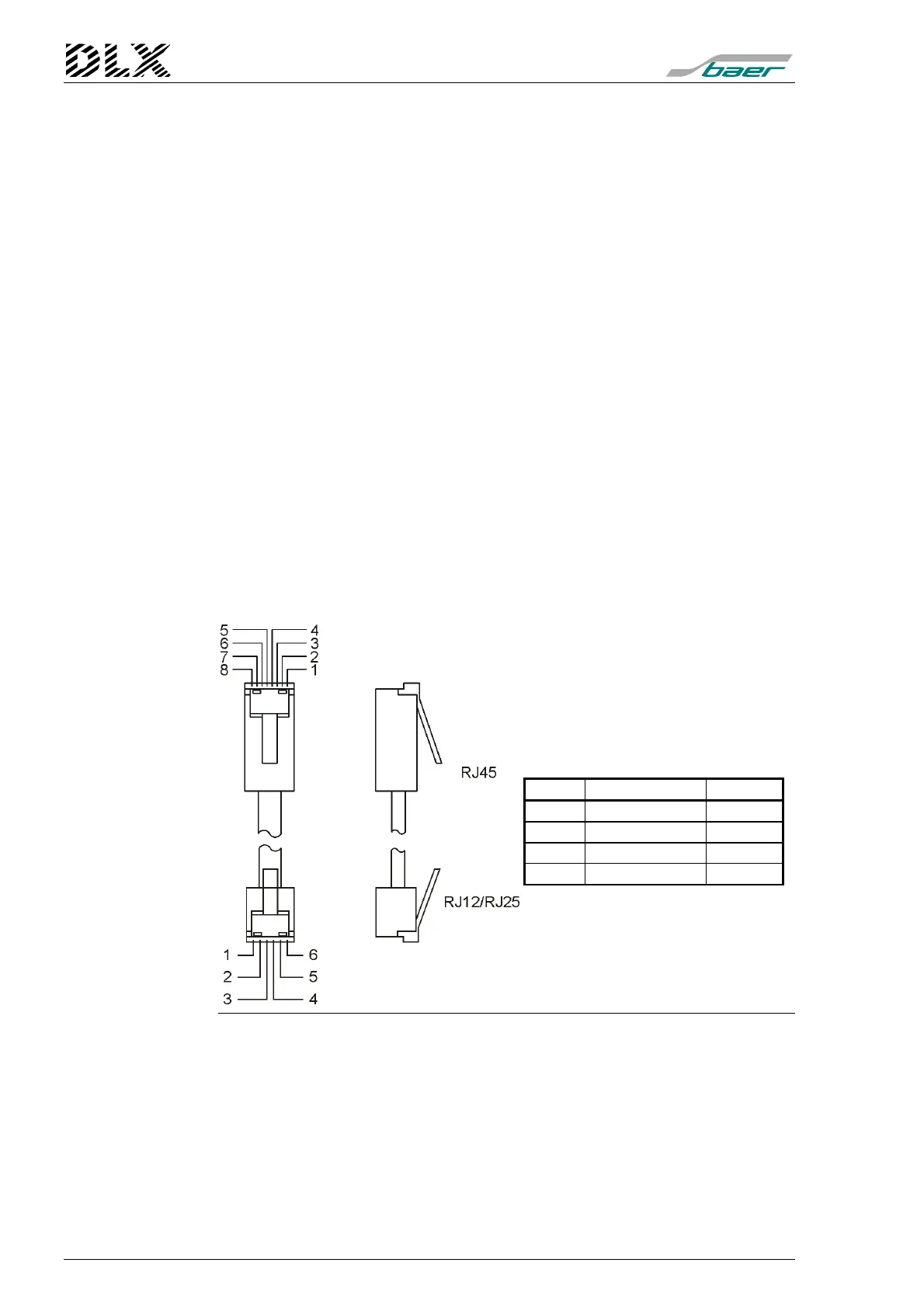
9.2.2 Pin allocation
The connection between the ISDN modem interface (terminal X5) and a
telephone line uses a telephone cable of type RJ45 to RJ12/RJ25.
Figure 45, Pin allocation of the ISDN cable (RJ45)
In areas with high probability of lightning additional protection needs
to be installed.
RJ45 Code RJ12
3 2a (Receive) 2
4 1a (Transmit) 3
5 1b (Transmit) 4
6 2b (Receive) 5



 To Next Page