R5906790 /04 Athena104
Note: Selecting the wrong lens parameters will result in an unexpected behavior of the lens when
using macros for switching between FLAT and SCOPE (change in picture size and focus).
3. Perform a lens HOME & RETURN operation. (See user guide of the “Communicator” chapter Installation >
Advanced > Lens parameters)
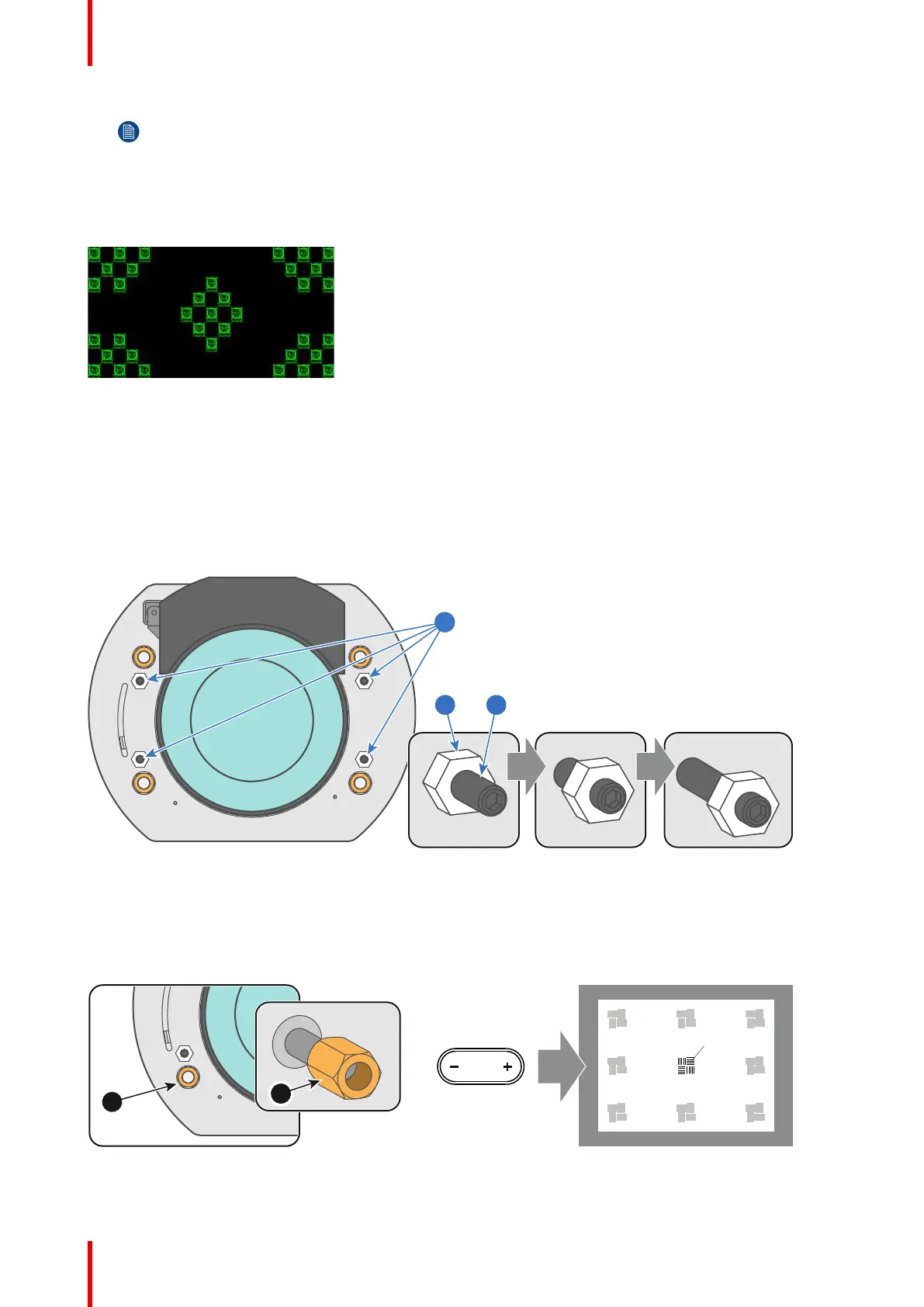
4. Project the green focus test pattern.
Image 11-3
5. Zoom the lens for maximum image on the screen (WIDE).
6. Is it possible to focus the center of the projected image?
► If yes, the Back Focal Length is OK. Proceed with the next step.
► If no, the Back Focal Length needs realignment. Proceed with the procedure “Back Focal Length
adjustment”, page 107.
7. Unlock and turn out the 4 set screws (reference 11 Image 11-4) of the Lens Holder by 1 centimeter. Use a
10mm nut driver for the lock nuts (reference 21 Image 11-4) and use a 3mm Allen wrench for the set screws.
Image 11-4
8. Fully loosen the Scheimpflug nut at the lower left of the Lens Holder (reference 4 Image 11-5). Use a 13mm
nut driver.
9. Optimize the focus of the projected image in the center of the screen (F) using the motorized focus control
(Local Keypad).
Image 11-5
Scheimpflug













 To Next Page