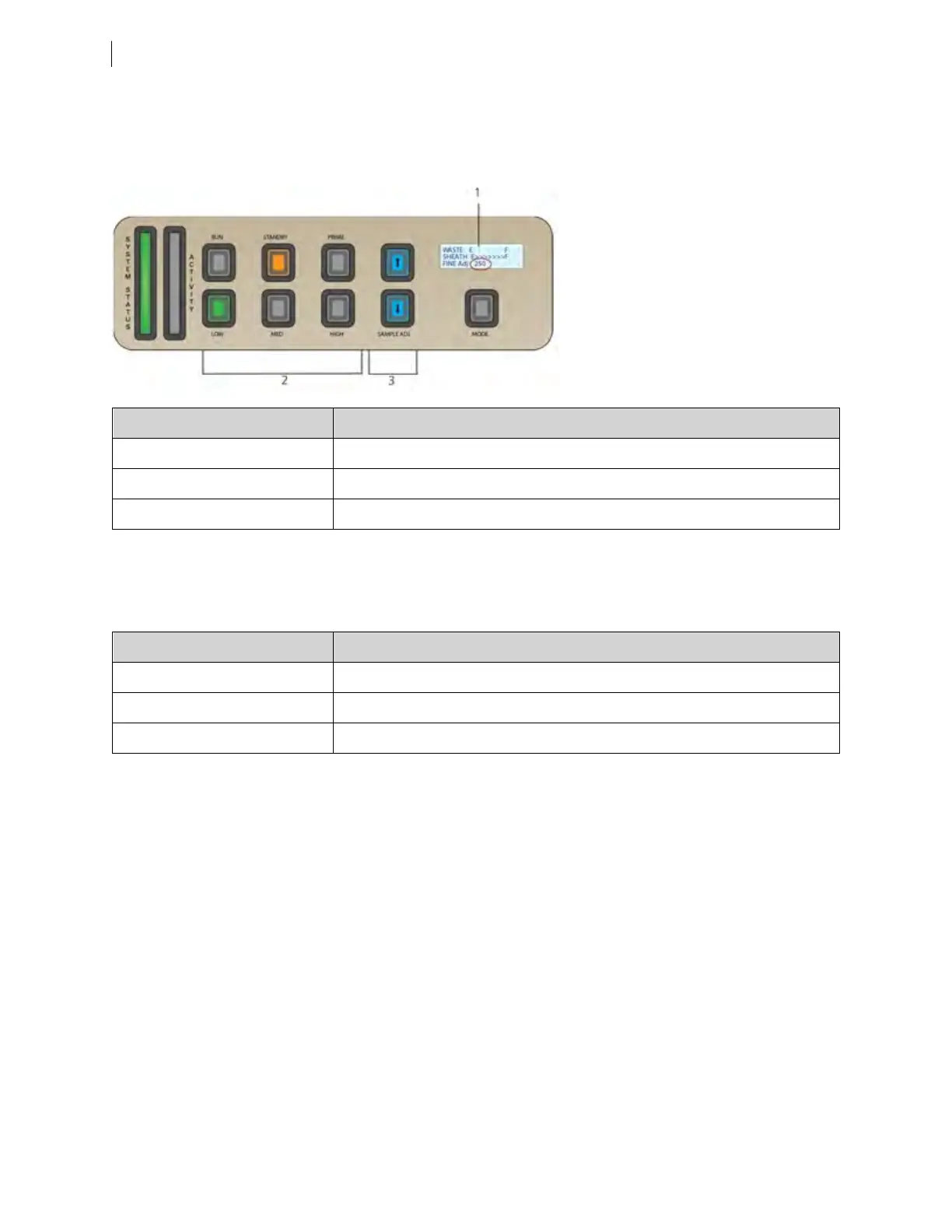
Sample flow rate control
The three flow rate control buttons (LOW, MED, HIGH) set the sample flow rate through the flow cell. The
SAMPLE ADJ buttons allow you to adjust the rate to intermediate levels.
Number Component
1 Status screen
2 Sample flow rate buttons
3 Sample fine adjust buttons
When sample adj is set at the midpoint of 250 (as shown on the status screen on the control panel) the sample
flow rates at the low, med, and high settings are approximately 12, 35, and 60µL/min of sample, respectively.
Each time you press one of the SAMPLE ADJ buttons, the fine adjust of the indicated sample increases or
decreases by 10. The following table shows the approximate sample flow rate range for low, medium, and high.
Settings Sample flow rate (µL/min)
Low 6–24
Med 17.5–70
High 30–120
Status screen
When not in FFSSmode, the first two lines of the status screen show the level of the waste and sheath tanks.
The third line toggles between Fine Adj. and Air Pressure. Status is described in detail in the following table.
16 BD FACSymphony™ A5 SE User's Guide











 To Next Page