40
6-847718-00 Rev. B00
Installation Procedures
Front Panel Mounting
Finish
1. Remove front panel assembly from
static shielding shipping bag.
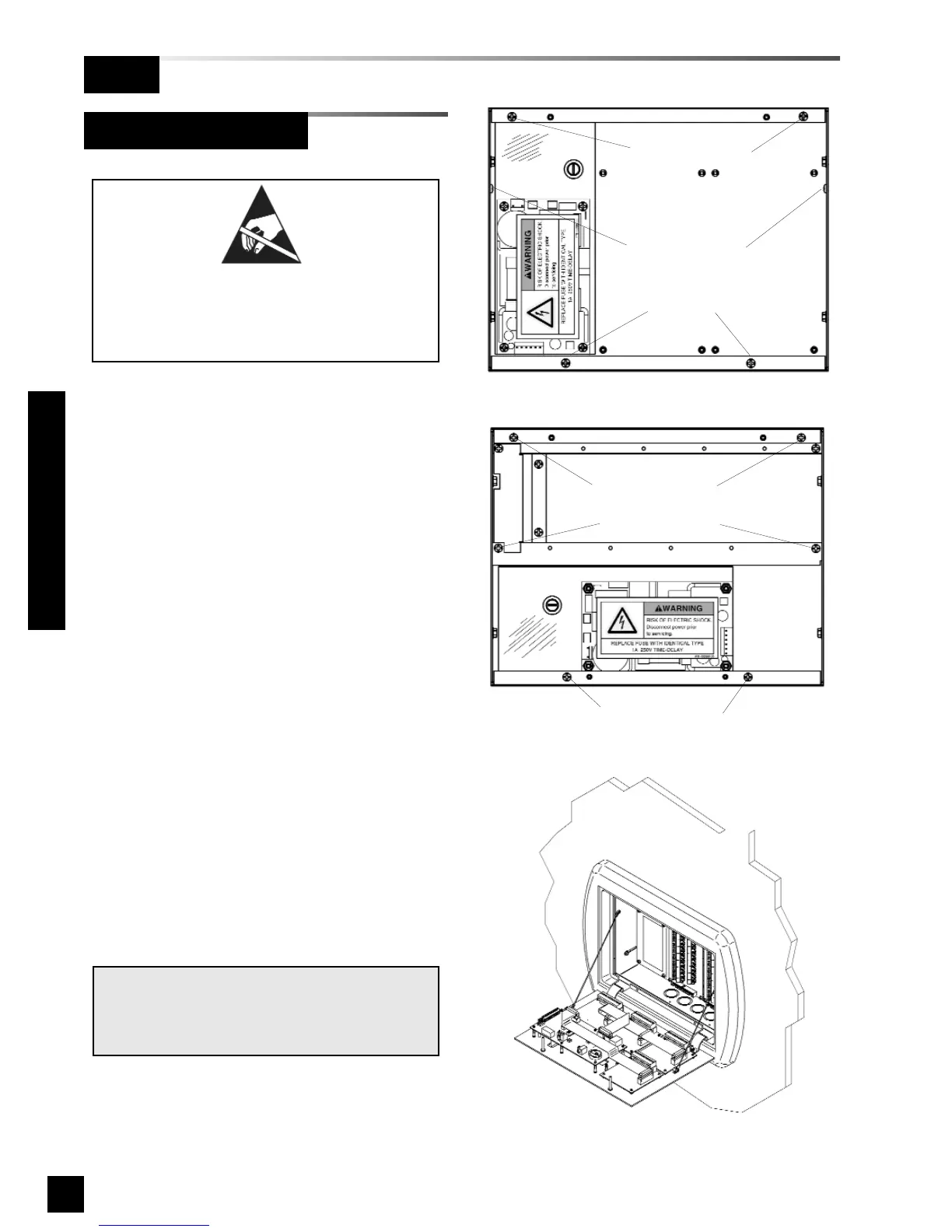
2. Remove front panel mounting screws
from alarm panel back box assembly
(Figures 30 and 31).
3. Remove lanyard mounting screws
from alarm panel back box assembly
(Figure 30 and 31).
4. Attach front panel to alarm panel back
box using screws removed in step 2
(Figure 32).
5. Attach lanyards to alarm panel back
box using screws removed in step 3.
6. Remove nut from front panel
grounding lug.
7. Install front panel grounding wire using
nut removed in step 6
8. Connect power supply DC wire
harness to J6 on annunciator module.
Refer to Wiring Schematic 1
(Page 46).
NOTE:
Harness connector is keyed to prevent incor-
rect orientation, however, use care to ensure
correct pin alignment.
Figure 32: Attach Front Panel and Lanyards
Figure 31: Area Alarm Panel Screws
Figure 30: Master / Combo Panel Screws
Lanyard screws
Lanyard screws
Front panel
mounting screws
Front panel
mounting screws
Front panel
mounting screws
Front panel
mounting screws
ATTENTION:
Observe Precautions for Handling
ELECTROSTATIC SENSITIVE
DEVICES



 To Next Page