62
6-847718-00 Rev. B00
Operation
Set-Up Procedures (Cont.)
Multiplexer Module
6. Select desired display brightness by
pressing either ! or " buttons. Each
push will increase or decrease
brightness of display. Audible alarm
will chirp one time with each button
press and two times when limit is
reached.
7. Press and release TEST button to
save changes. LEDs will sweep from
top to bottom to indicate end of set-up
sequence.
8. Multiplexer module will return to
monitoring mode.
Setting Audible Alarm Repeat Time and
Display Intensity:
Used to set time interval for reactivation
of audible alarm after alarm MUTE
button has been pressed.
1. Loosen two screws on front of alarm
panel. Hinge open front cover.
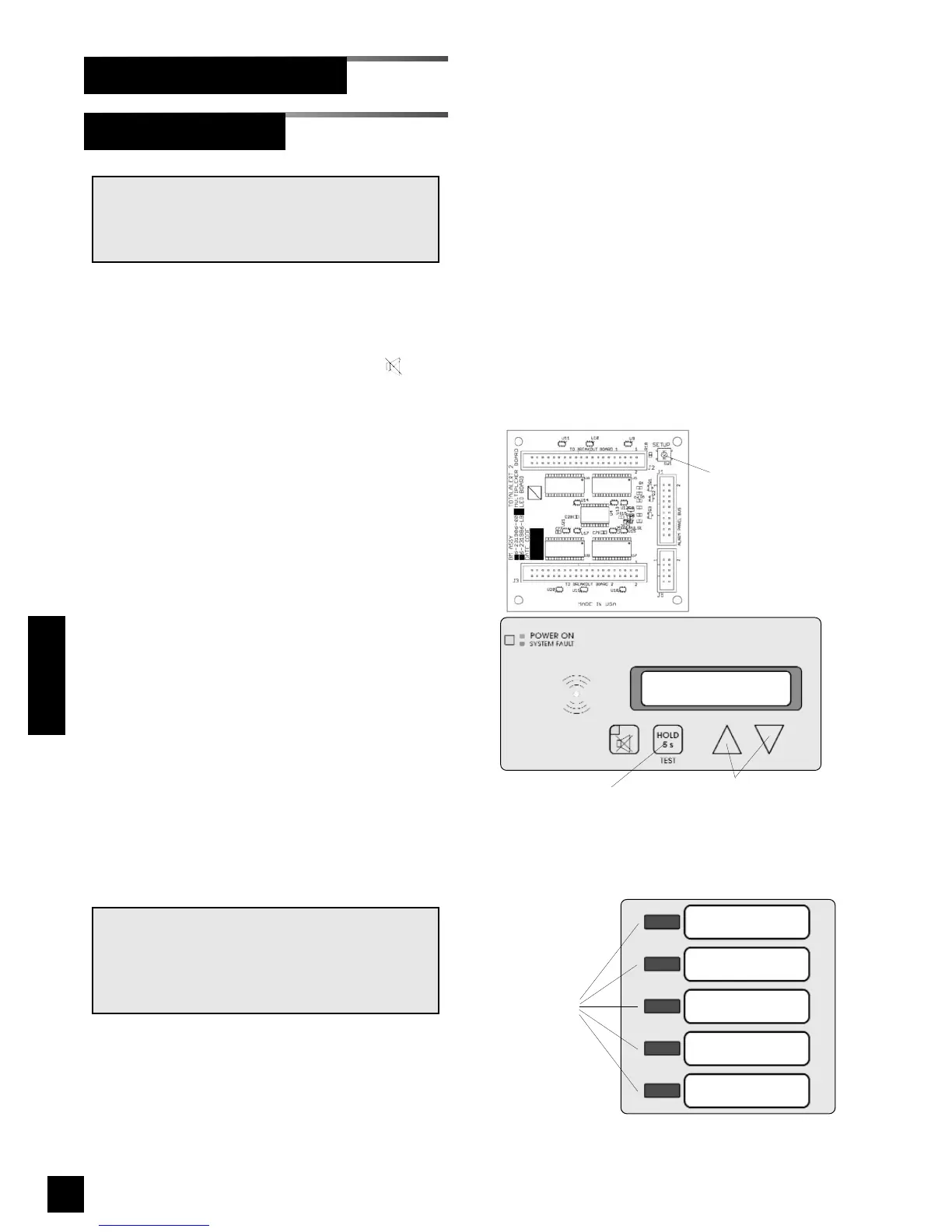
2. Locate SETUP button on multiplexer
module circuit board (Figure 43).
3. Press and release SETUP button.
Audible alarm will chirp and
multiplexer module front panel LED
indicators will show current audible
alarm repeat time as shown below:
Indicator Illuminated Repeat Time
None OFF
LED 1 - red 1 Min.
LED 2 - red 5 Min.
LED 3 - red 15 Min.
LED 4 - red 30 Min.
LED 1 - green 1 Hr.
LED 2 - green 2 Hr.
LED 3 - green 8 Hr.
LED 4 - green 12 Hr.
LED 5 - green 24 Hr.
4. Using either ! or " buttons, select
desired audible alarm repeat time.
5 Press and release TEST button on
front of alarm panel. All LEDs will
illuminate.
NOTE:
To comply with the requirements of the City of
New York Department of Buildings; Materials
and Equipment Acceptance Division (M.E.A.),
set audible alarm repeat time to 30 minutes.
NOTE:
Normally, no setup is required for the multiplex-
er module. The following advanced setup pro-
cedures are available.
Multiplexer Module Board
SETUP
button
TEST
button
Up and down
buttons
LED 1
LED 2
LED 3
LED 4
LED 5
Status LEDs
Figure 44: Multiplexer Module LEDs
Figure 43: Multiplexer Programming Buttons



 To Next Page