76
6-847718-00 Rev. B00
Operation
1. Start a web browser such as Microsoft
Internet Explorer.
2a.Enter the Device Name in the browser’s
address bar.
Device Name:
TA2_XXXXX where XXXXX is the
device serial number.
2b.Enter the Device’s IP address in the
browser’s address bar:
Example: http://10.10.5.10
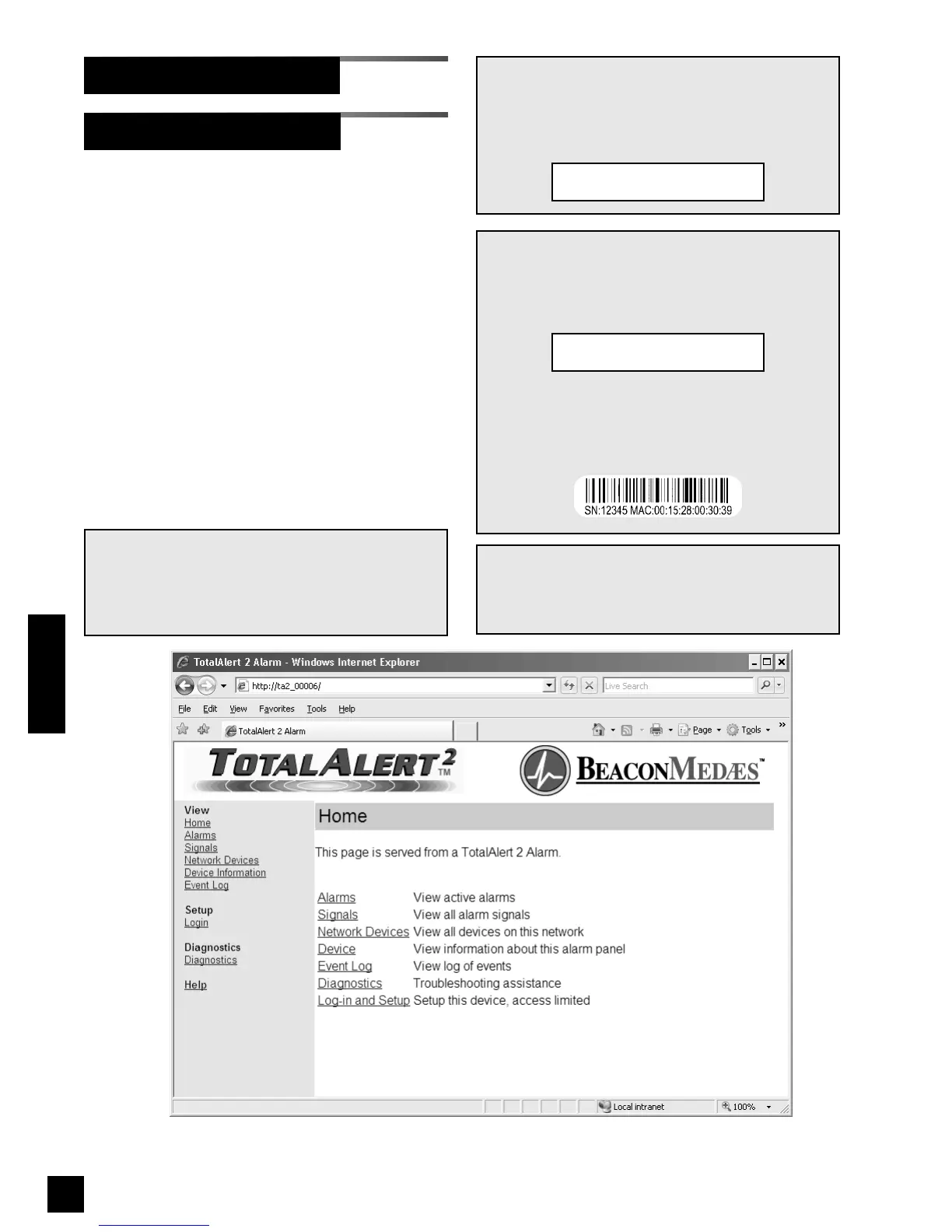
3. After you enter the device name or IP
address, the alarm’s home page will be
displayed (Figure 56).
Accessing the Web Page
Set-Up Using Web Pages
NOTE:
To learn the IP address of a master or combo
alarm, press and hold the TEST button on the
front panel for 5 seconds. The IP address will be
shown on the VFD.
NOTE:
To learn the serial number of the alarm, cycle the
power on the alarm panel. The serial number will
be shown on the VFD during the bootup
sequence:
The serial number can also be found on a label
inside the alarm panel. Open the front panel and
locate the bar code label on the annunciator
module.
Version: 1.0.0
SN 12345
NOTE:
To learn the name of a master or combo alarm,
cycle the power on the alarm panel. The name
will be shown on the VFD during the bootup
sequence:
Browse at: http://
TA2_12345
Figure 56: Typical alarm panel home page
NOTE:
If you rename the alarm panel, you can still use
the factory programmed device name to access
the alarm home page.



 To Next Page