82
6-847718-00 Rev. B00
Draft 29 June 2007
5. If Custom gas type was selected, enter
the custom gas type and click next
(Figure 64).
6. The Signal Setup - Step 2 page will be
displayed (Figure 65).
7. Select the Message for the alarm input
from the drop-down menu.
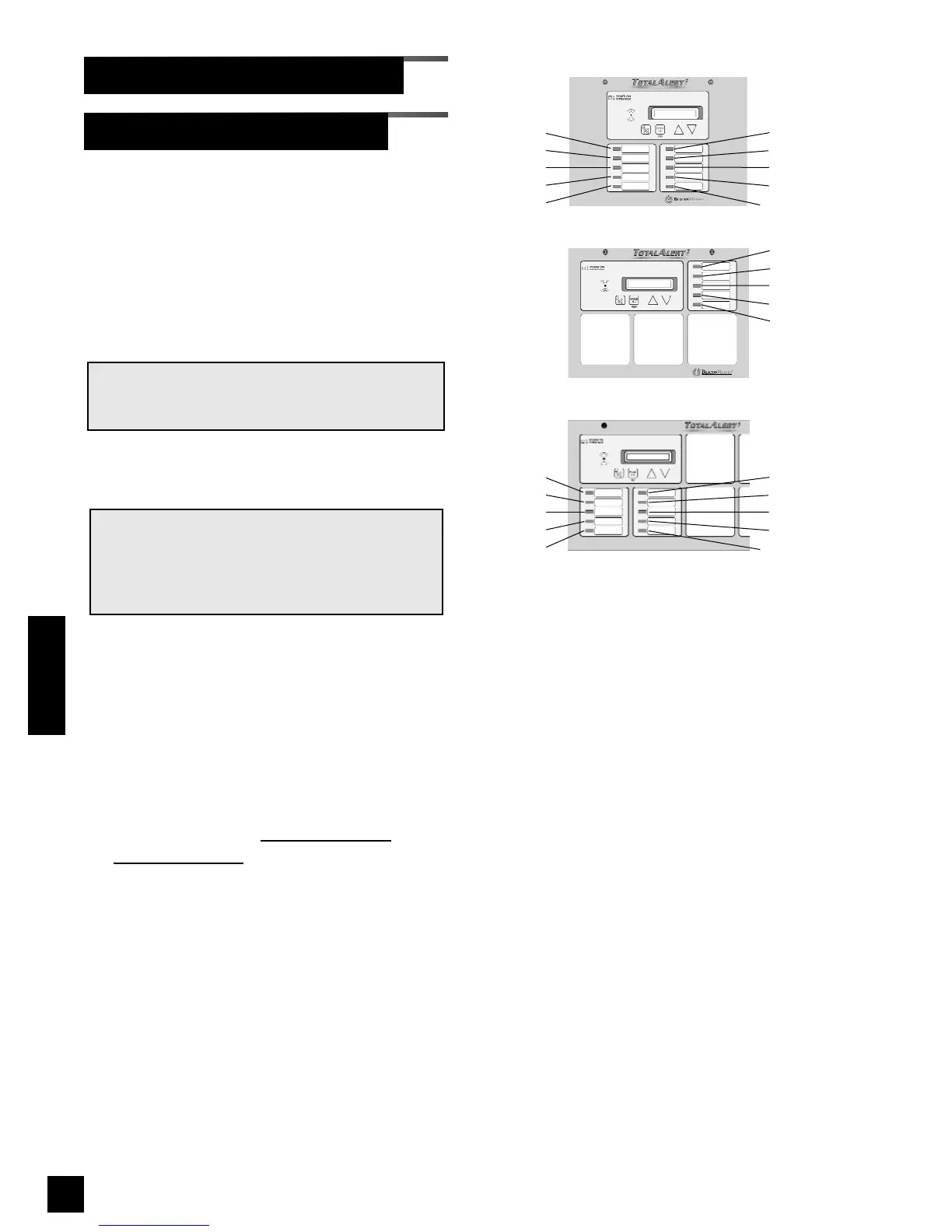
8. Select the LED number for the alarm
input (Refer to Figure 66).
9. Enter the Location then click Next.
10.If Custom Message was selected, enter
the custom message and click Next
(Figure 67).
11. The Signal setup Summary page will be
displayed (Figure 68).
12.To return to the Alarm Message Setup
page click on the Return to
Alarm
Message Setup link.
NOTE:
Only one type of gas can be assigned to each
LED. After an LED has been assigned to a type
of gas, that LED number is available only for
that particular type of gas.
NOTE:
If a custom message is required, select Custom
Message from the Message drop-down menu.
Setup Alarm Messages (Cont.)
Set-Up Using Web Pages (Cont.)
Figure 66: LED Numbering
1
2
3
4
5
6
7
8
9
10
1
2
3
4
5
1
2
3
4
5
6
7
8
9
10
Master Alarm
Small Combo Alarm
Large Combo Alarm
Operation



 To Next Page