107
4.5 "Configuration" menu 4.5 "Configuration" menu
Individual updates for Intuvia/Nyon
X A single update is especially useful if the last update
of the eBike/on-board computer was a long time ago.
1. Remove the on-board computer and connect to the
computer via the USB cable for diagnostics.
2. Start the DiagnosticTool on the computer.
3. Subsequently perform the update as described on
p. 106.
NEW
Reprogram Nyon (possible as of model year 2018
software). To do so, activate "Restore Nyon" in
the "Configuration" menu. All settings, maps and
user profile will be deleted.
NEW
Update of Nyon is only possible if its battery is
charged to at least 85%
.
Nyon can also be updated via WiFi (see
p. 29). Personal data and saved map material
remain saved.
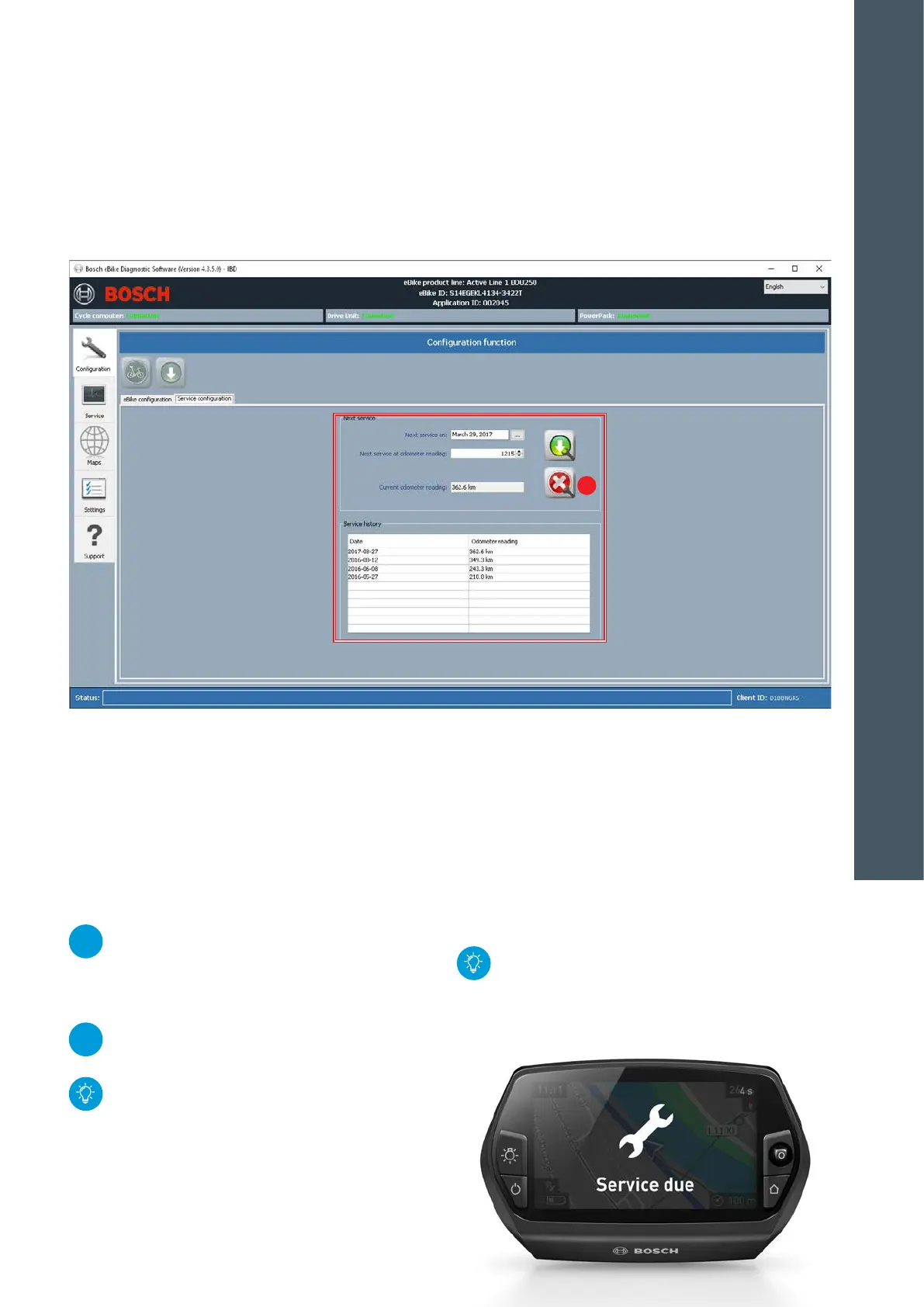
Service interval configuration
1. Set next service according to date and/or mileage
(message appears on display when service is due)
2. Click on the button with the green arrow to save the
entries on the eBike.
X Use the green arrow button to transfer a performed
service into the service history.
X Service interval can be removed with the "Delete"
(A) button.
The service interval can be deleted by deleting
the date and resetting the mileage to 0. After-
wards, use the green arrow button to save any
changed entries.
A
4
DIAGNOSTICS










 To Next Page