20
1.11 How to Operate Nyon
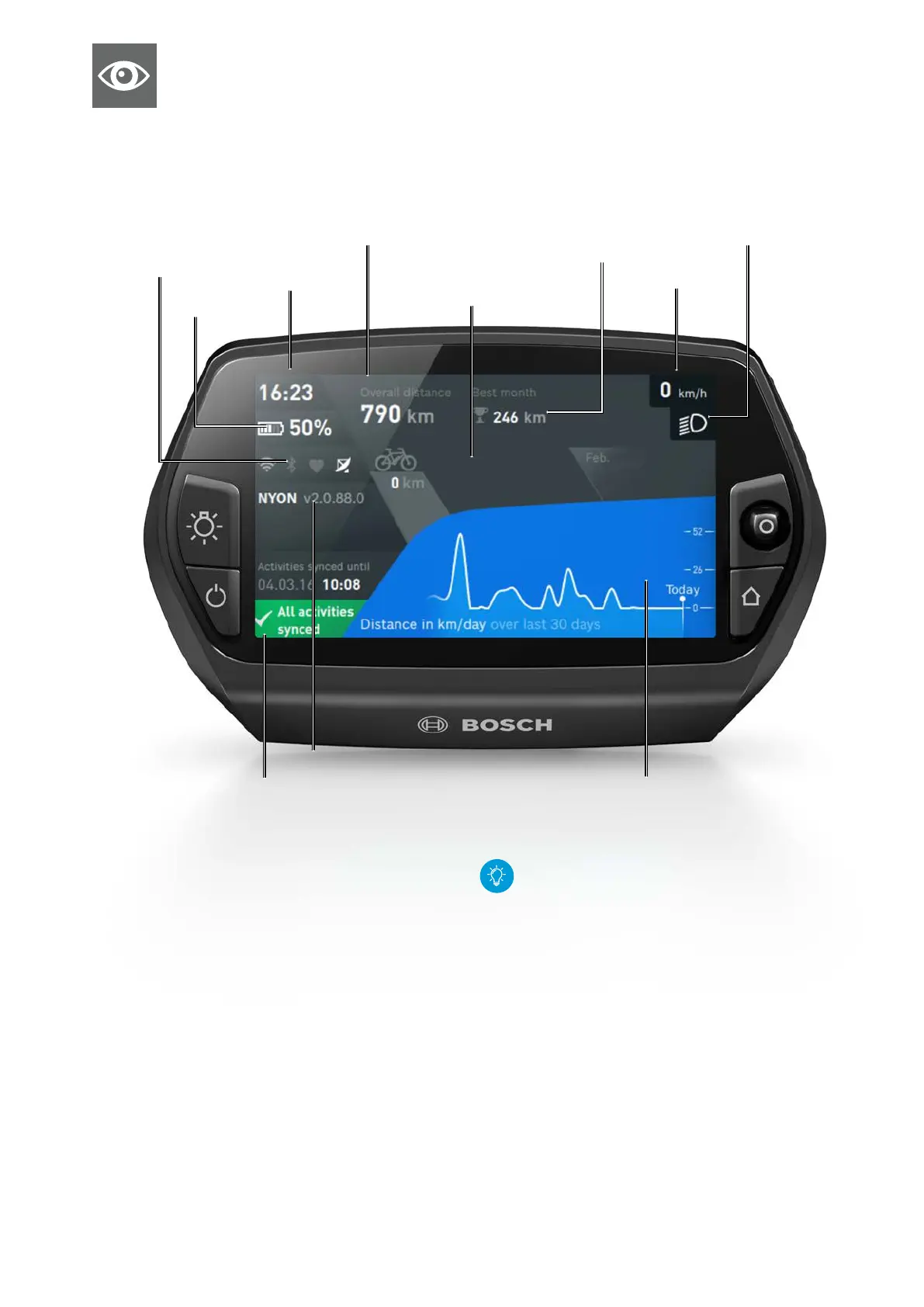
"Dashboard" operating mode
Clock
Software version of Nyon
Synchronisation status Trip meter of kilometers/miles of last 30 days
Speed
Connection status
(Bluetooth, Wi-Fi, heart
rate monitor, GPS)
Total distance travelled with the eBike The maximum number of kilo-
meters/miles ridden within a month
Kilometers/miles ridden com-
pared with the previous month
Bike lights
Functions
X Manual synchronisation: immediately transfer
changes made on the smartphone app eBike Connect
or the Online-Portal
&
eBike-Connect.com to Nyon:
1. Ensure that the Bluetooth and/or Wi-Fi connec-
tion is enabled.
2. Move the joystick to the right.
3. Select the "Synchronisation" button.
4. Changes (saved routes/places, custom screens/
riding modes, user settings, etc.) are syn-
chronised.
Total distance indicator "TOTAL":
Total distance ridden by the logged-in rider (in
some cases, on several eBikes)
Charge state of
the eBike battery










 To Next Page