NEW
21
1.11 How to Operate Nyon 1.11 How to Operate Nyon
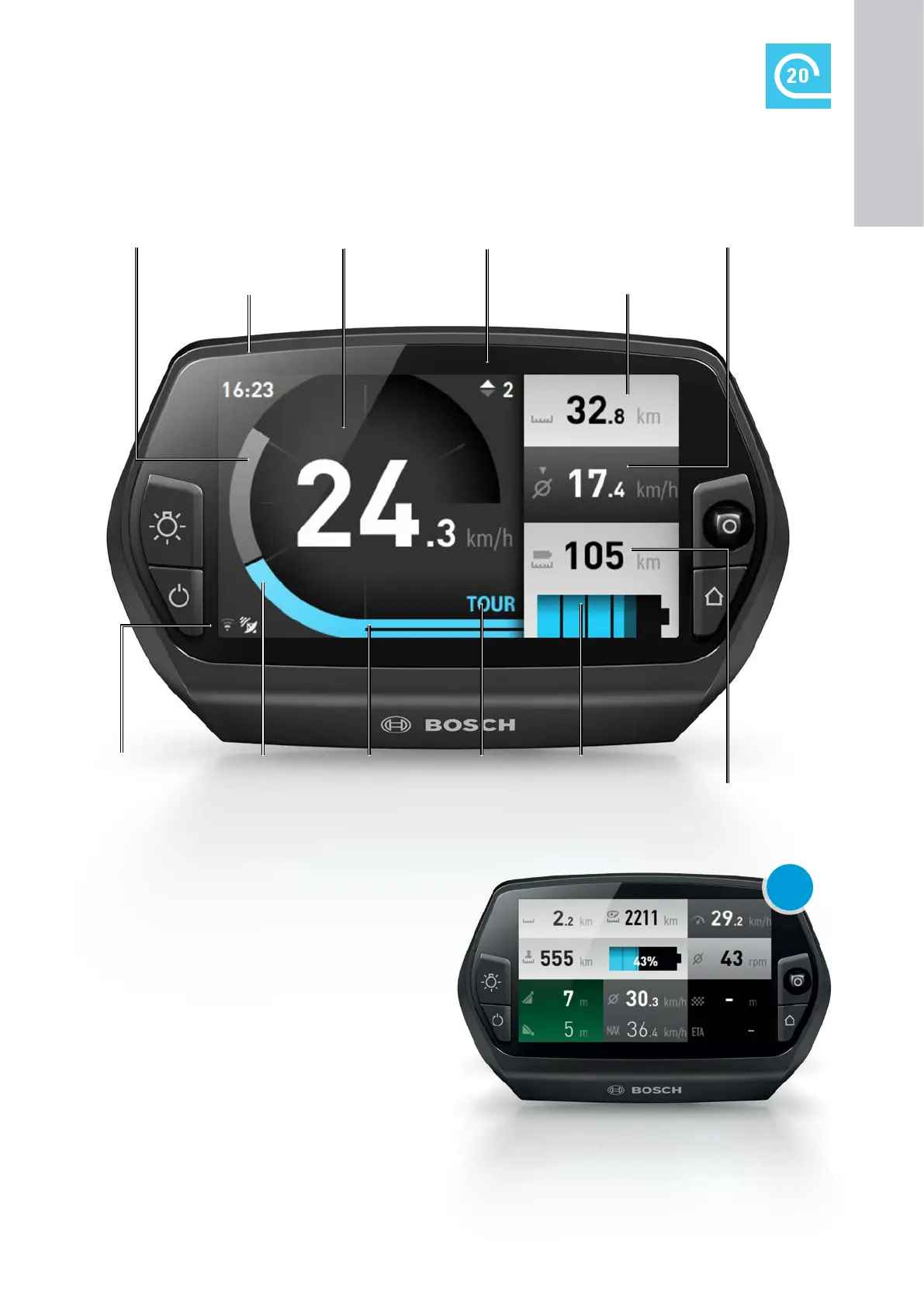
"Ride" operating mode
Clock
Text display
Riding mode
Visualisation of
riding mode
Motor power Charge state of the
eBike battery
Residual range
Trip distance odometer
Own pedal power Speed Shift recommendation Average speed
Connection status
(Wi-Fi, Bluetooth, heart
rate monitor, GPS)
Functions
X Activation of a custom riding mode
("Custom Riding Modes")
– Up to four riding modes can be individually config-
ured with the smartphone app or in the online
portal, see p. 35.
– Fee-based premium function, purchase in the
"Shop" menu of the smartphone app
eBike Connect
X Activation of a user-defined screen ("Custom
Screen")
– You can choose from 20 various blocks of basic
information and three different graphic layouts.
Configuration is via eBike Connect smartphone app
or in the online portal
&
eBike-Connect.com, see
p. 35.
X "Reset Trip"
– Reset the trip meter and average values to "0".
Example of a custom screen with display
of residual energy content of battery
1
ON-BOARD
COMPUTER










 To Next Page