Page 1845349D © 2002 Radionics
D6412/D4412 Installation Guide
D6412/D4412
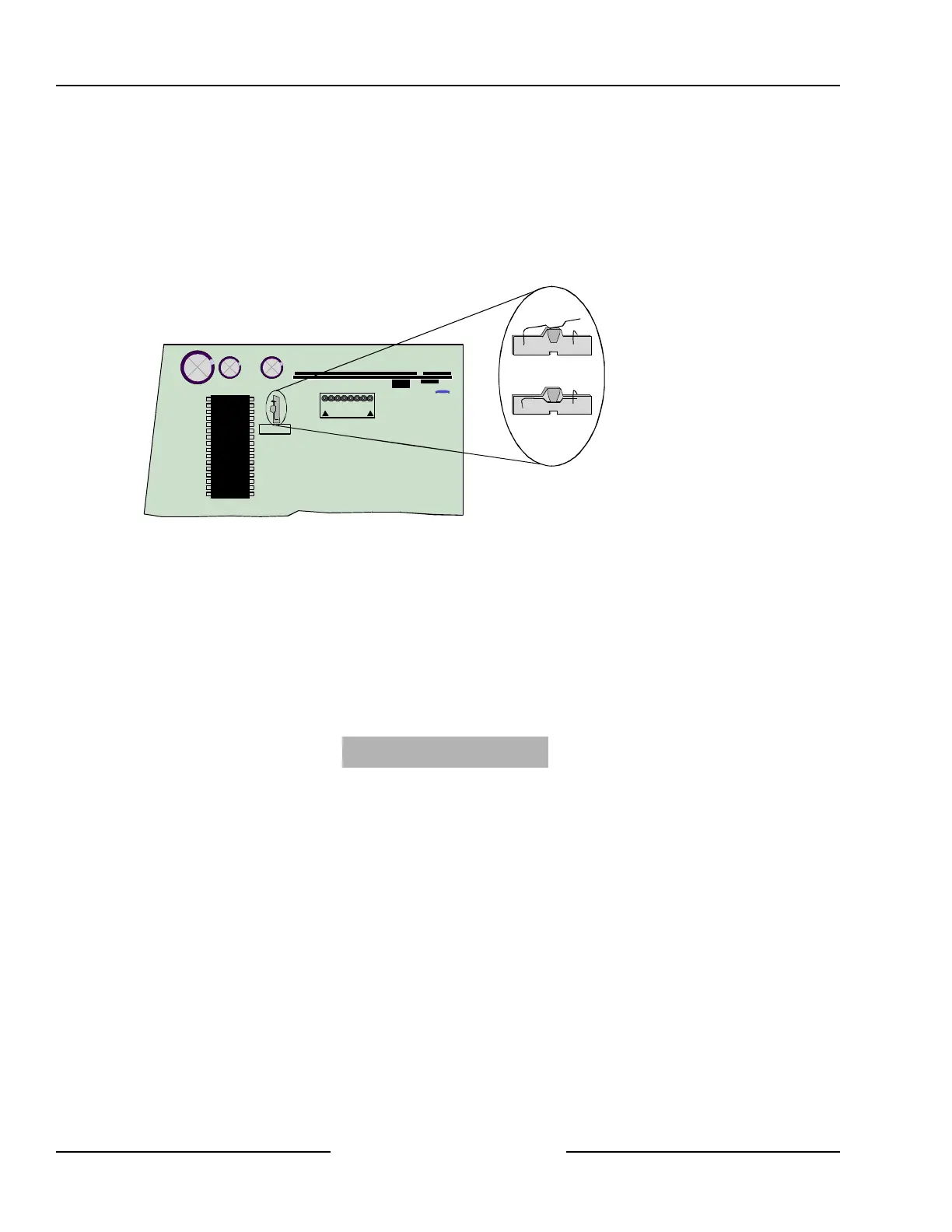
3.5.2 Closing the Installer Switch
Closing the Installer Switch disables the panel (see Figure 3). System reporting is disabled and the system
cannot be armed. A system trouble shows at all keypads.
Opening the Installer Switch from the closed position resets the panel. The panel resets all its timers, counters,
indexes, and buffers. Any points that restore after a reset is performed do not generate restoral reports.
Leaving the Installer Switch in the closed position allows you to power up the panel and charge the battery as
you install the detection devices and Command Centers.
AUXILIARY
JP1
Installer
INSTALLER SWITCH
NORMAL (OPEN)
INSTALLER SWITCH
LOCKED (CLOSED)
Figure 3: Installer Switch
3.6 Finishing the Installation
3.6.1 Earth Ground and Installer Switch
First, make the earth ground connection and close the Installer Switch if you have not already done so.
To reduce the occurrence of false alarms upon toggling of the Installer Switch, the panel ignores all point faults
while the devices stabilize during the setup process. The panel’s startup process takes approximately 60
seconds to complete, and it occurs at power-up and when the panel resets (Installer Switch OPEN). See
Sections 3.6.7, Power Up, and 13.3.10, Exiting the Installer’s Menu, for more information. During this period, a
screen showing the panel model number (D6412 or D4412), firmware revision number and a “Please Wait...”
message appears for approximately 10 seconds.
D6412 Rev
X.XX
Please Wait...
3.6.2 Charge the Battery as You Finish
Connect the battery and then the transformer so that the panel can charge the battery as you finish the
installation. See Section 4.0, Power Supply, for instructions.
Self Diagnostics at Power Up and Reset: The system performs a series of self diagnostic tests of its
hardware, software, and program at power up and at reset. They take about 60 seconds to complete. Command
centers may display ‘System Fault’ and sound during the power up and reset interval.
If the panel fails any of the tests, a system trouble message appears at the Command Centers.
Touch the Earth Ground Terminal first: To discharge any static charge you may be carrying, always touch the
panel’s earth ground terminal before beginning work on the panel.
3.6.3 Install and Wire Detection Devices
Install and wire detection devices and Command Centers at their locations throughout the premises.
Do not make the connections at the panel end of the wiring yet.
Section 7.0, On-Board Sensor Loops, contains instructions for wiring the on-board point locations to detection
devices. Section 11.0, Arming Devices, contains instructions for wiring the Command Centers.
Instructions for wiring the off-board point locations are found in the instructions packaged with the point
expansion devices.
Installation



 To Next Page