Page 43© 2002 Radionics
D6412/D4412 Installation Guide
45349D
D6412/D4412
10.2.4 Installation
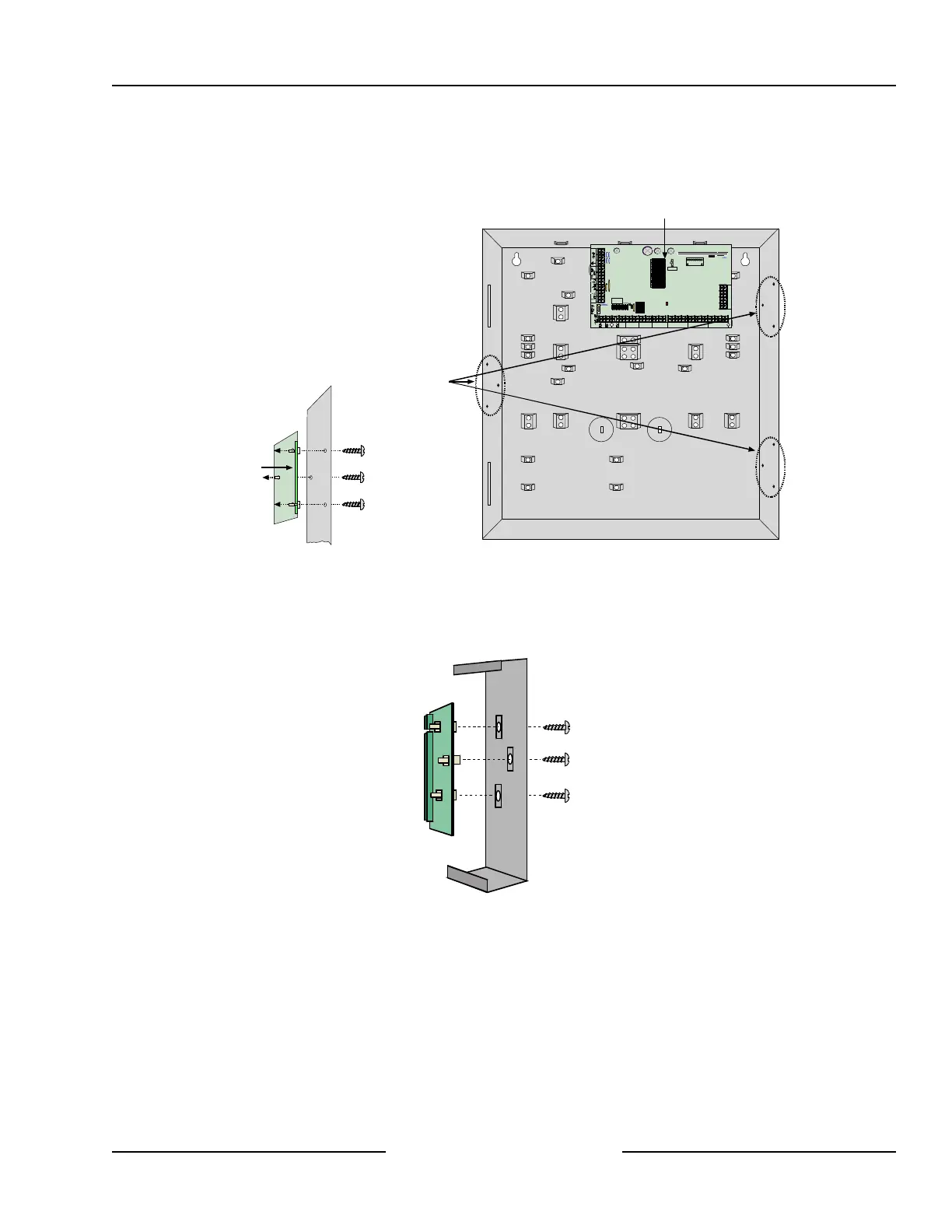
You can install the DX3010 in the enclosure with the panel (see Figure 27) with the mounting hardware supplied
with the DX3010.
DX3010 Side
Mounting Locations
R
Y
G
B
Alrm
+
PO1
L-1
+ -
L-2Com L-4ComL-3 L-6C omL-5 L-8ComL-7
T
T1
R1
AUXILIARY
JP1
Installer
JP2-PO1
Select
A B
R
D6412/D4412 PCB
DX3010
Terminals
Enclosure Wall
Mounting Hardware
(supplied w/DX3010)
Figure 27: DX3010 - Control Panel Enclosure Side Mounting
Alternatively, you can mount the DX3010 remotely in its own D203 enclosure (see Figure 28).
Distance from the panel is determined by the total combined wire length of all devices (including keypads)
connected to the panels Data terminals. The combined total wire length must not exceed 1000 ft. (305 m) (22
AWG [0.8 mm]).
Install the
module in
the D203
housing
Figure 28: Installing the DX3010 in a Remote Enclosure
Off-board Outputs



 To Next Page