Page 55© 2002 Radionics
D6412/D4412 Installation Guide
45349D
D6412/D4412
SDI Devices
13.0 Installer’s Keypad and Installer Mode
13.1 Installer’s Keypad Connector
IMPORTANT
The Installer’s Keypad must be set to Address 0 (set MODE to OFF) and the Installer Switch must be
closed in order to program the panel from the keypad.
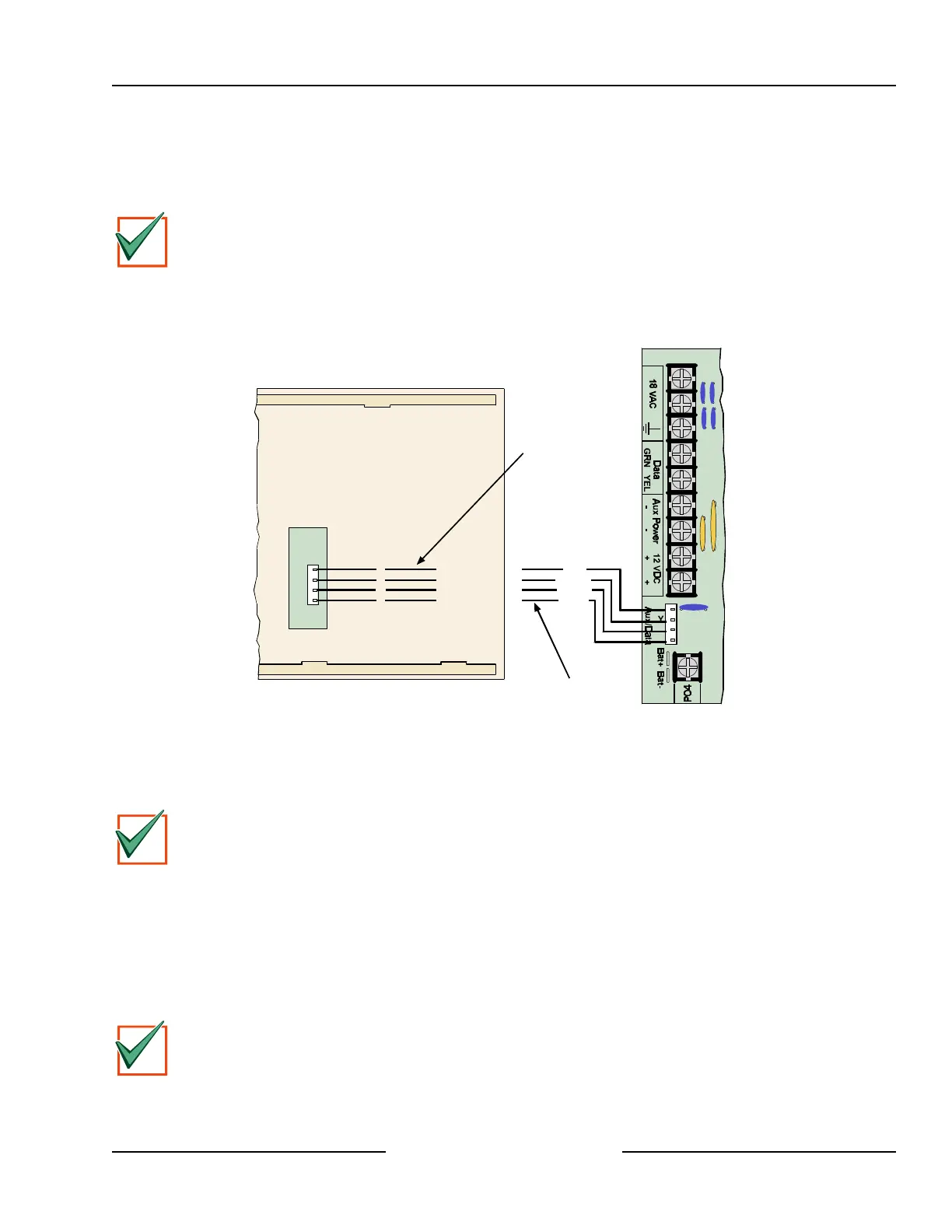
Figure 44 shows you how to connect and disconnect an Installer’s Keypad (D623 or D625 Text Command
Center) and enter the Installer’s Mode. Refer to D6412/D4412 Program Entry Guide (P/N: 45351) for complete
information on programming the panel from a keypad.
D6412/D4412 PCB
Y
G
B
R
Use wire assemblies supplied with keypad and panel to create a double ended ‘installer’ cable.
Back of Command Center
RedR
Y
G
B
Yellow
Green
Black
Connector supplied
with keypad.
Connector supplied
with panel.
Figure 44: Installer’s Keypad
13.2 Entering the Installer Mode
IMPORTANT
Press the [Cmd] key when the Text Command Center display prompts you to press the [#] key.
13.2.1 Installer’s Passcode
To enter the Installer’s Mode, first enter the installer’s passcode and then press [Cmd] + [4] + [1]. The default
Installer Passcode is 6543210. The passcode length can be between 3 and 7 digits in length (default length is 4
digits, which shortens the default Installer passcode to 6543). To change the default passcode length, see
Section 2.9, Passcode Configuration, Installer Passcode, in the D6412/D4412 Program Entry Guide (P/N:
45351).
The system displays the installer’s menu described in Section 13.3, Installer’s Menu.
IMPORTANT
The Installer Switch must be closed to select Keypad Program from the Installer’s Menu (see Figure 44).



 To Next Page