Page 25© 2002 Radionics
D6412/D4412 Installation Guide
45349D
D6412/D4412
6.3 Location
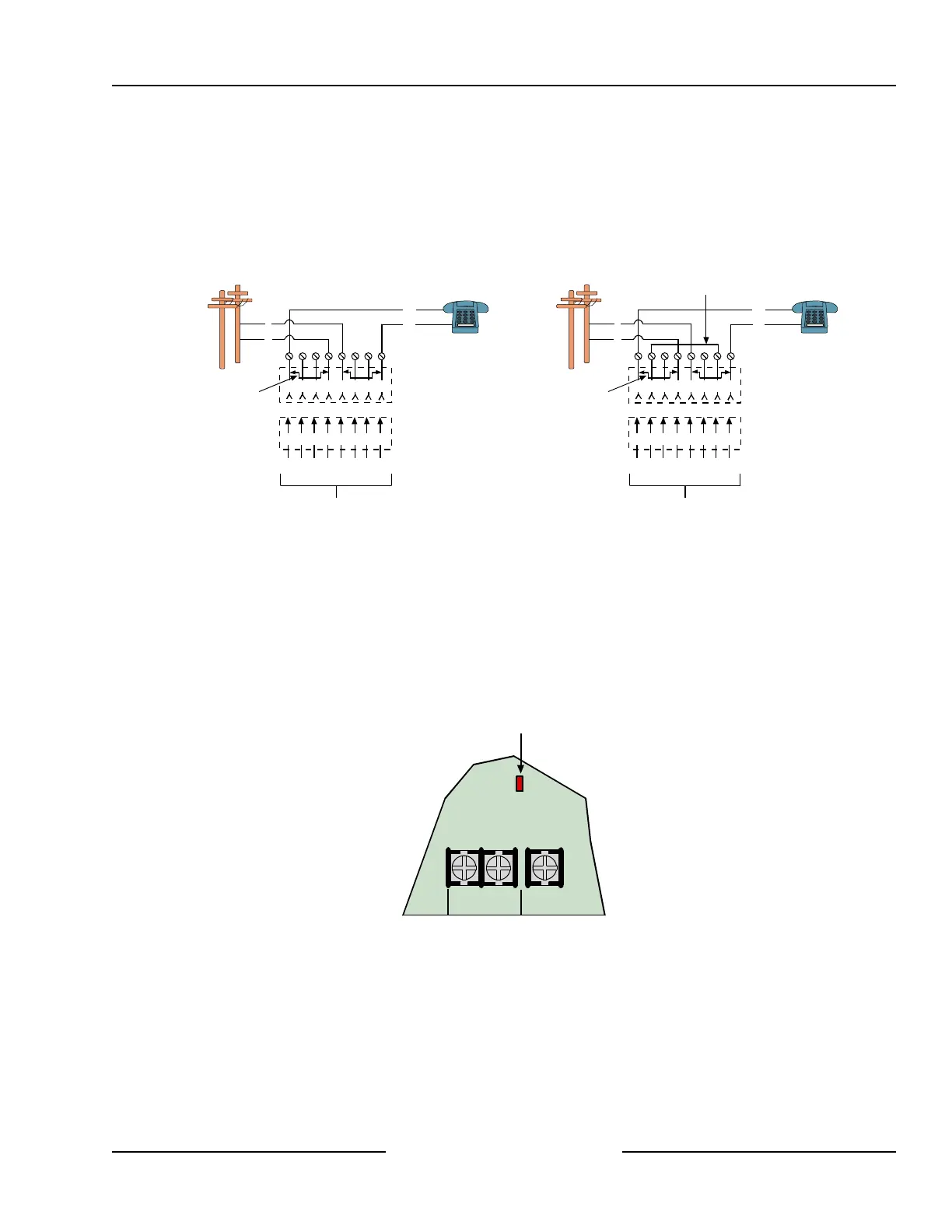
To prevent jamming of signals, wire the RJ31X jack or RJ38X jack to support line seizure as shown in Figure 6.
Install the jack on the street side of the phone switch, wired ahead of any PBX equipment. Line seizure
temporarily interrupts normal phone usage while the communicator transmits data. After installation, confirm that
the panel seizes the line, acquires dial tone, reports correctly to the receiver, and releases the phone line to the
in-house phone system.
1 2 3 6 7 8
1 2 3 4 5 6 7 8
R1 T1R T
RJ31X Jack
Telco Connector Block
Outside Telco
(PSTN)
4 5
Premises
Telephone
T
R
T1
R1
To Control Panel
Bar Short removed on
Telco Connector Block
insertion - positions
1&4 and 5&8.
RJ31X Jack Connections
1 2 3 6 7 8
1 2 3 4 5 6 7 8
R1 T1R T
RJ38X Jack
Telco Connector Block
Outside Telco
(PSTN)
4 5
Premises
Telephone
T
R
T1
R1
To Control Panel
Bar Short removed on
Telco Connector Block
insertion - positions
1&4 and 5&8.
RJ38X Jack Connections
Strap
Figure 6: RJ31X/RJ38X Wiring
6.4 Phone Cord Connection
Connect the flying leads of a D164 Telephone Cord to the telephone terminals labeled R, R1, T1,T. The
terminals are located on the right side of the panel. Connect the other end of the cord to the RJ31X jack or
RJ38X jack.
6.5 System Status LED (Red)
The System Status LED shows system status, including phone status as described in Section 4.2.7, System
Status LED. Figure 7 shows the location of the LED on the panel.
L-2Com L-3
System Status LED
Figure 7: System Status LED
6.6 Dialing Format
You can program the system to use DTMF or pulse dialing. See DTMF/Pulse Dialing in the D6412/D4412
Program Entry Guide (P/N: 45351).
Telephone Connections



 To Next Page