10
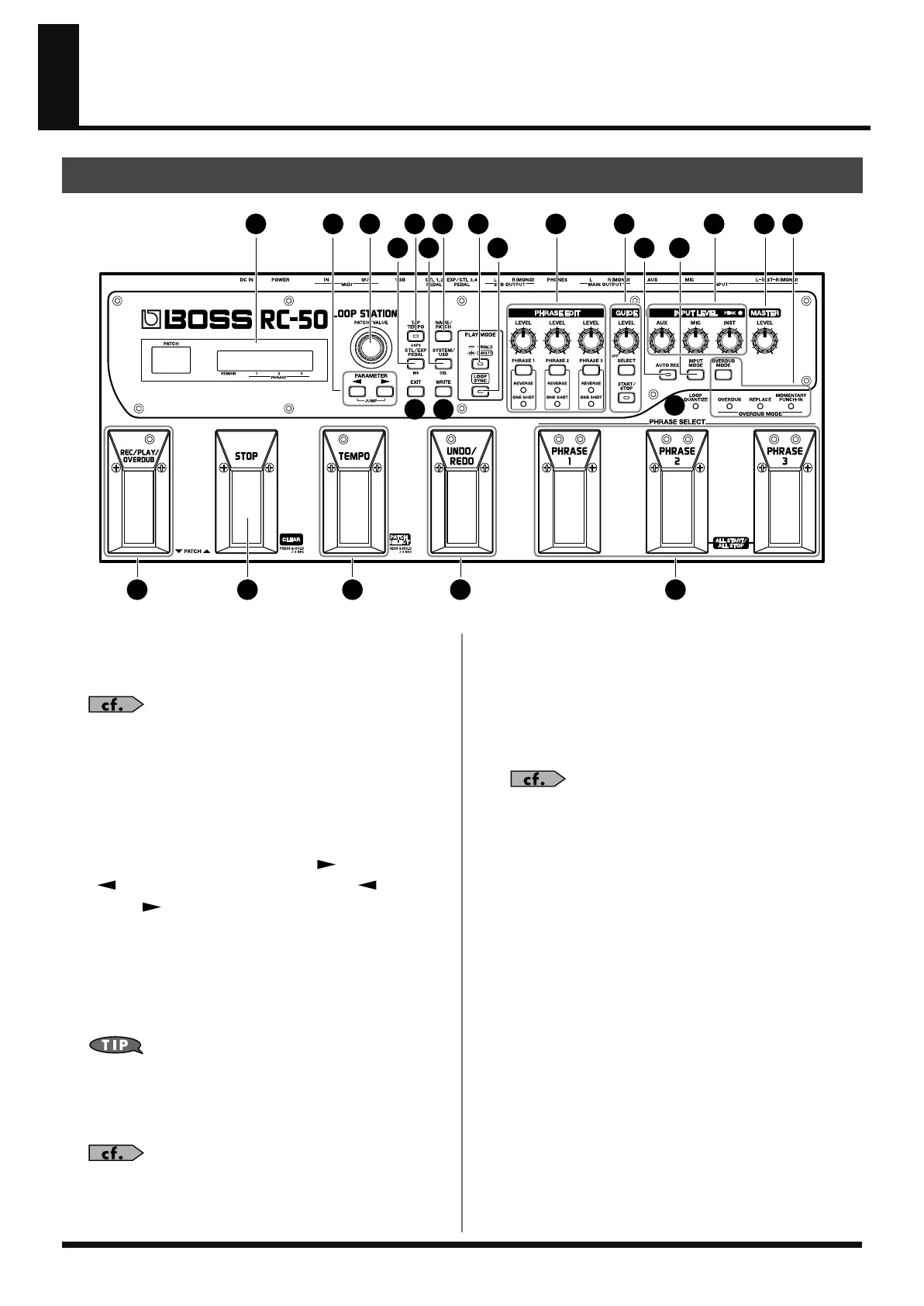
Names of Things and What They Do
fig.00-210
1. Display
Displays a variety of information about the RC-50. The left
display indicates the patch number.
“What is a Patch?” (p. 28)
2. PATCH/VALUE Dial
Used for switching patches and changing the values of settings.
3. PARAMETER Button
Press these to select parameters.
* Jump to major parameters by holding down [ ] and pressing
[ ] (direction: start
→
end) or by holding down [ ] and
pressing [ ] (direction: end
→
start). When there are not many
parameters, a jump to the final (or beginning) parameter results.
4. TAP TEMPO Button
Press this button to change patch tempos. You can adjust the
tempo by tapping the button several times; the tempo is set to
match the one you tap out using the button.
You can also use the TEMPO pedal instead of this button to
change tempos.
* In the Patch Name screen, this button is also pressed to switch the
letter at the cursor position between uppercase and lowercase.
“Setting the Patch Tempo” (p. 45)
5. NAME/PATCH Button
Use this button when naming patches and changing patch
settings.
6. CTL/EXP PEDAL Button
Press this to set the functions for the RC-50’s pedals and
external pedals.
“Pedal Settings” (p. 70)
* In the Patch Name screen, pressing this button inserts a blank space at
the cursor position.
7. SYSTEM/USB Button
This button is pressed to change system settings and when
using the RC-50 while connected to a computer.
* In the Patch Name screen, pressing this button deletes the character at
the cursor position and shifts all characters after it to the left.
8. EXIT Button
Use this button to cancel an operation.
9. WRITE Button
Use this button in storing and deleting settings.
Front Panel
1
6 7
11
4 523
10 12 13 14 1819
8 9
17
20 22 23 24
15 16
21
RC-50_e.book 10 ページ 2009年4月10日 金曜日 午後1時17分




 To Next Page