54
Saving Patches
After creating a patch, save the patch to prevent the content you
have created from being deleted.
After selecting the save-destination patch, save the patch in its
current form.
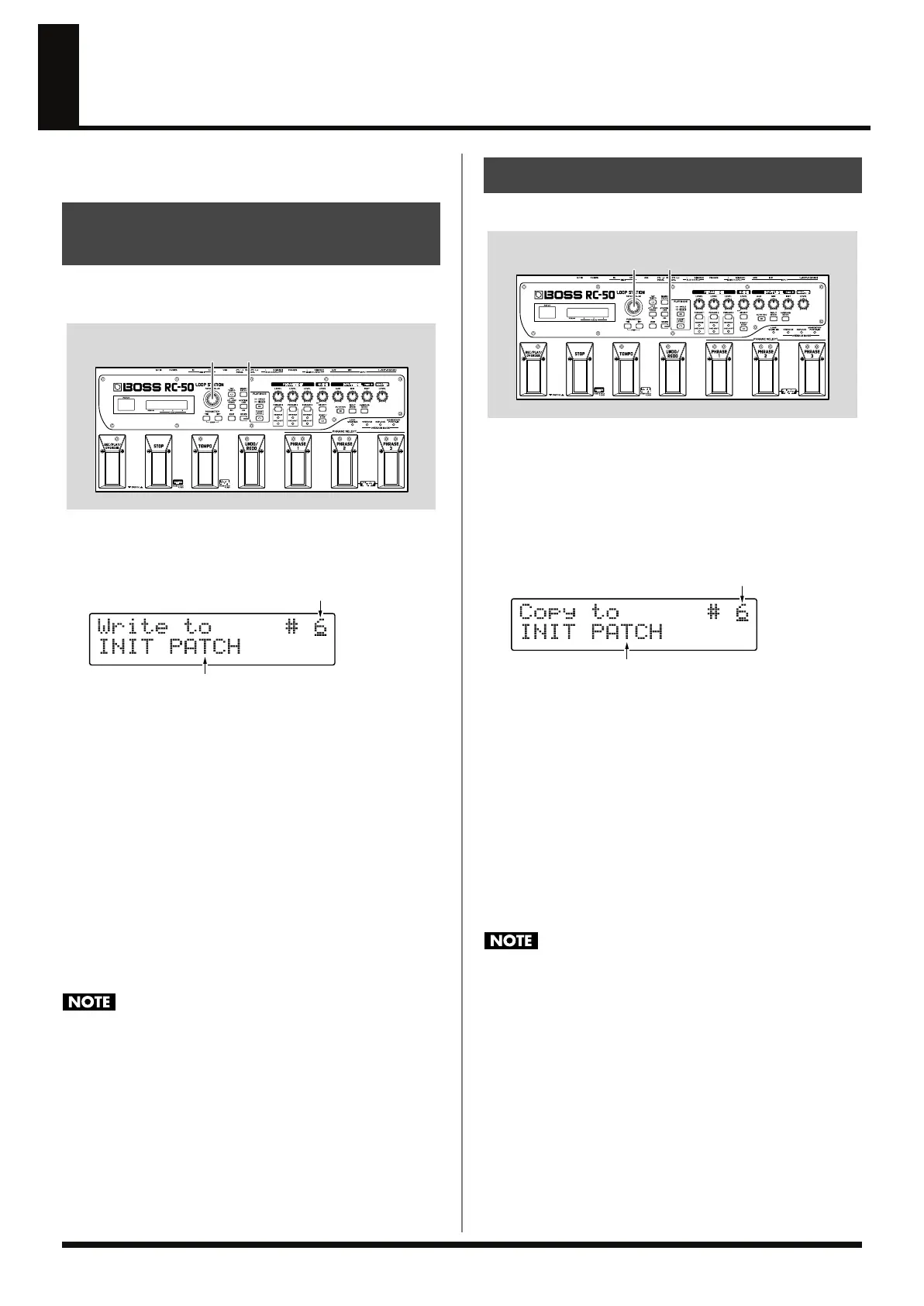
fig.04-350
1.
Press [WRITE].
The Patch Write screen appears; you can now specify the save-
destination patch number.
fig.04-360d
2.
Use the PATCH/VALUE dial to select the save-destination
patch number.
* This procedure is not required if the patch number is acceptable as is.
* You cannot save to patch numbers 1–5 when Preset Protect (p. 69) is
set to ON.
* To cancel the Write procedure, press [EXIT]. The Play screen returns
to the display.
3.
Press [WRITE].
The patch is saved, and the Play screen returns to the display.
* All data contained in the patch is lost once Patch Write is executed.
* If the phrase that have been overdubbed exists and the Tempo Sync (p.
53) is set to ON, the original tempo of the phrase is updated to the
patch tempo at saving.
• When the remainder capacity of RC-50 is a little, the Patch Write
fails occasionally and the message “Memory Full!” appears.
→
“To Confirm the Available Recording Time” (p. 30)
• Do not turn off the power while the message “Now writing...”
is displayed. This may result in loss of recorded material.
You can copy a patch to a different patch.
fig.04-370
1.
Select a copy-source patch.
Select a patch, referring to the information in “Selecting
Patches” (p. 44).
2.
Press [WRITE].
The Patch Copy screen appears; you can now specify the copy-
destination patch number.
fig.04-380d
3.
Use the PATCH/VALUE dial to select the copy-destination
patch number.
* You cannot copy to patch numbers 1–5 when Preset Protect (p. 69) is
set to ON.
* To cancel the copy, press [EXIT]. The Play screen returns to the
display.
4.
Press [WRITE].
The RC-50 switches to the save-destination patch, and the Play
screen returns to the display.
* All data contained in the copy-destination patch is lost once the copy
is executed.
• When the remainder capacity of RC-50 is a little, the Patch Copy
fails occasionally and the message “Memory Full!” appears.
→
“To Confirm the Available Recording Time” (p. 30)
• Do not turn off the power while the message “Now copying...”
is displayed. This may result in loss of recorded material.
Saving by Patch Numbers
(Patch Write)
2
1,3
Patch Name (Save Destination)
Save-Destination Patch Number
Copying Patches (Patch Copy)
3
2,4
Patch Name (Copy Destination)
Copy-Destination Patch Number
RC-50_e.book 54 ページ 2009年4月10日 金曜日 午後1時17分




 To Next Page