29
About Play Modes
Chapter 2
Note about the start of playback of a
phrase while another phrase is playing
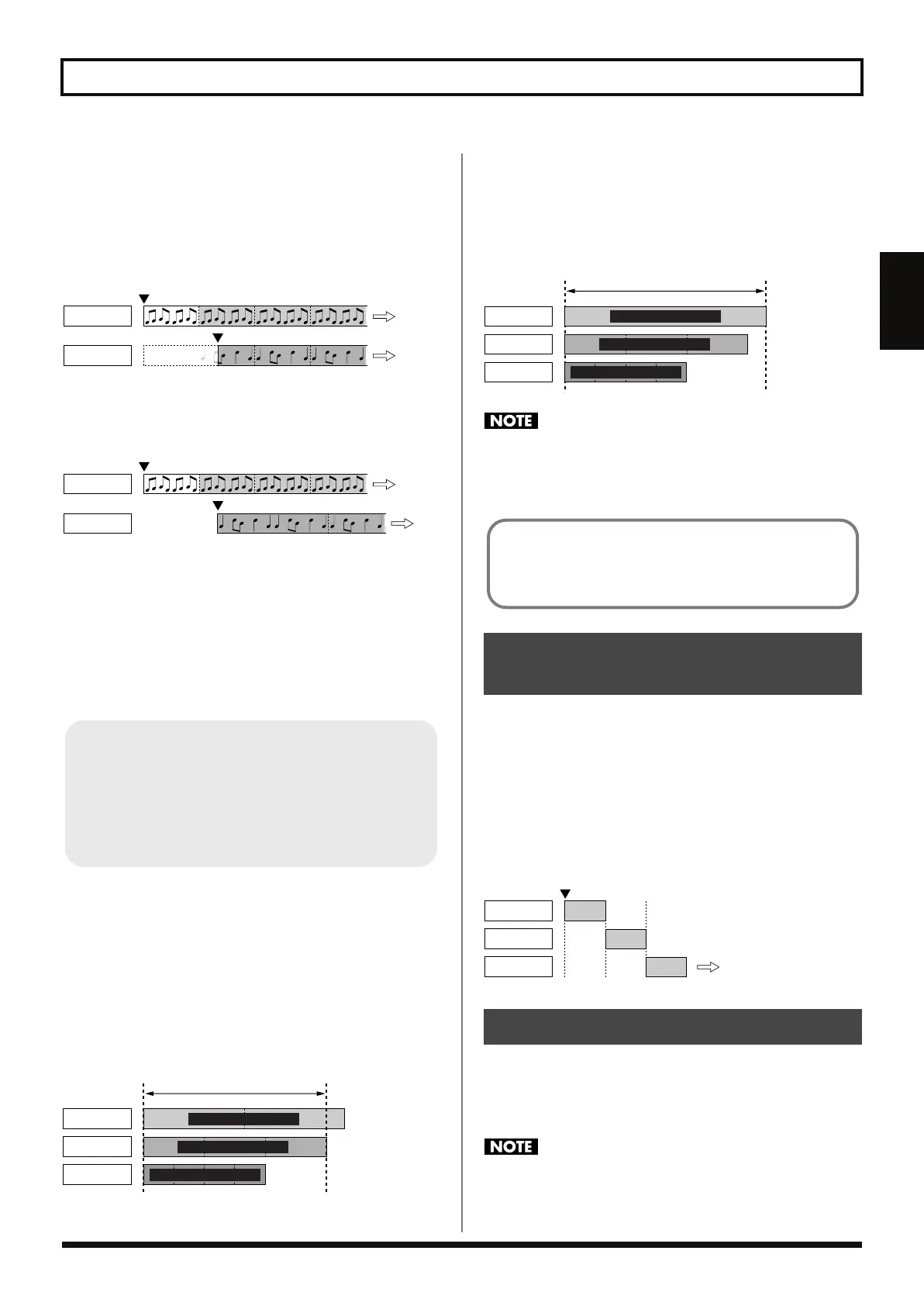
When Loop Sync is On
Phrase beginnings are always in sync. Thus, if while a phrase is
already playing you start playback of another phrase, the other
phrase starts from the “current point in the phrase within the loop.”
fig.02-040
When Loop Sync is Off
Playback always starts from the beginning of the phrase.
fig.02-041
About the Loop Time
When Loop Sync is enabled, the length of the repeated playback (the
loop time) is the “playback time of the phrase with the longest
playback time of those recorded phrases playing when Tempo Sync
is on.” In other words, the loop time is the same as the playback time
of the longest of a group of phrases when played at the same tempo.
When One or More Recorded Phrases Have
Tempo Sync Switched Off
If you are using a recorded phrase that exceeds the loop time
described above with Tempo Sync switched off, then at the end of
the loop, the phrase starts playing back from the beginning without
the remaining portion of that phrase being played.
You can play back effect sounds and other material the speed of
which, because of the song’s tempo, you don’t want to change,
regardless of the length of the effect sound.
fig.02-042
When There Are No Recorded Phrases With
Tempo Sync Switched On
The loop length is the “length of the phrase with the longest
playback time among the recorded phrases being played.”
You can use this in situations such as when repeating playback
simultaneously of phrases in which the tempo is not a factor.
fig.02-043
Even if procedures such as Clear or Undo (p. 32) are used while
a performance is in progress to erase the “phrase with the
longest playback time,” the loop length remains unchanged
until all of the phrases have stopped playing.
In Single mode, you can switch among the three phrases as you play
back the material.
For example, you can record three phrases with Melody A, Melody
B, and the bridge, then play these as a single song by switching them
in sequence.
You can set the RC-50 so that when phrases are switched during
playback, you can switch to the next phrase the instant you press the
PHRASE pedal or after the phrase currently playing is done (Phrase
Change Mode: p. 49).
fig.02-050
Each time you press the PLAY MODE button, it alternately switches
the Play mode to Single or Multi mode.
The indicator lights when Multi mode is active; the indicator is off in
Single mode.
Pressing the PLAY MODE button during playback, recording,
or overdubbing of a phrase stops the playback, recording, or
overdubbing of that phrase.
Phrase 1
Phrase 2
Playback starts from point within phrase
Phrase 1
Phrase 2
Playback always starts from
beginning of phrase
Tempo Sync
Tempo Sync is a function that plays back all patches at a
common performance tempo (the patch tempo). Even when you
have phrases that were recorded at different tempos, when
Tempo Sync is set to ON, the phrases are played at the same
tempo. For more detailed information, refer to “About Tempo
Sync” (p. 36).
Phrase 1
Phrase 2
Phrase 3
Loop played at this length
Tempo Sync: Off
Tempo Sync: On
Tempo Sync: Off
Switching Phrases as They
Are Played: Single Mode
Switching the Play Mode
Phrase 1
Phrase 2
Phrase 3
Loop played at this length
Tempo Sync: Off
Tempo Sync: Off
Tempo Sync: Off
When the Phrase is Set to ONE SHOT (p. 52)
ONE SHOT phrases cannot be used with loop playback. These
phrases are played back only when the REC/PLAY/OVERDUB
pedal is pressed.
Phrase 1
Phrase 2
Phrase 3
Start of Performance
Switching among
the three phrases
as they play
RC-50_e.book 29 ページ 2009年4月10日 金曜日 午後1時17分




 To Next Page