30
About Recording, Playback, and Overdubbing
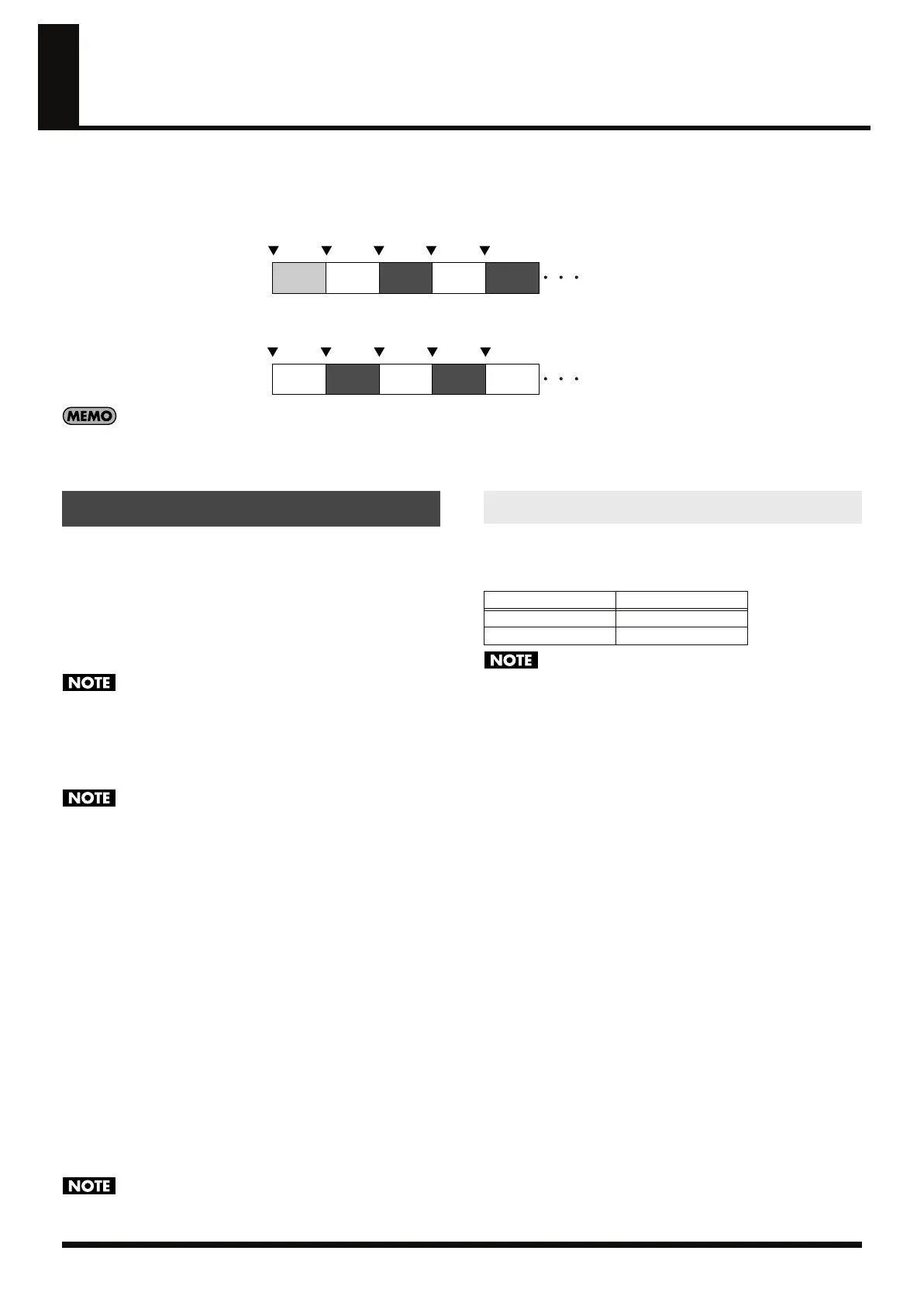
On the RC-50, you will primarily use the three basic operations of recording, playback, and overdubbing (layered recording) for performances.
When you press the REC/PLAY/OVERDUB pedal in the Play screen, the RC-50 switches among the following basic operations depending on the
status of the current phrase.
When the Current Phrase is Blank
fig.02-060
When material is recorded to the current phrase
fig.02-061
You can also start overdubbing immediately after recording. For more details, refer to “Overdubbing Immediately After Recording (REC
Pedal Action)” (p. 69).
* Pressing the REC/PLAY/OVERDUB pedal during playback of a phrase set to ONE SHOT (p. 52) starts playback of the phrase without starting overdubbing.
If the current phrase is blank, you can record to the phrase by
pressing the REC/PLAY/OVERDUB pedal in the Play screen.
Number of Phrases That Can Be
Recorded Simultaneously
The only phrase that can be recorded to is the current phrase. If you
record to a phrase other than the current phrase, the current phrase
is switched and recording is conducted on the next phrase.
You cannot simultaneously record to multiple phrases.
About Tempos During Recording
Recording is carried out at the tempo in effect immediately
preceding the recording.
You cannot change the RC-50's tempo while recording is in
progress. In cases such as during performances synchronized to
the operations of an external MIDI device, the RC-50's tempo
cannot be changed even if the tempo of the external MIDI
device is changed. The change is executed immediately after
recording is finished.
To Confirm That the RC-50 is Currently Recording
When the RC-50 is recording, the REC/PLAY/OVERDUB pedal
indicator and the red indicator on the PHRASE pedal corresponding
to the current phrase are lit.
To Confirm Whether or Not A
Phrase Contains a Recording
Phrases with material recorded to them are indicated by a “o” mark
in the respective phrase’s field in the display.
When a phrase is blank, this is indicated by a “–” mark.
To Confirm the Available Recording Time
While recording is in progress, the remaining time available for
recording is indicated in the display in minutes. When less than one
minute remains, the time is then indicated in seconds.
Recording stops automatically when the remaining recording
time runs out.
The RC-50’s Recording mode (p. 48) can be switched to record in
stereo or mono. When all of the RC-50’s patches are blank, the total
recording time available is as shown below.
• The times listed above take into account the amount of memory
needed for the actual recording combined with the memory
required for the RC-50’s operations (e.g., Undo/Redo).
• The minimum length of time required for a phrase is
approximately 1.5 seconds. If the phrase you’ve record is
shorter than that, the length of the phrase will be adjusted
automatically, and then recording will stop.
To Switch Recording-Related Operations
You can make the following settings with the RC-50 to switch
among the different types of recording tasks (settings are common to
both Single mode and Multi mode).
●
Simultaneously starting recording when sounds are input
→
“Auto Recording” (p. 47)
●
Switching between stereo and mono
→
“Recording Mode” (p. 48)
●
Recording while muting the sounds localized at the center
→
“AUX Center Cancel” (p. 48)
●
Recording with the tone adjusted for use with guitar amps
→
“AUX & MIC Flat Amp Simulate (p. 48)
The following operations are also possible in Multi Mode.
●
Starting playback of a different phrase at the same time
recording of the current phrase starts
→
“Playing Multiple Phrases Simultaneously (Simul-Start)”
(p. 50)
●
Starting playback of all phrases at the same time recording of
the current phrase starts
→
“All Start/All Stop” (p. 61)
Over-
dubbing
PlaybackRecording
When the REC/PLAY/OVERDUB
pedal is pressed
Operation on the current phrase
Over-
dubbing
Playback
Over-
dubbing
Playback Playback
When the REC/PLAY/OVERDUB
pedal is pressed
Operation on the current phrase
Over-
dubbing
Playback
Recording
About Recording Time
Recording Mode
Recording Time
STEREO
Approx. 24 minutes
MONO
Approx. 49 minutes
RC-50_e.book 30 ページ 2009年4月10日 金曜日 午後1時17分















 To Next Page