77
Chapter 8
Controlling Operations from an External MIDI Device
You can have the RC-50’s performances be played at the same tempo
as the external device’s tempo (Synchronized Performance).
To set Synchronized Performance for all patches, set System MIDI
Sync (p. 75) to AUTO.
To set Synchronized Performance for each patch individually, set
System MIDI Sync to PATCH and set the patch’s MIDI Sync (p. 50)
setting to AUTO.
When the RC-50 is set to use Synchronized Performance, the RC-50’s
patch tempos conform to the tempo data (MIDI Clock) from the
external MIDI device.
However, Loop Quantize (p. 42) is enabled for use, allowing you to
record phrases with the correct measure lengths.
* The RC-50 will follow and synchronize to the tempo, but in some cases
there may be a time lag relative to your external MIDI device.
* During recording, the tempo is fixed at the tempo at which recording
began.
* Set the external MIDI device beforehand so it is ready to transmit
MIDI Clock and MIDI Start and Stop messages. For details, refer to
the owner’s manual that came with the device.
When the MIDI Start message is received while all phrases are
stopped, playback of the current phrase begins. At this time, any
phrase set to start simultaneously also begins playing back.
• Upon reception of MIDI Start, recording or playback begins
immediately, with no recording/playback count-in (p. 40)
sound played.
• Upon reception of MIDI Start, recording begins immediately,
even if Auto Recording (p. 47) is set.
When the MIDI Stop message is received, playback of all phrases
stops
fig.08-140
You can switch the RC-50’s patches with Program Change messages
from external MIDI devices.
The RC-50 can receive Program Change messages numbered 1
through 99, corresponding to the 99 individual patches 1–99.
* Program Change messages 100–128 cannot be received.
* Even if received, Bank Select MIDI messages (Control Change #0,
#32) are disregarded.
With Control Change messages from external MIDI devices, you can
use such external MIDI devices to control functions that are difficult
to handle using the RC-50’s pedals alone, making operation of the
RC-50 easier and more convenient.
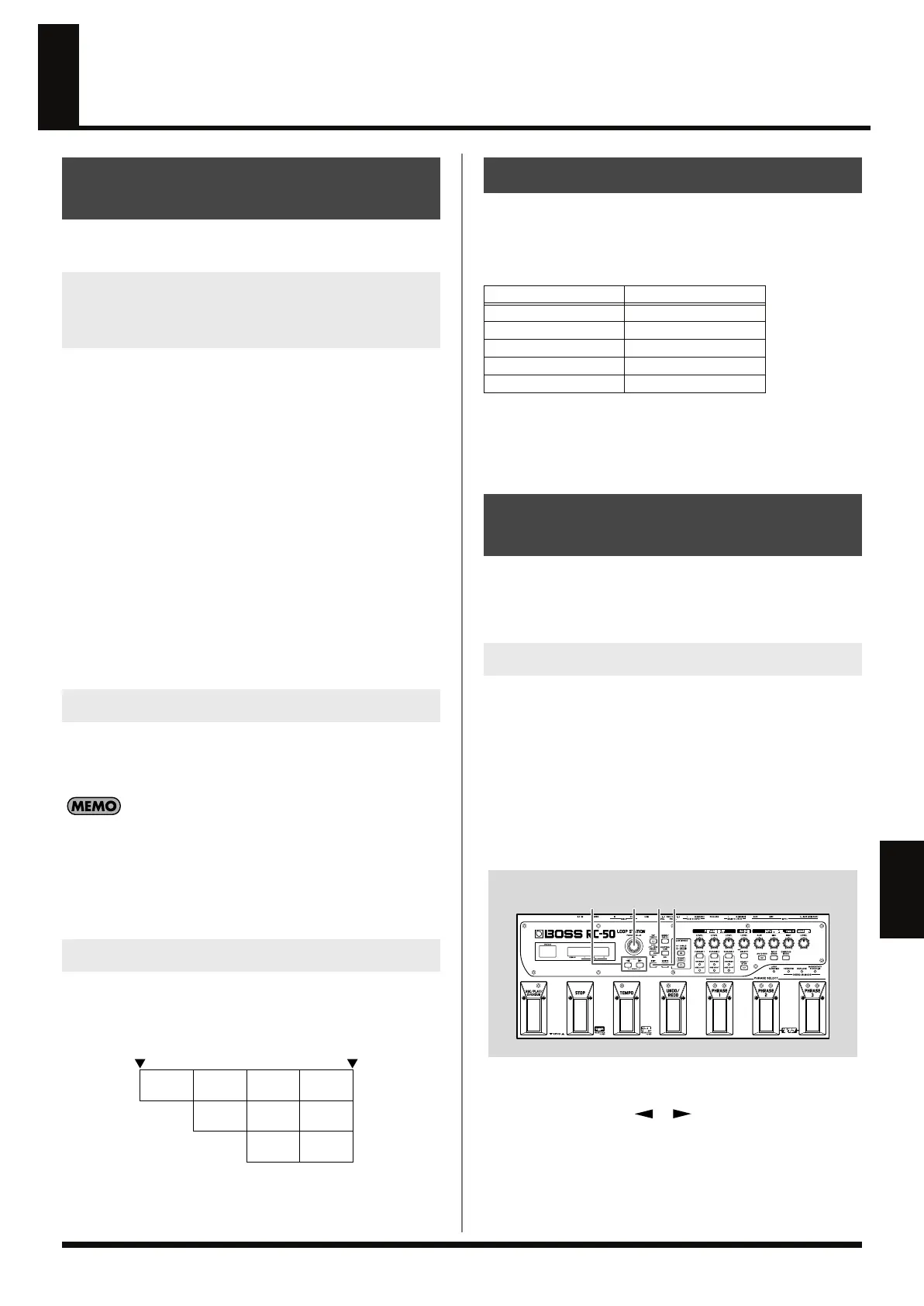
CC#1/CC#7/CC#80 (Control Change) functions operate in
accordance with system settings, that is, settings that are shared by
and applied the same way to all of the RC-50’s functions and that
remain the same regardless of the patch selected, and patch settings,
or settings that are used to select different functions for each
individual patch. In each parameter, you select whether the system
settings or the patch settings are to be applied, giving you the
freedom to apply them as needed for any environment.
Use the following procedure to switch between system and patch
settings.
fig.08-150
1.
Press [CTL/EXP PEDAL] to display the pedal settings screen.
2.
Press PARAMETER [ ] [ ] to display the CC# Function
screen for the Control Change message whose settings you
want to change.
Synchronizing RC-50 Performances
to the External Device
To Play Performances on External MIDI
Devices at the Same Tempo as the RC-50’s
Tempo (Synchronized Performance)
To Receive Start
To Receive Stop
Playback Playback
Playback Playback Playback
Playback
Playback Playback
Playback
Phrase 1
Phrase 2
Phrase 3
Start
received
Stop
received
Switching Patches
Program Number
Patch Number
1
1
2 2
3 3
: :
99 99
Controlling Other Functions
(CC#1/CC#7/CC#80 Functions)
System Settings and Patch Settings
RC-50_e.book 77 ページ 2009年4月10日 金曜日 午後1時17分















 To Next Page