24
Layering Further Material (Overdubbing)
With the RC-50, you can also layer further recordings (overdub) onto previously
recorded phrases.
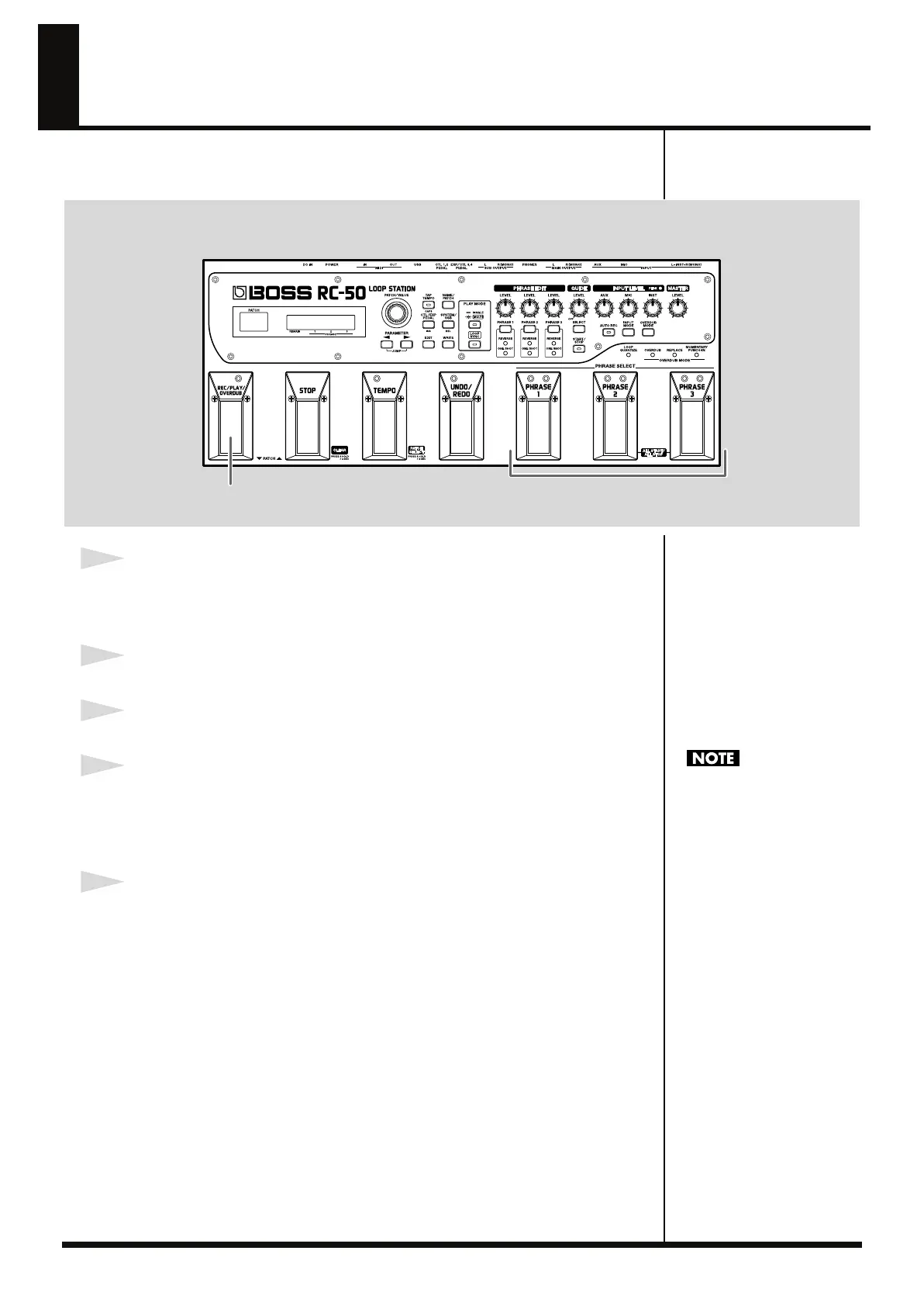
fig.01-121
1
Prepared a prerecorded phrase.
Record the phrases using the procedures described in “Recording” (p. 20), or have
ready a patch selected in “Playback” (p. 22).
2
Press the PHRASE pedal for the phrase you want to overdub.
3
Press the REC/PLAY/OVERDUB pedal to play back the phrase.
4
Press the REC/PLAY/OVERDUB pedal once again when you reach the point at
which you want to start overdubbing.
The performance from that point on will continue to be overdubbed until the next
time you press the REC/PLAY/OVERDUB pedal.
5
To finish overdubbing and return to playback mode, press the REC/PLAY/
OVERDUB pedal once again.
The new performance is overdubbed onto the originally recorded performance.
The next section contains a description of the procedure to eliminate (undo) the
results of the overdubbing.
3,4,5 2
Do not turn off the power
while overdubbing is in
progress. This may result in
loss of recorded material.
RC-50_e.book 24 ページ 2009年4月10日 金曜日 午後1時17分




 To Next Page