55
Saving Patches
Chapter 4
You can exchange patches with one another, rearranging the
patches.
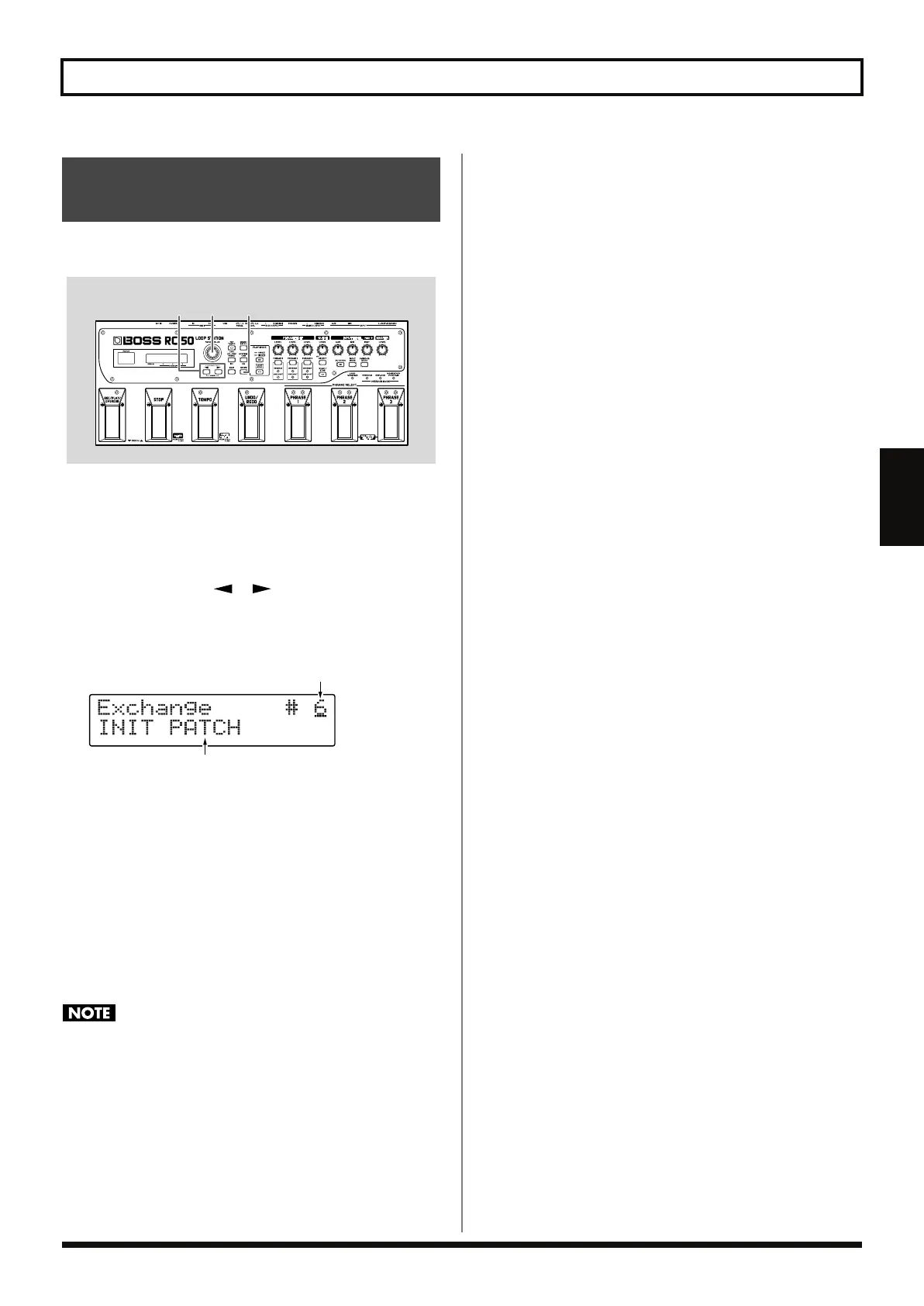
fig.04-390
1.
Select an exchange-source patch.
Select the patch while referring to the information in “Selecting
Patches” (p. 44).
2.
Press [WRITE].
3.
Press PARAMETER [ ] [ ] until “Exchange” appears
in the display.
The Patch Exchange screen appears; you can now specify the
exchange-destination patch number.
fig.04-400d
4.
Use the PATCH/VALUE dial to select the exchange-
destination patch number.
* You cannot exchange using patch numbers 1–5 when Preset Protect
(p. 69) is set to ON.
5.
Press [WRITE].
The patches are exchanged, and the Play screen returns to the
display.
* If the phrase that have been overdubbed exists and the Tempo Sync (p.
53) is set to ON, the original tempo of the phrase is updated to the
patch tempo at saving.
Do not turn off the power while the message “Exchanging...” is
displayed. This may result in loss of recorded material.
Exchanging Patches
(Patch Exchange)
43
2,5
Patch Name (Exchange Destination)
Exchange-Destination Patch Number
RC-50_e.book 55 ページ 2009年4月10日 金曜日 午後1時17分















 To Next Page