80
Before Using USB
The RC-50 is equipped with a USB connector, and connecting the
RC-50 to a computer with a USB cable enables you to carry out the
following operations.
Backup
Save the RC-50’s user data to the computer
Recover
Return data saved to a computer back to the RC-50.
Export
Copy the RC-50’s phrase data to computers as WAV files.
Import
Load WAV files on computers to the RC-50.
Windows
Windows Me/2000/XP
Macintosh
Mac OS 9.1.x/9.2.x
Mac OS X
Drivers
The RC-50 uses the OS’s standard driver, which is installed
automatically when the RC-50 and computer are connected via USB.
When Using Windows XP/Windows 2000
Log on to Windows with any of the following user names.
• Administrator or other user name in the Administrator’s group.
• User name whose account category is that of computer
administrator.
Note that a proper USB connection cannot be achieved with user
names other than the above.
For more details, consult the system administrator for the computer
you are using.
When the RC-50 is connected to a computer via USB, “BOSS_RC-50”
(or the “Removable Disk (*:)” icon) appears in My Computer in
Windows, or on the desktop with Macintosh OS.
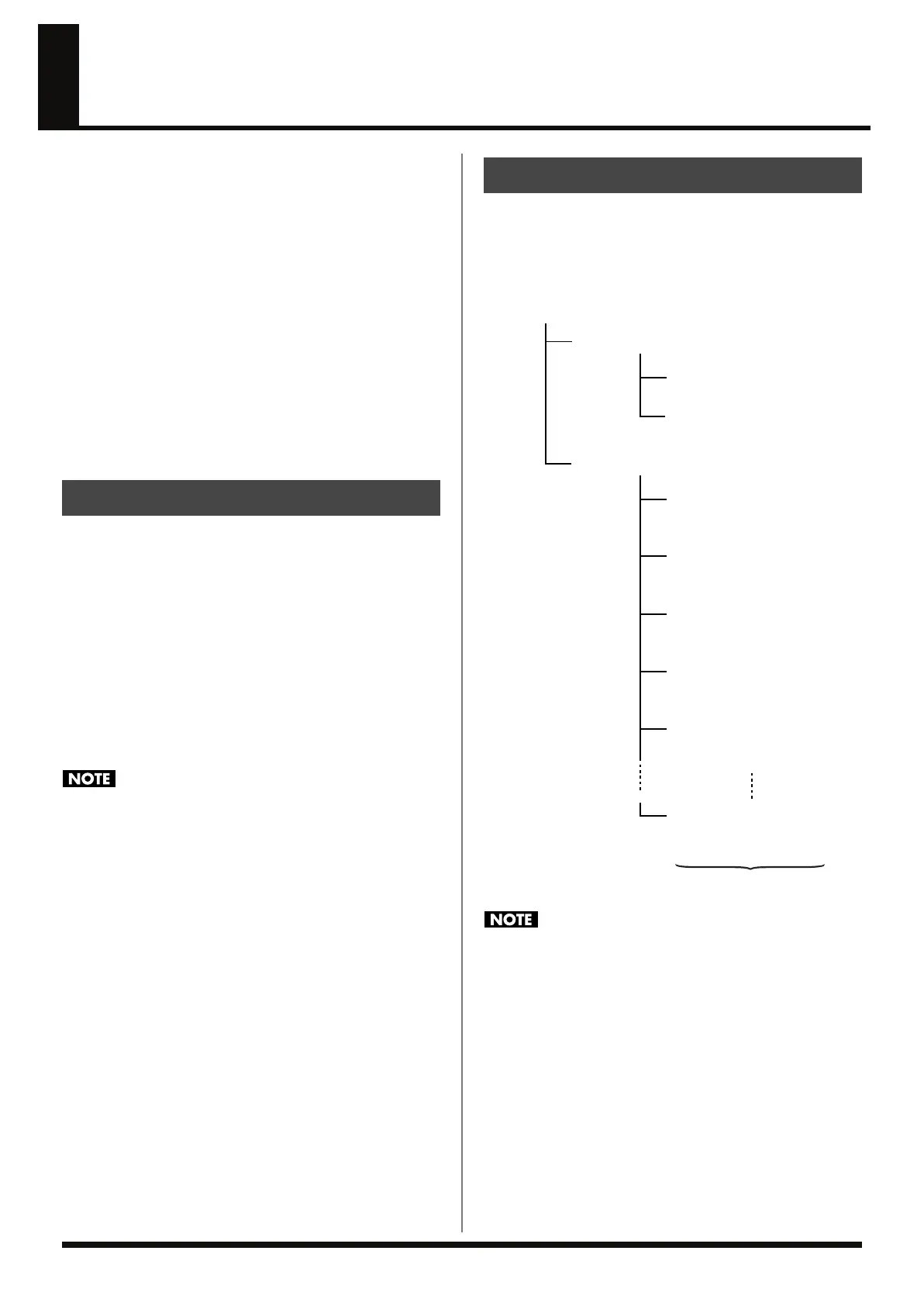
The “ROLAND” folder resides within “BOSS_RC-50,” with the RC-
50’s data saved according to the hierarchy shown below.
fig.09-020
• When the RC-50 performs Recover/Import, the patch data will
be overwritten regardless of the setting of Preset Protect (p. 69).
• Be sure not to write corrupt files to PATCH.RC5 or
SYSTEM.RC5.
• Do not delete or change the folder names of the ROLAND
folder, DATA folder, or WAVE folder.
• Do not transfer any files to the RC-50 other than those in the
“ROLAND” folder. Although files from other folders are
ignored by the RC-50, they reduce the amount of space
available for saving data.
Compatible OSs
Organization of the RC-50’s Data
ROLAND Folder
DATA Folder
All Recorder Phrase Data
Patch Parameter File
System Settings File
PATCH.RC5
SYSTEM.RC5
WAVE Folder
Patch Number 1
Phrase 1 WAV File
001_1.WAV
Patch Number 1
Phrase 2 WAV File
001_2.WAV
Patch Number 1
Phrase 3 WAV File
001_3.WAV
Patch Number 2
Phrase 1 WAV File
002_1.WAV
Patch Number 2
Phrase 2 WAV File
002_2.WAV
Patch Number 99
Phrase 3 WAV File
099_3.WAV
RC-50_e.book 80 ページ 2009年4月10日 金曜日 午後1時17分















 To Next Page