81
Before Using USB
Chapter 9
You can save patch phrases to computers as WAV files as well as
import files from computers to the RC-50. This makes it convenient
when you want to use phrases created with the RC-50 in putting
together songs using sequencer software or when importing phrases
with effects to the RC-50.
The following describes the WAV file format that can be used by the
RC-50.
• If you are using Windows, the extension
“
.WAV
”
may not
appear in the file name.
If you do want to have this shown, open
“
Folder Options
”
under
“
Control Panel
”
and uncheck the item
“
Don't display
extensions of associated files.
”
• After importing a WAV file to the RC-50, confirm in the Play
screen that the phrase can be played back normally.
• Content that can be saved to the RC-50 includes all patches,
phrases, and system settings up to a maximum of 250 MB. WAV
files in excess of this size cannot be imported to the RC-50.
• You cannot import a short WAV file at the minimum recording
time (about 1.5 seconds).
• The RC-50 includes no sequencer software.
When you import a WAV file into the RC-50, the original tempo set
for the import-destination phrase is not changed.
Performing while synchronizing to the tempos of phrases created by
importing commercially available loops and other such material
requires proper setting of the phrases’ original tempos.
You can use the following procedure to check the original tempo.
If you know the song’s tempo:
Set that song’s tempo to the original tempo.
If you know the song length (in seconds), time
signature, and number of measures:
If you have determined the song’s length (time), time signature, and
number of measures by playing back the WAV file on your
computer or other device, you can then calculate the original tempo
as shown below.
Time signature (Numerator/Denominator) x 4 x Number of
Measures x 60 ÷ Total Song Length (Seconds) = Tempo
For example, if the song is in 4/4 time, is 2 measures long, and runs
4.8 seconds, the tempo is calculated as follows:
4/4 x 4 x 2 x 60 / 4.8 = 100
Once you know the tempo, use the procedure described in
“Confirming and Setting the Original Tempo” (p. 37) to set the
original tempo.
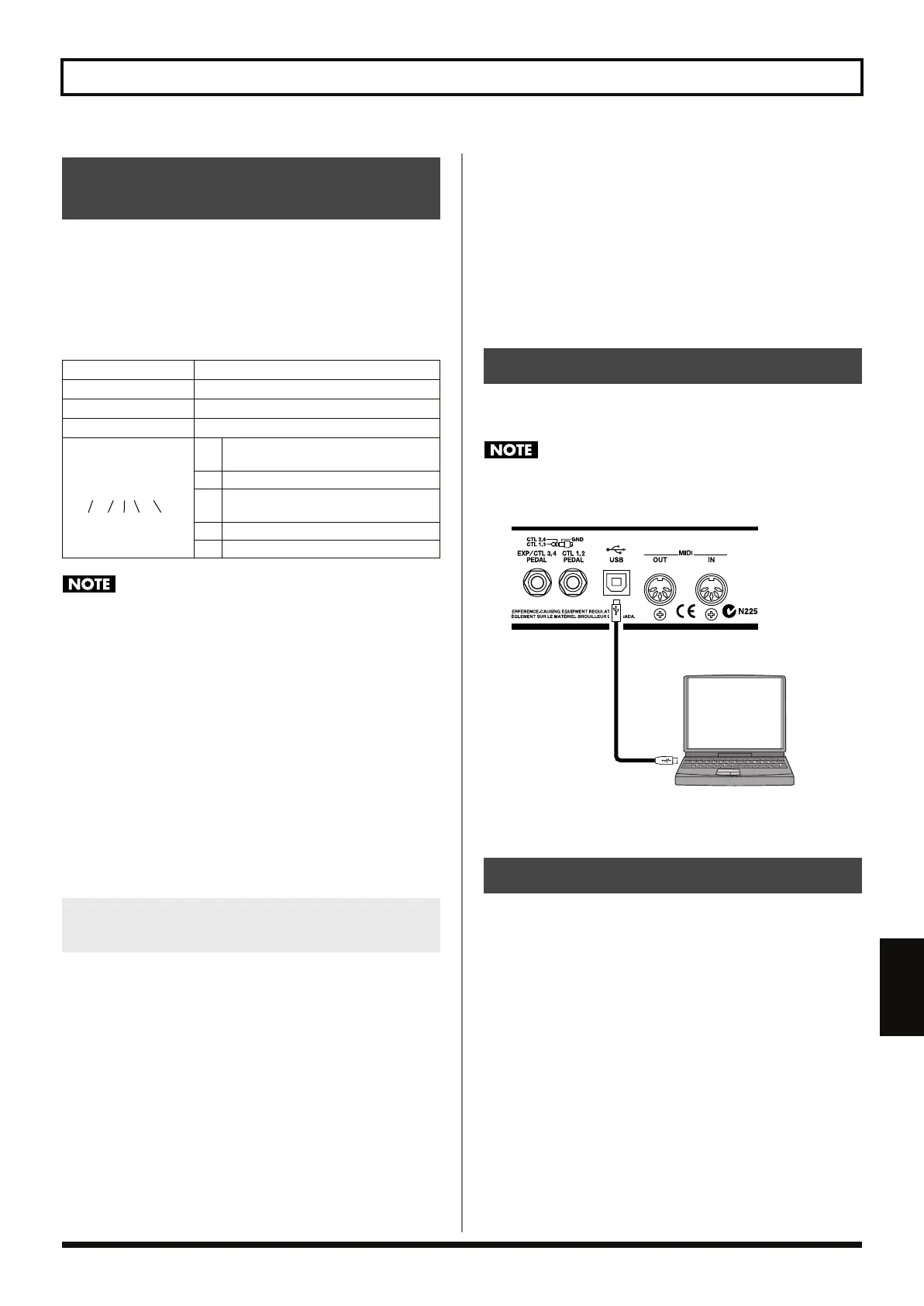
Use a USB cable to connect the USB connector on the computer to the
RC-50’s USB connector.
When connecting the USB cable, remove the cover attached to
the USB connector. Leave the cover attached when not using the
USB connector.
fig.09-010
Do not perform the following operations when the RC-50 and the
computer are enabled for data transfers or while data is being
transmitted. Doing so may cause the computer to fail to respond.It
can also result in corruption of the RC-50’s data.
• Removing the USB cable
• Suspending the computer (placing it in standby), placing it in
hibernation, restarting, or shutting down
• Turning off the power to the RC-50
About WAV Files Handled
by the RC-50
Sampling Rate
44.1 KHz
Quantization Bit Rate
16 bit
Number of Channels
Mono or Stereo
Compression Format
No compression
File Names
(1)
Patch Numbers:
Three-digit number (001-099)
(2) Underscore (underline) character
(3)
Phrase Numbers:
Single-digit number (1, 2, or 3)
(4) Dot (period) character
(5)
The uppercase letters “WAV” (extension)
Determining the Original Tempo of a
Phrase Created from an Imported WAV File
001_1.WAV
(1) (2) (3) (5)(4)
Connecting to the Computer
Notes on Using USB
RC-50_e.book 81 ページ 2009年4月10日 金曜日 午後1時17分




 To Next Page