71
Pedal Settings
Chapter 7
fig.07-110
1.
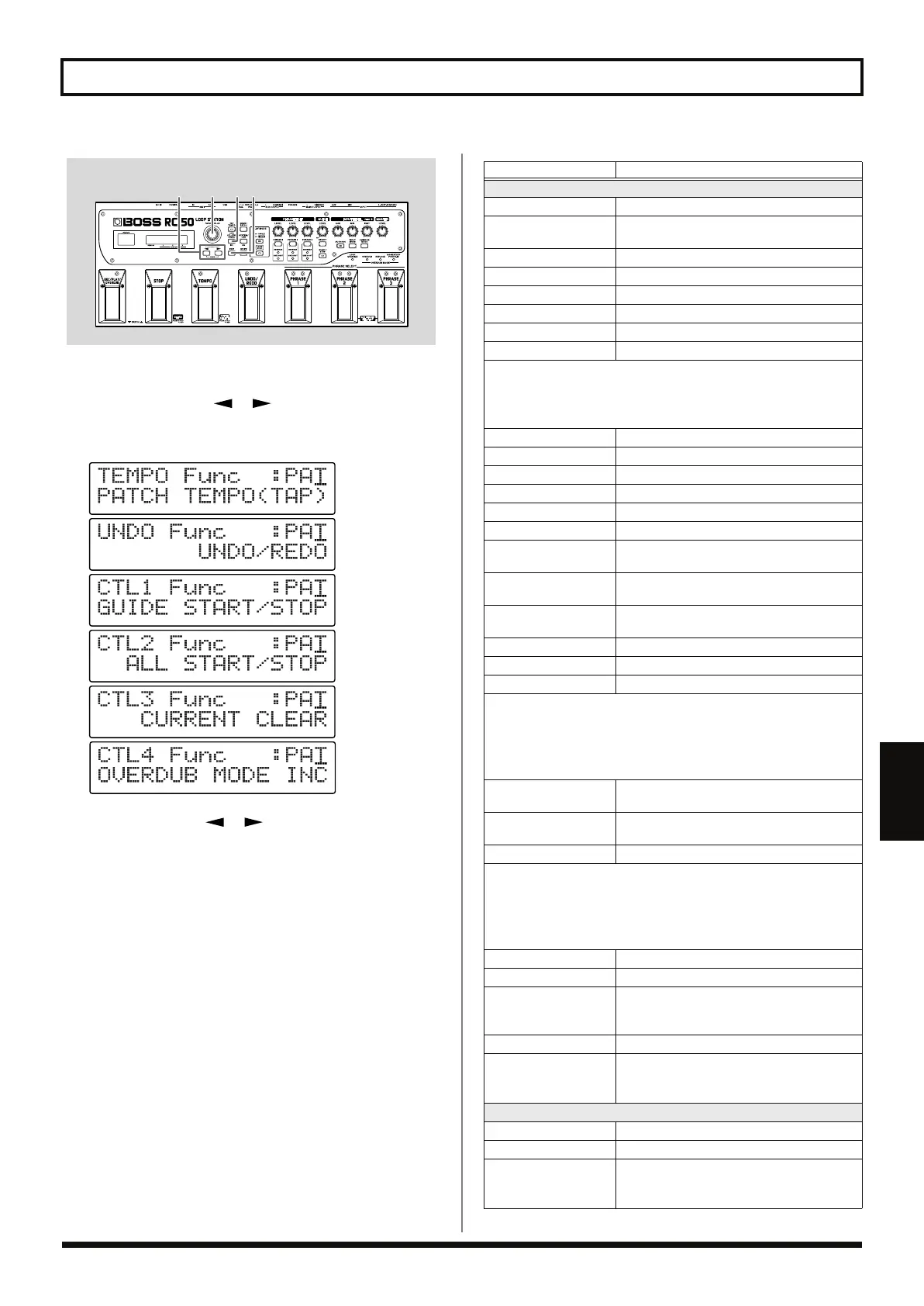
Press [CTL/EXP PEDAL].
2.
Press PARAMETER [ ] [ ] to display the desired
parameter, either “TEMPO Func,” “Undo Func,” “CTL1 Func,”
“CTL2 Func,” “CTL3 Func,” or “CTL4 Func.”
fig.07-120d
3.
Use PARAMETER [ ] [ ] to move the cursor to the
lower row of the display, then use the PATCH/VALUE dial to
set the pedal or foot switch function.
4.
Repeat Steps 2 and 3 as needed.
5.
Press [EXIT] to return to the Play screen.
* When selecting patch pedal settings, use the procedure described in
“Saving by Patch Numbers (Patch Write)” (p. 54) when saving the
settings.
32,3
1 5
Available Settings
Description
Applies to both system settings and patch settings
OFF
No operation
ALL START/STOP
Starts and stops playback of all Phrases 1–3
simultaneously
PHRASE 1 PLY/STP
Starts and stops playback of Phrase 1 (*)
PHRASE 2 PLY/STP
Starts and stops playback of Phrase 2 (*)
PHRASE 3 PLY/STP
Starts and stops playback of Phrase 3 (*)
PHRASE 1 PLAY
Starts playback of Phrase 1 (*)
PHRASE 2 PLAY
Starts playback of Phrase 2 (*)
PHRASE 3 PLAY
Starts playback of Phrase 3 (*)
(*)
• Playback does not start if the phrase is blank.
• Playback begins immediately, with no playback count-in sound
played.
PHRASE 1 STOP
Stops playback of Phrase 1
PHRASE 2 STOP
Stops playback of Phrase 2
PHRASE 3 STOP
Stops playback of Phrase 3
PHRASE 1 REVERSE
Turns reverse playback of Phrase 1 on and off
PHRASE 2 REVERSE
Turns reverse playback of Phrase 2 on and off
PHRASE 3 REVERSE
Turns reverse playback of Phrase 3 on and off
PHRASE 1 ONESHOT
Switches Loop and One Shot playback for
Phrase 1
PHRASE 2 ONESHOT
Switches Loop and One Shot playback for
Phrase 2
PHRASE 3 ONESHOT
Switches Loop and One Shot playback for
Phrase 3
PHRASE 1 CLEAR
Clears Phrase 1 (*)
PHRASE 2 CLEAR
Clears Phrase 2 (*)
PHRASE 3 CLEAR
Clears Phrase 3 (*)
(*)
• Phrases cannot be cleared if the current phrase is being
recorded/overdubbed.
• You cannot switch between Loop and One Shot playback while
recording, playback, or overdubbing is in progress.
CURRENT REVERSE
Turns reverse playback of the current
phrase on and off
CURRENT ONE SHOT
Switches Loop and One Shot playback for
the current phrase
CURRENT CLEAR
Clears the current phrase (*)
(*)
• Phrases cannot be cleared if the current phrase is being
recorded/overdubbed.
• You cannot switch between Loop and One Shot playback while
recording, playback, or overdubbing is in progress.
UNDO/REDO
Undo/Redo
PATCH TEMPO (TAP)
Tap input for patch tempo
OVERDUB MODE INC
Switches Overdubbing mode switching
sequence to OVERDUB
→
REPLACE
→
MOMENTARY PUNCH-IN
GUIDE START/STOP
Starts and stops the guide
PLAY MODE
Switches the Play mode (Single/Multi)
* All phrases stop when the mode is switched
during recording, playback, or overdubbing.
Applies to system settings only
PATCH NUMBER INC
Switches to the next higher patch number
PATCH NUMBER DEC
Switches to the next lower patch number
PATCH WRITE
Writes the patch
* When pressing a pedal twice, Patch Write is
executed.
RC-50_e.book 71 ページ 2009年4月10日 金曜日 午後1時17分















 To Next Page