10
Part Names and Functions
Remote Control
1
14
3
10
5
9
11
20
25
4
21
26
27
24
23
22
13
12
7
19
8
16
6
15
2
18
17
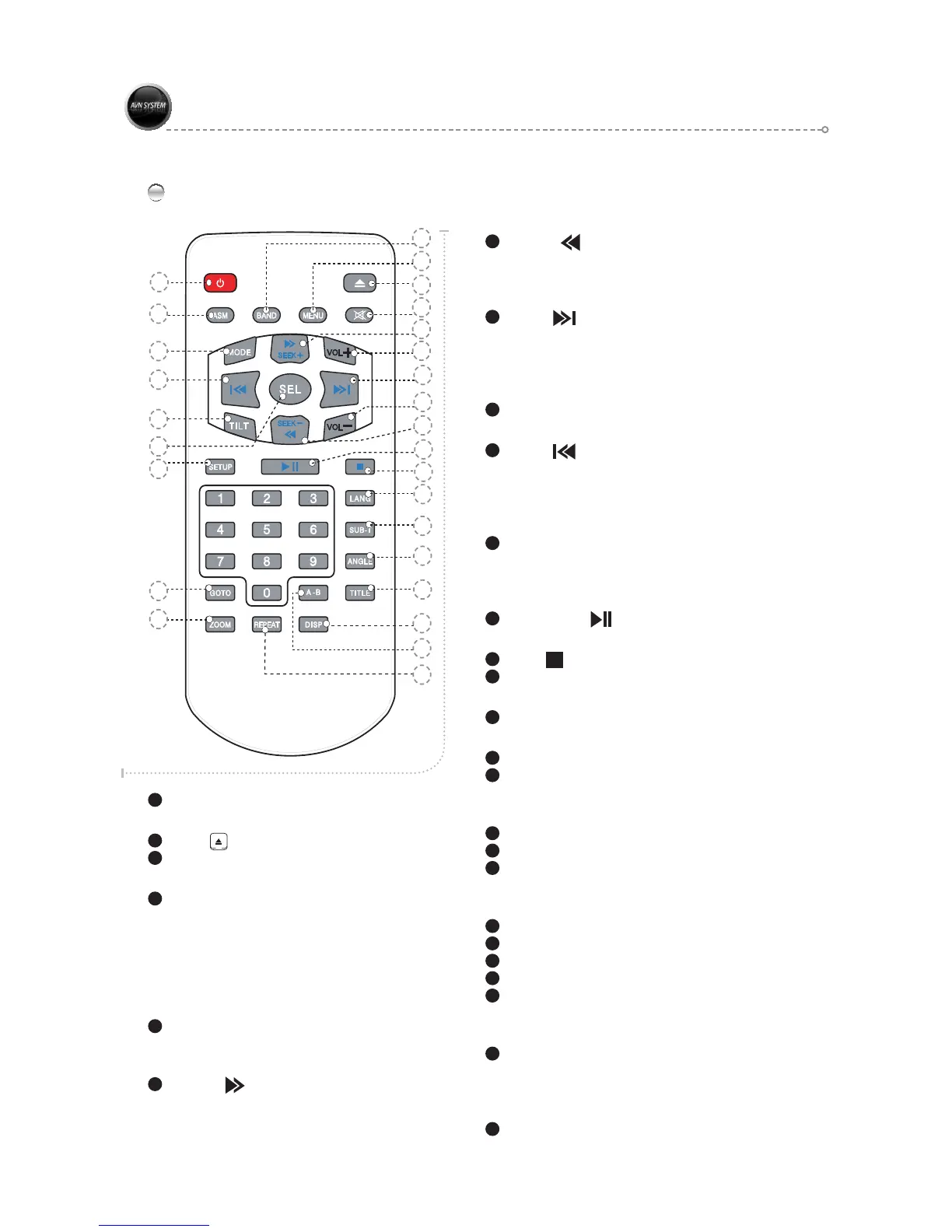
1
Power button
You can turn on or off the power by pressing the button.
2
Eject ( ) button
To Release Disc.
3
Mode button
Main Menu ON/OFF.
4
DISP button
Selects the one of the following time display mode in
AUDIO CD. SINGLE ELAPSED, TOTAL ELAPSED,
TOTAL REMAIN, OFF
Selects the one of the following time display mode in
DVD. TITLE REMAIN, CHAPTER ELAPSED,
CHAPTER REMAIN, DISPLAY OFF.
5
TILT button
Selects one of the following view angle by pressing the button.
15˚►30˚►45˚►60˚►75˚
degrees.
6
SEEK+ ( ) button
*
Short key: Increases the radio frequency.
*
Long key: Fast the play speed in DVD mode.
7
SEEK
- ( ) button
*
Short key: Decreases the radio frequency.
*
Long key: Slows the play speed by two times in DVD
mode.
8
NEXT ( ) button
MP3 NEXT and PREV must be hold 2 button 2-3
second.
Has a same function like “SEEK+” button in SAT Radio
mode
9
SEL button
Selects the current item.
10
PREV ( ) button
MP3 NEXT and PREV must be hold 2 button 2-3
second.
Has a same function like “SEEK-” button in SAT.Radio
mode
11
SETUP button
Turns the SETTING MENU ON/OFF in all modes.
Pressing the Long key in DVD mode selects the DVD
Setup menu.
12
Play/Pause ( ) button
Pauses and replays a disc.
13
Stop ( ) button
Stops a disc.
14
ASM button
Auto frequency scan in radio mode.
15
MUTE button
You can turn on or off the sound by pressing the button.
16
Volume +
Adjust the volume up.
17
BAND button
Selects radio mode each time press the button.
Mode will change as follows :
FM1►FM2►AM
18
MENU button
Returns to the root menu.
19
Volume -
Adjust the volume down.
20
GOTO button
Selects a chapter that you want to go. Press the “SEL”
button after you input a chapter number.
21
A-B button
Selects a repeat interval or OFF.
22
LANG button
Selects a LANGUAGE.
23
SUB-T button
Selects a SUB-TITLE or OFF.
24
ANGLE button
Selects a view angle in DVD mode.
25
ZOOM button
Enlarges a screen each time you press it in DVD mode
as follows :
X1►X2►X3►X4►ZOOM OFF
26
REPEAT button
Repeats a TITLE or CHAPTER.
Menu will changes as follows:
REPEAT CHAPTER
►REPEAT TITLE ►REPEAT OFF.
27
TITLE button
Returns to the DVD root menu.



 To Next Page