99
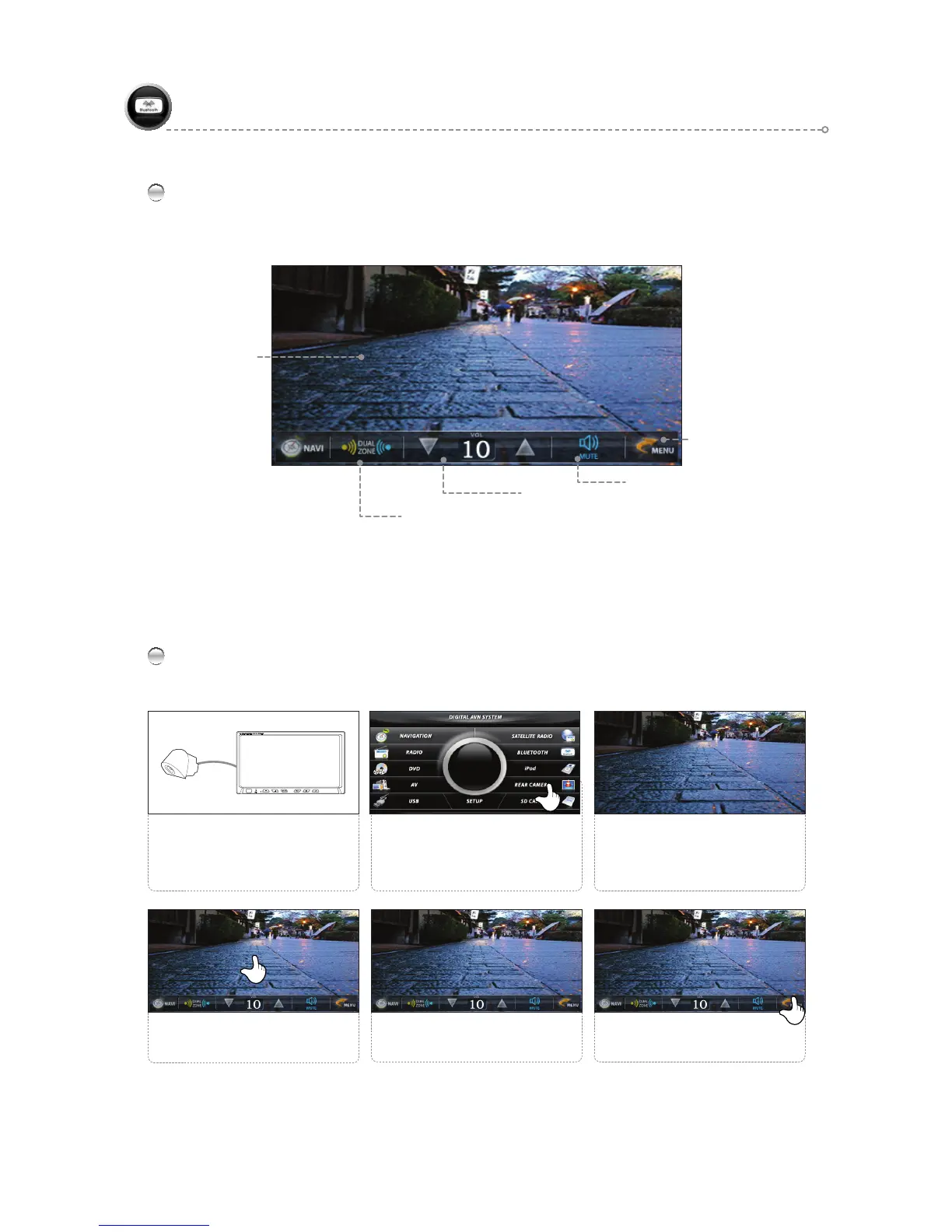
REAR VIEW CAMERA Main Screen
Operates only when the REARVIEW Cable of the Power & Speaker Cable (16P) is connected to the car.
Converts to REARV EW MODE when Reverse gear is detected.
REAR VIEW CAMERA
REAR VIEW
CAMERA
Playback Screen
Move to Menu Icon
Mute
Volume Control & Display
Dual ON/OFF
(Refer to page 105 )
REAR VIEW CAMERA Simple Operation
2
Select <REAR CAMERA>.
Connect the REARVIEW with the
reverse gear, and connect REARVIEW
IN to the REAR VIEW CAMERA.
(Refer to pages 107~108.)
1 3
Use the FUNCTION icons as
desired.
5
Press the <MENU> icon to return
to the main screen.
6
Touch the screen to bring up the
menu screen.
4
When the reverse gear signal is
detected, the product switches to
REAR CAMERA Mode.



 To Next Page