96
BLUETOOTH Simple Operation
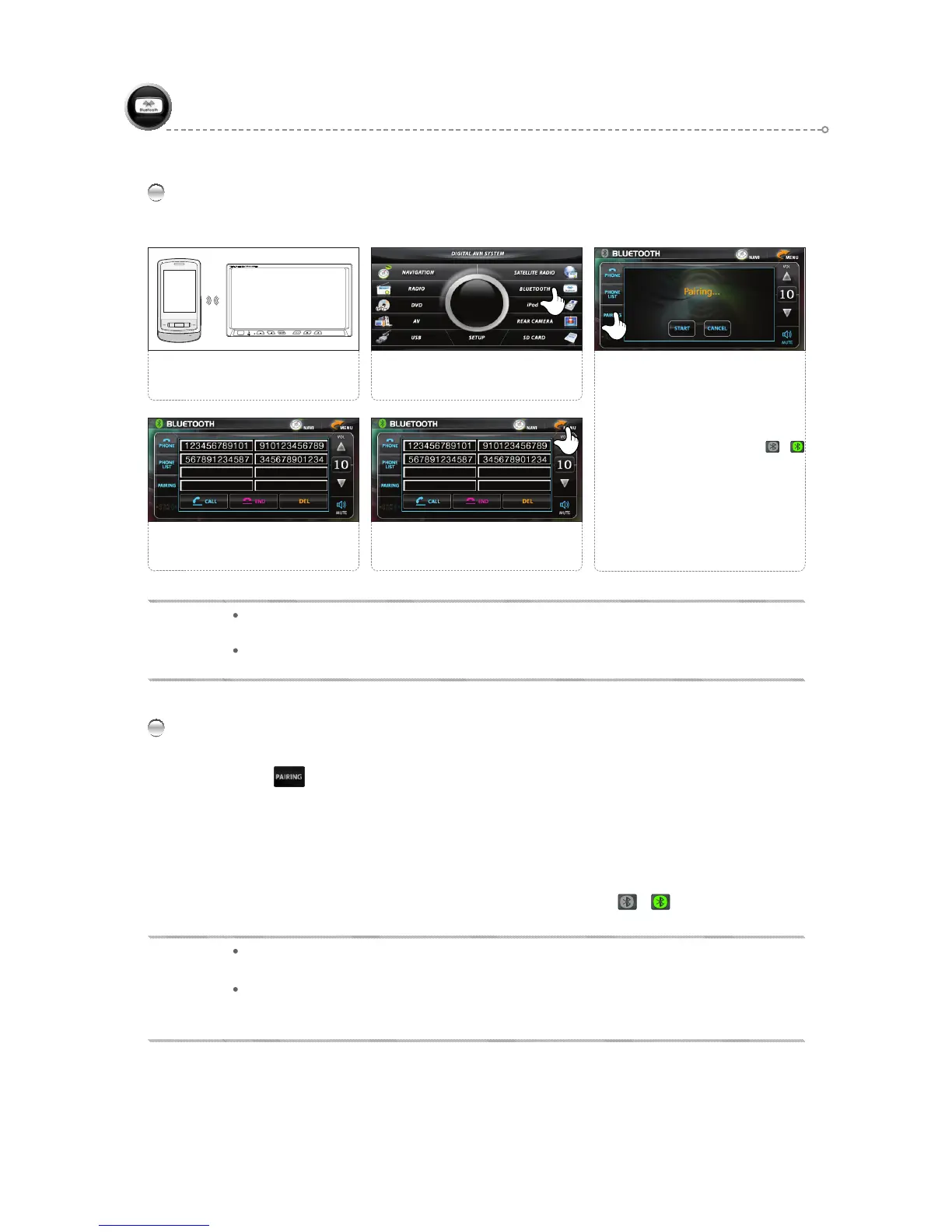
Select <PAIRING>.
(PAIR NG is attempted during a
three-minute period.)
<PHONE/PHONE LIST/PAIR NG>
are all available for use.
●
The indicator switches from ►
when the connection is made.
●
If PAIR NG fails, the <PAIR NG>
icon can be pressed again to retry
connection.
3
Connect the product with a mobile
phone.
12
Select <BLUETOOTH>.
Use the FUNCTION icons as
desired.
4
Press the <MENU> icon to return to
the main screen.
5
The BLUETOOTH Function is available only with BLUETOOTH-enabled mobile phones.
Refer to the Mobile Phone Manual for instructions regarding mobile phone BLUETOOTH connection. (Default password: 0000)
BLUETOOTH(Handsfree)
PAIRING
01
Press the button in B/T MODE.
02
The user's mobile phone searches for devices and finds the SJ-AVN.
(Refer to the corresponding manual.)
03
The SJ-AVN is registered. (Default password at registration: 0000)
04
When PAIRING is successfully completed, the icon turns from ► .
NOTE
Connecting is attempted automatically upon turning power on.
(When pairing is established, connection to the last phone number called is made.)
If Connecting is successful, the mode is maintained, and if it fails, it is retried over a period of three-
minute.
NOTE
Depend on condition of circumstance or cellular phone’s kind, it might not be connected. In this case,
please try to connect by yourself.
In case of failure of Bluetooth pairing
: Delete item in paired list on your phone
: Reset both phone and this unit by switching Off/On



 To Next Page