95
The BLUETOOTH Function is available only with BLUETOOTH-enabled mobile phones.
Refer to the Mobile Phone Manual for instructions regarding mobile phone BLUETOOTH connection. (Default password: 0000)
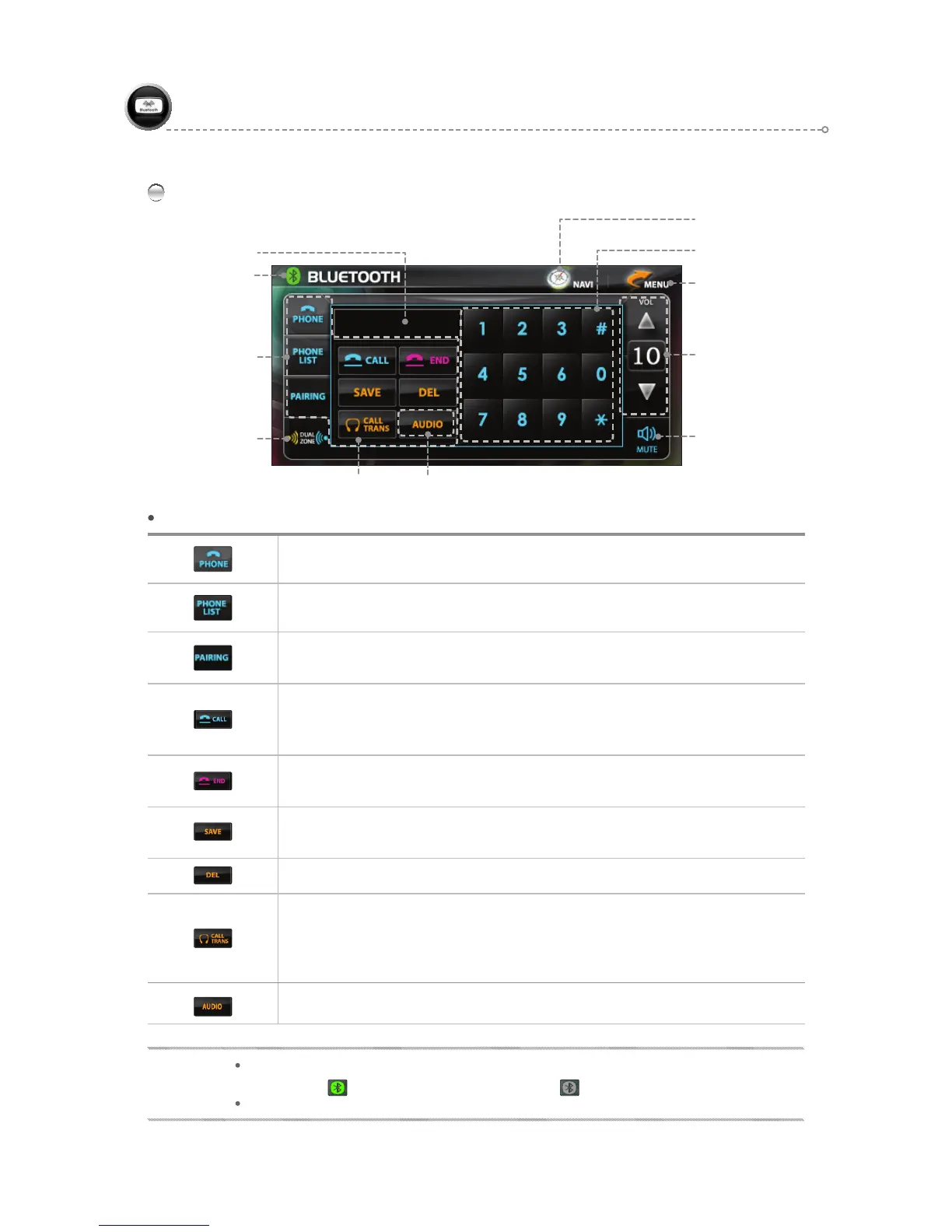
BLUETOOTH Main Screen
BLUETOOTH(Handsfree)
BLUETOOTH Function Icons
Use to make calls and enter phone numbers.
Use to make a call via the Phone List or to delete content from the Phone List.
Use to retry pairing.
(Pairing is attempted automatically upon turning power on.)
- Use to receive or make a call.
- Use to activate call waiting and receive another incoming call during another call in
progress. (This may differ by mobile phone specifications)
Use to end a call.
Press END when entering a phone number to clear the entire number.
Use to save a directly entered phone number or the phone number of an incoming call.
(A total of six phone numbers can be saved in sequence.)
Use to delete an incorrectly entered phone number one digit at a time
Use to make calls via a mobile phone or Bluetooth.
(Calls made via Bluetooth as default)
• Receiving calls via mobile phone: conduct calls via mobile phone only.
• Receiving calls via Bluetooth: calls emitted from the left driver-side speaker.
Audio Control Pop-up Window (Refer to Page 91)
Move to Menu Icon
Navigation Buttion (PIP)
Volume Control & Display
Mute
Call Trans
Phone Number Input Icons
BLUETOOTH
FUNCTION Icons
Dual ON/OFF
(Refer to page 105.)
Phone Number Display
NOTE
Bluetooth Status Display
CONNECTED :
Turned on. DISCONNECTED : Turned off.
When touching the Connect icon, this turns Bluetooth connection ON/OFF.
Audio Control Pop-up Window
HANDSFREE ON/OFF



 To Next Page