8
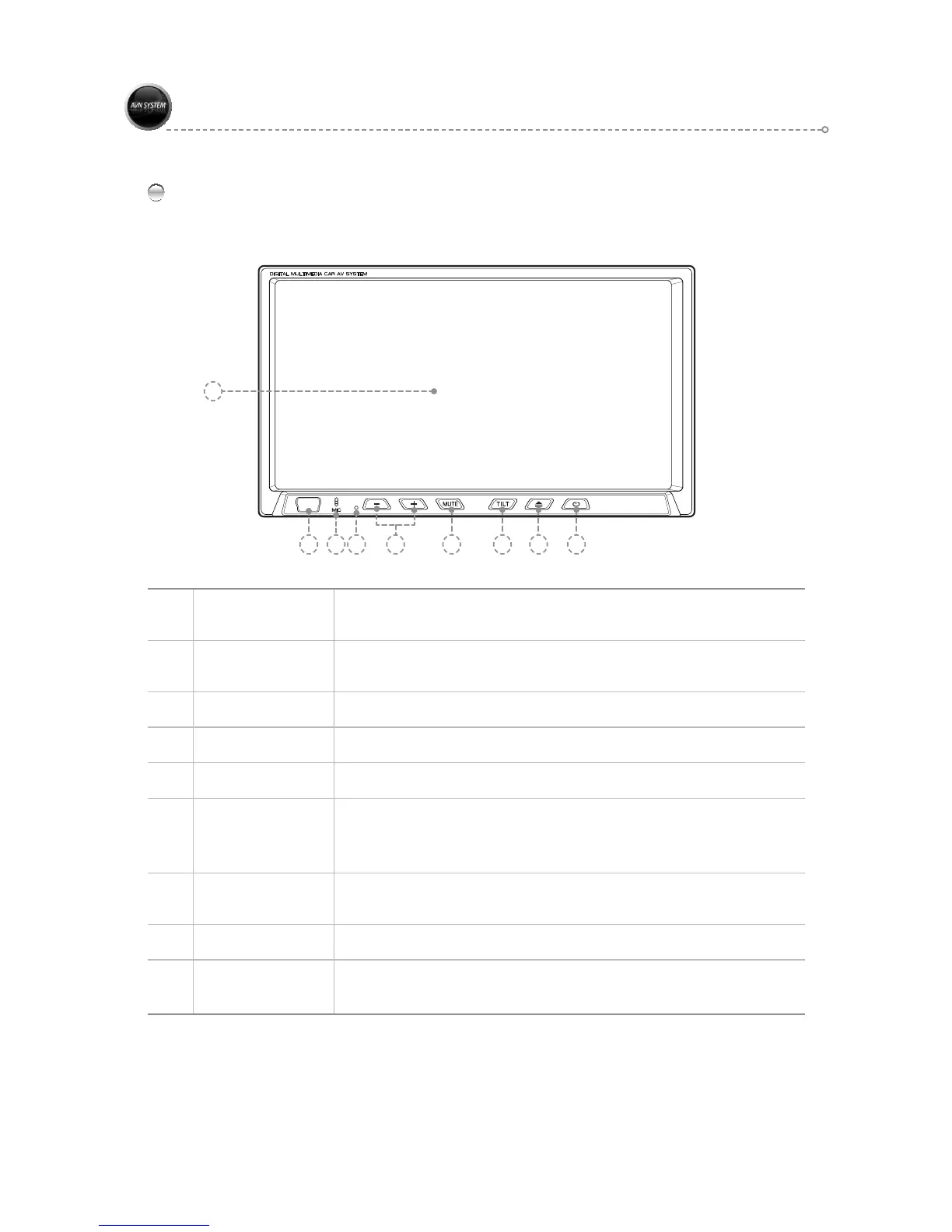
Main Unit - Front
Part Names and Functions
2 3 6
7 8 9
4 5
1
1 LCD Screen
Displays the screen.
The product is equipped with a touch screen to facilitate user operation.
2 USB Port
Use with the USB cable to connect with other external devices
(external hard drive, memory stick, etc.).
3 MIC
Sound input device when using Bluetooth.
4 RESET
Press the RESET button to reset.
5 VOLUME Button
Decrease Volume : - Increase Volume : +
6 MUTE Button
Short key : Audio MUTE ON/OFF
Long key :
Navigation Mode : Other Modes Turn the Mute function On/Off.
Other Modes except Navigation Mode : Turn the screen On/Off.
7 TILT Button
Adjust the angle of the LCD panel.
Can set angle to [15°►30°►45°►60°►75°].
8 EJECT Button
EJECT / NSERT a CD
9 POWER Button
Short Key : Main Menu
Long Key: Use to turn the power of the main unit(ON/OFF)



 To Next Page