84
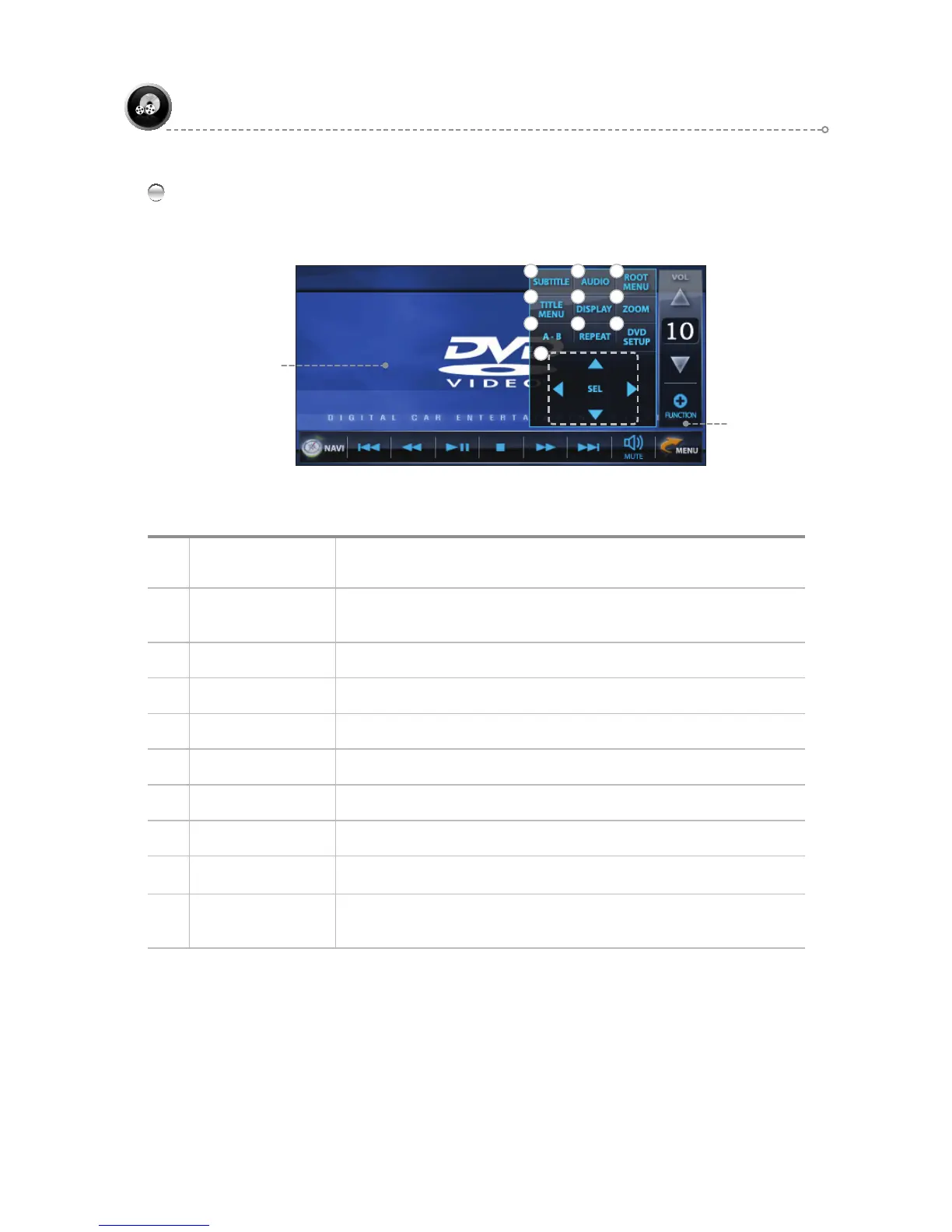
FUNCTION Icons
Press the FUNCTION icon to bring up the FUNCTION pop-up window.
Exit Pop-Up Window: When FUNCTION, FULL SCREEN is selected, the pop-up window is exited.
DVD
FUNCTION
Pop-Up Window
2
5
3
64
1
DVD Playback Screen
7 8 9
10
1 SUBTITLE
Changes the DVD subtitles.
(This function is available only with the subtitles (languages) supported on the DVD )
2 AUDIO
Changes the DVD AUDIO.
(This function is available only with the AUDIO (languages) supported on the DVD )
3 ROOT MENU
Displays the DVD ROOT MENU list screen.
4 TITLE MENU
Displays the DVD TITLE MENU list screen.
5 DISPLAY
DISC INFO Display
6 ZOOM
ZOOM (Cycle : 1, 2, 3, 4, OFF)
7 A-B
Repeat
8 REPEAT
Cycle Sequence: REPEAT CHAPTER ►REPEAT TITLE
9 DVD SETUP
Set up the Language, Video, Audio, and Rating of the DVD TITLE.
10 MOVE ICONS
Move from and Select DVD SETUP MODE.
Scroll through and Select from the file list of a DVD and other discs.



 To Next Page