105
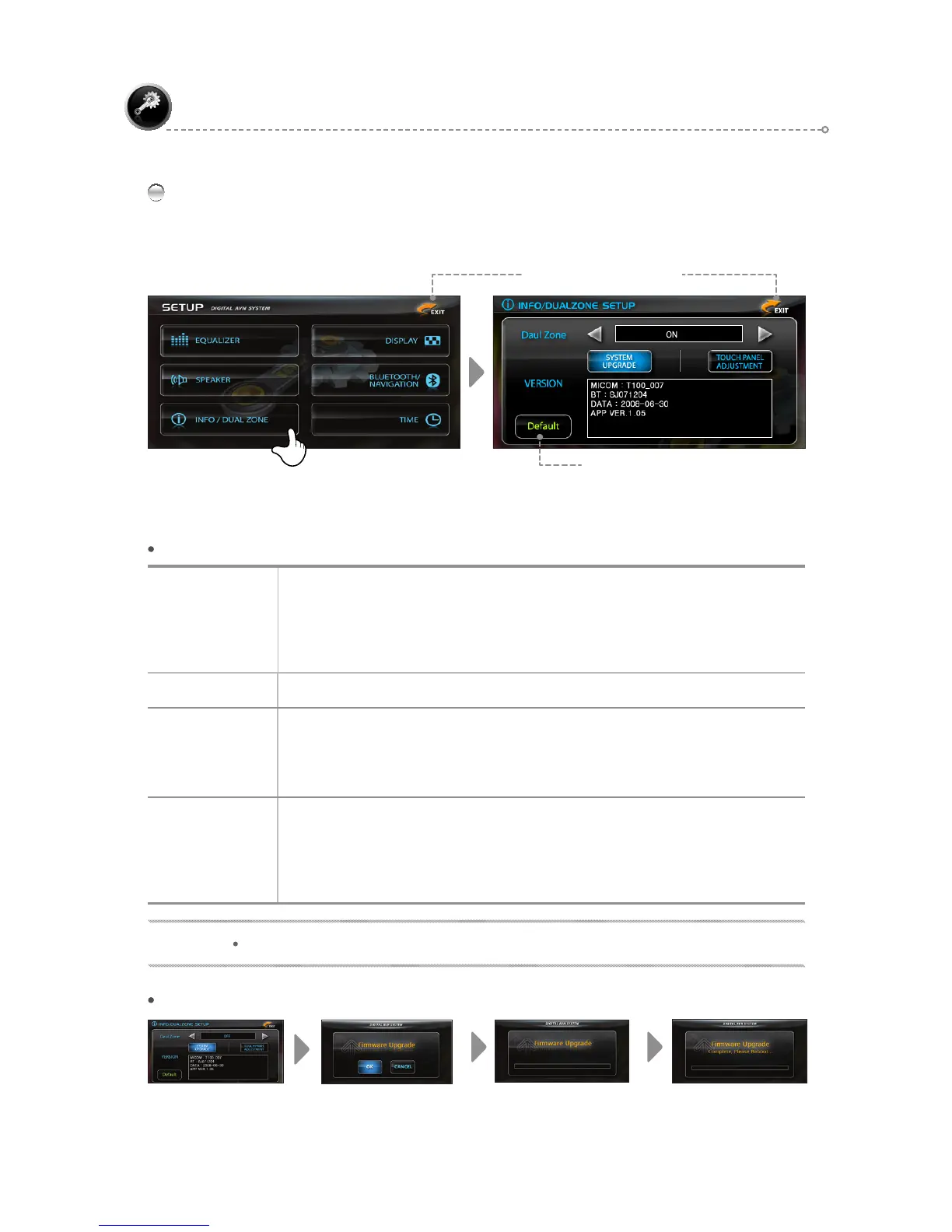
INFO/DUALZONE
Use the [◄►] icons to adjust settings in each menu.
SETUP
INFO/DUAL ZONE – Menu Description
SYSTEM UPGRADE STEP
Dual Zone
Set Dual Zone <ON/OFF>.
ON: DVD plays even if another mode is entered.
(Note, valid only if the product has a Disc or SD Card).
OFF: When changing to another mode from DVD Mode, the switch occurs after the
DVD is closed.
VERSION
Use to confirm the version of various applications and/or firmware.
SYSTEM UP-
GRADE
When the upgrade popup window appears after pressing the corresponding key, press
OK key to conduct the upgrade.
The system must be rebooted upon installation completion.
Ⲽ Refer to the "SYSTEM UPGRADE STEP" figure below.
TOUCH PANEL
ADJUSTMENT
If the corresponding key is pressed when in the screen touch correction mode, a
crosshair appears at the center of the screen.
If the intersection point of the crosshair is pressed for more than 3 seconds, press the
crosshair in sequence beginning from the upper left and moving counter-clockwise to
set.
NOTE
Do not turn off the power while an upgrade is in progress.
Restore Default Settings
Move to Previous Screen



 To Next Page