EasyManua.ls Logo

Boyo AVN700A - Page 128

Boyo AVN700A
136 pages
Print Icon
To Next Page IconTo Next Page
To Previous Page IconTo Previous Page
Loading...
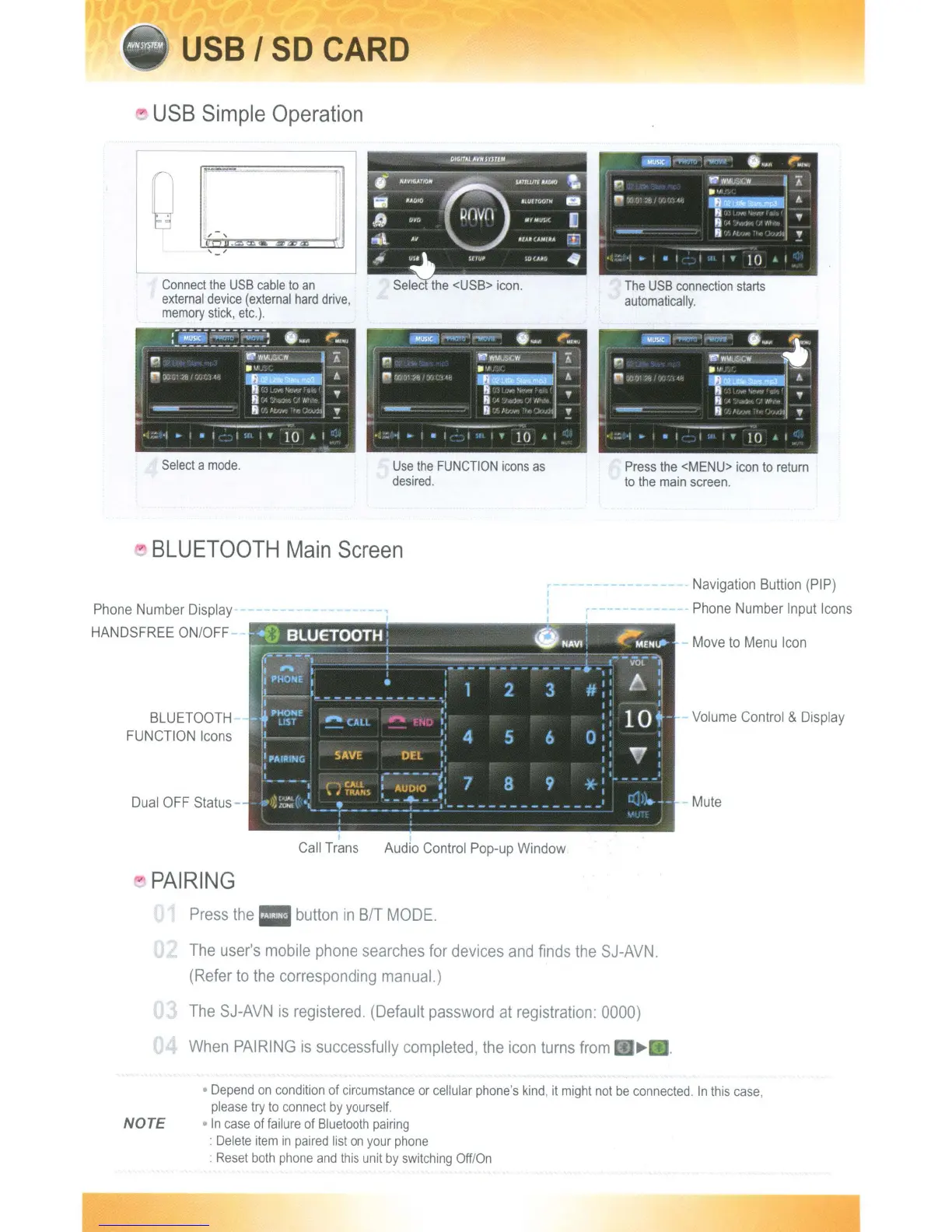
USB
I
SO
CARD
USB
Simple
Operation
..
I
I
Connect
the
USB
cable
to
an
external
device
(external
hard
drive,
memory
stick,
etc.),
--------
.1oJ?l~
(iiiiSiCI-
'.-..-
,
0
...
"'.W
II.
HAV',,"'IO"
8
SAtJll/l'f UlJIO
it.
rr-
fJ
~'W>
~
A
.',
iii
".t{jIO
.tUHOorlf
lilt
C7
't,',
;1:
,- .
~
IJ)
U'Mull(
l!
8·'"
".,j<-
;,,.
..
"
ti\
iJ3
I)
"'"
"
!
if
~
:
'1
~
.
I
,
10
I
Select
a
mode.
Use
the
FUNCTION
icons
as
desired.
Press
the
<MENU>
icon
to
return
to
the
main
screen.
BLUETOOTH
Main
Screen
Phone Number Display
HANDSFREE ON/OFF
BLUETOOTH
FUNCTION Icons
Dual
OFF
Status-
Navigation
BUllion
(PIP)
Phone Number Input Icons
Move
to
Menu
Icon
Volume Control & Display
Mute
PAIRING
Call Trans Audio Control Pop-up Window
Press
the
button
in
BIT
MODE,
NOTE
The
user's
mobile
phone
searches
for
devices
and
finds
the
SJ-AVN.
(Refer
to
the
corresponding
manual.)
The
SJ-AVN
is
registered,
(Default
password
at
registration:
0000)
When
PAIRING
is
successfully
completed,
the
icon
turns
from
~
Depend
on
condition
of
circumstance
or
cellular
phone's
kind,
it
might
not
be
connected.
In
this
case,
please
try
to
connect
by
yourself.
In
case
of
failure
of
Bluetooth
pairing
:
Delete
item
in
paired
list
on
your
phone
:
Reset
both
phone
and
this
unit
by
switching
Off/On
USB
I
SO
CARD
USB
Simple
Operation
..
I
I
Connect
the
USB
cable
to
an
external
device
(external
hard
drive,
memory
stick,
etc.),
--------
.1oJ?l~
(iiiiSiCI-
'.-..-
,
0
...
"'.W
II.
HAV',,"'IO"
8
SAtJll/l'f UlJIO
it.
rr-
fJ
~'W>
~
A
.',
iii
".t{jIO
.tUHOorlf
lilt
C7
't,',
;1:
,- .
~
IJ)
U'Mull(
l!
8·'"
".,j<-
;,,.
..
"
ti\
iJ3
I)
"'"
"
!
if
~
:
'1
~
.
I
,
10
I
Select
a
mode.
Use
the
FUNCTION
icons
as
desired.
Press
the
<MENU>
icon
to
return
to
the
main
screen.
BLUETOOTH
Main
Screen
Phone Number Display
HANDSFREE ON/OFF
BLUETOOTH
FUNCTION Icons
Dual
OFF
Status-
Navigation
BUllion
(PIP)
Phone Number Input Icons
Move
to
Menu
Icon
Volume Control & Display
Mute
PAIRING
Call Trans Audio Control Pop-up Window
Press
the
button
in
BIT
MODE,
NOTE
The
user's
mobile
phone
searches
for
devices
and
finds
the
SJ-AVN.
(Refer
to
the
corresponding
manual.)
The
SJ-AVN
is
registered,
(Default
password
at
registration:
0000)
When
PAIRING
is
successfully
completed,
the
icon
turns
from
~
Depend
on
condition
of
circumstance
or
cellular
phone's
kind,
it
might
not
be
connected.
In
this
case,
please
try
to
connect
by
yourself.
In
case
of
failure
of
Bluetooth
pairing
:
Delete
item
in
paired
list
on
your
phone
:
Reset
both
phone
and
this
unit
by
switching
Off/On

Table of Contents