Programmer
29
Chapter 2 Programming with Help Function
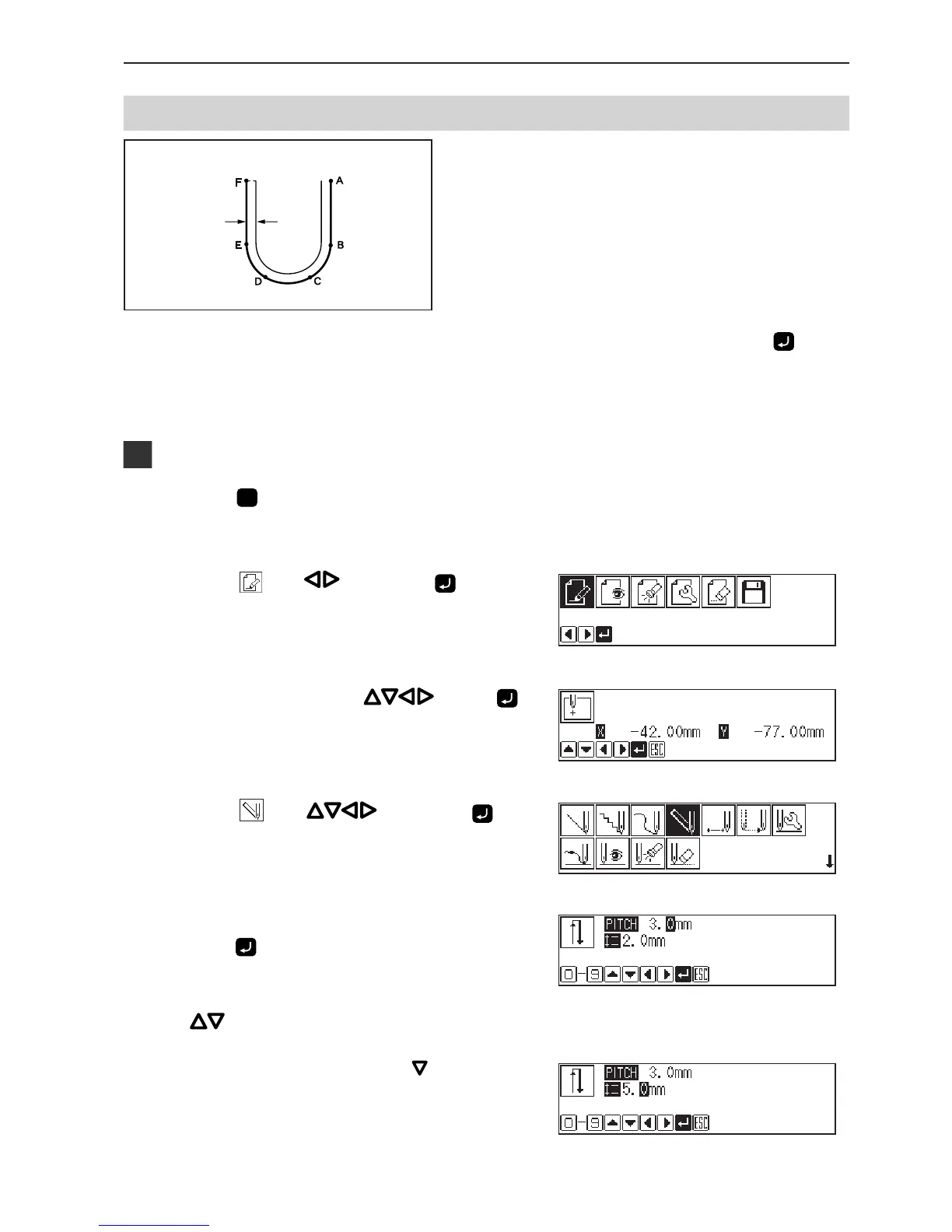
Double stitch
A double stitch is programmed to make two lines
with a constant width.
The example in the left is used for explanation of a
double stitch to the right of sewing direction.
When the line changes from straight to curve or curve to straight as in points B or E, be sure to press
twice to
make a split.
More intermediate points such as points C or D will create smooth curves.
Programming
1. Press
P
.
The work clamp comes down and the programmer screen is
displayed.
2. Select with , then press .
3. Move the needle with
. Press
when the needle point is at point A of the
pattern.
The first stitch (point A) is programmed.
4. Select with , then press .
5. Input the stitch length of the double stitch.
Press
.
3.0 mm is input in the example.
Input 030 to make the stitch length to 3.0 mm.
To switch input between the stitch length and the width, use
.
6. Select the stitch length with , then input
it.
5.0 mm is input in the example.
Input 050 to make the stitch length to 5.0 mm.
Sewing
width



 To Next Page