46
EN
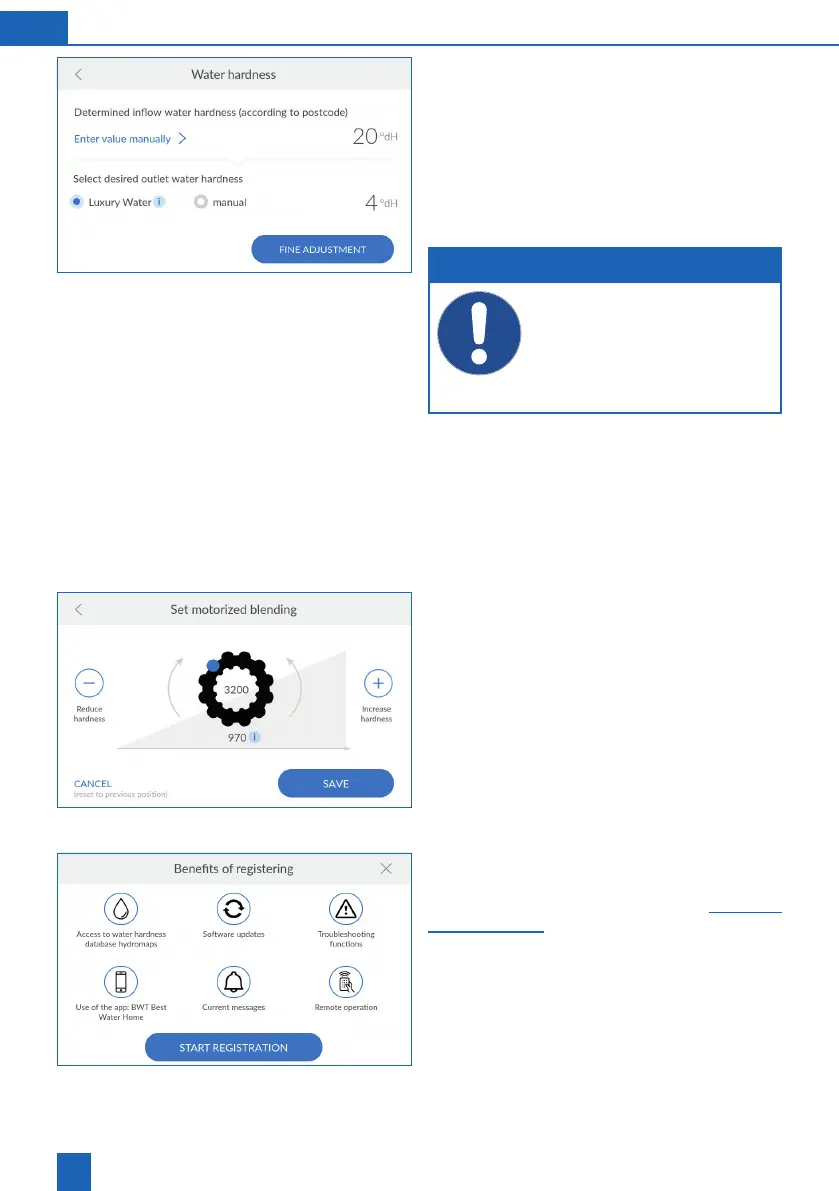
Setting the water hardness
is taken from the hydromaps water hardness da-
tabase. Check that the database value matches the
water hardness at the installation location and adjust
If necessary, press
ENTER VALUE MANUALLY
.
Enter the water hardness at the installation
location.
NOTE
The water hardness cannot be changed
during regeneration.
When setting the outlet water hardness,
ensure that the maximum permissible sodi-
um concentration of 200 mg/l in accordance
with the German Drinking Water Ordinance
is not exceeded.
Select the desired outlet water hardness (luxury
water with approx. 4 °dH), or enter it manually.
Follow the instructions on the display.
as follows:
Press
FINE ADJUSTMENT
.
Setting motor blending
The impulse value within the gear wheel corre-
sponds to fully opened blending. The value below
the gear wheel reflects the current position of
blending.
After adjusting your setting, press
SAVE
11.4.4 Registration
To be able to use all the additional functions, you
must register your product (see chapter -
36).



 To Next Page