50
EN
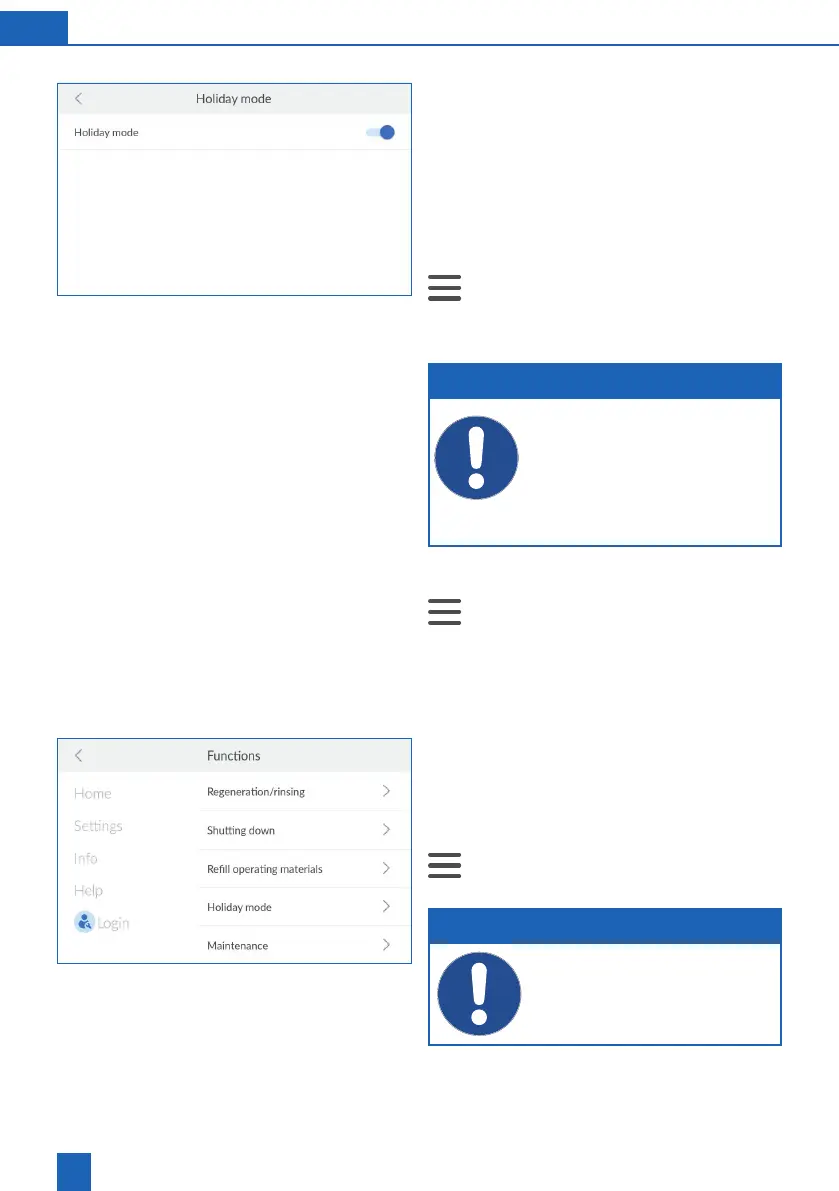
11.5.4 Holiday mode
If you do not need the product for a certain amount
of time (e.g. during holidays, etc.), switch it to
Holiday mode. Holiday mode is a standby mode
that conserves resources and reduces the risk of
water damage:
Regeneration does not take place, which saves
water and regenerative.
Activating Holiday mode
>
Functions > Holiday mode
Press the sliding switch to activate Holiday
mode.
NOTE
You can activate Holiday mode on the
product or via the app. However, you can
only deactivate it on the product.
If you have already gone on holiday and
forgotten to activate Holiday mode, use the
BWT Best Water Home app or remote opera-
tion to switch on Holiday mode.
Deactivating Holiday mode
>
Functions > Holiday mode
Press the sliding switch to deactivate Holiday
mode.
11.5.5 Maintenance
The product is equipped with a maintenance
function that must be activated twice a year. You
will be guided via the display in checking the basic
functions.
>
Functions > Maintenance
NOTE
No maintenance can be performed during
the regeneration procedure.
If necessary, wait until regeneration is
complete.



 To Next Page